
 Tiếng Việt
Depositing funds into an XM account requires logging into the Members Area, selecting a funding method, entering the deposit amount and confirming the transaction before funds appear in the trading account balance. The exact steps vary slightly depending on the payment method chosen and the XM legal entity assigned to the account.
XM supports several deposit methods, including bank transfer, credit/debit card, and e-wallets such as Skrill, each with different processing speeds and levels of convenience. Card and Skrill deposits typically reflect faster than bank wire transfers, though availability depends on the trader’s country.
According to XM’s official Help Center, most deposits are received instantly or on the same day the request is made, though processing times can vary depending on the method and receiving bank. XM does not charge a deposit fee on standard methods, but intermediary banks or card-issuing banks may apply their own charges independent of XM’s policy.
XM requires deposits to be made from a payment account or bank account registered under the trader’s own verified name, and does not accept third-party or anonymous funding sources. This rule protects against fraud and ensures withdrawals are returned to the original funding source. Mbroker breaks down each step below, starting with exactly how to deposit funds into an XM account.
How Do You Deposit Funds Into an XM Account?
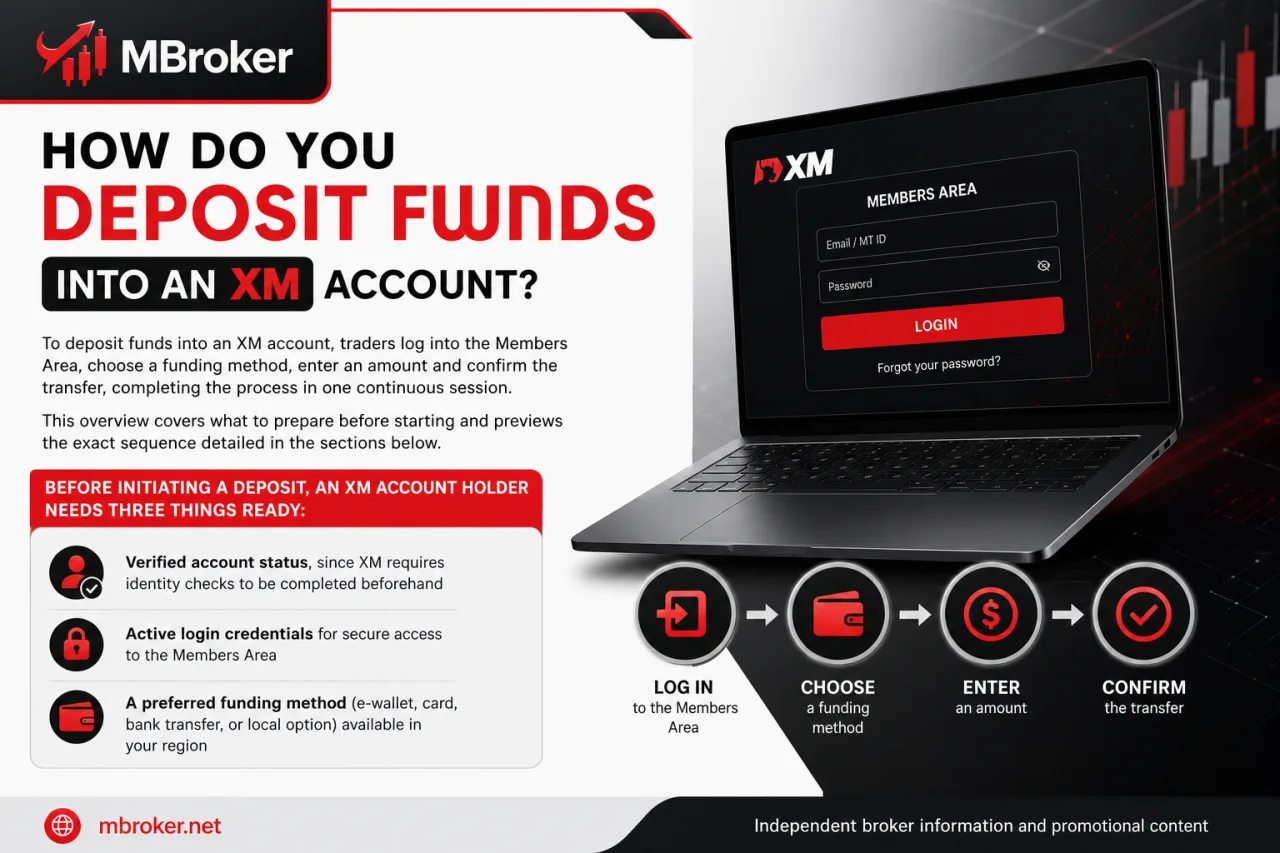
To deposit funds into an XM account, traders log into the Members Area, choose a funding method, enter an amount and confirm the transfer, completing the process in one continuous session. This overview covers what to prepare before starting and previews the exact sequence detailed in the sections below.
Before initiating a deposit, an XM account holder needs three things ready:
- Verified account status, since XM requires identity checks to be completed beforehand
- Active login credentials for the Members Area, meaning a registered email and password
- A funding source registered under the trader’s own name, matching the payment method selected
Once these are confirmed, the deposit itself follows a short, structured flow. The step-by-step breakdown below walks through logging in, selecting a payment method, entering the amount and verifying that funds reflect in the trading account.
What Do You Need to Prepare Before Making a Deposit?
Making a deposit into an XM account requires four things prepared in advance: full account registration, completed identity and address verification, working Members Area login access, and a payment method registered under the trader’s own name. Missing any one of these prerequisites typically blocks the deposit request before funds can be transferred.
Each requirement plays a distinct role in the deposit process:
- Registered account: the trader has completed XM’s sign-up form and received an active trading account number
- Verified identity and address: XM has approved submitted documents through its KYC process, confirming the account is not restricted
- Members Area access: the trader holds a valid email and password combination to reach the funding section
- Matching payment method: the bank account, card or e-wallet used for funding carries the same name as the registered XM account
XM applies these checks primarily to prevent third-party funding and confirm that withdrawals return to the original source. Traders who have not finished verification typically find the deposit option restricted or unavailable until documents are approved.
What Are the Step-by-Step Instructions to Deposit Funds on XM?
To deposit funds on XM, traders complete five ordered steps: log into the Members Area, open the Deposit section, select a funding method, enter the amount and confirm the transfer. This sequence covers exactly what happens after preparation is complete, expanding the overview above into concrete actions.
- Log into the Members Area using the registered email and password.
- Navigate to the Deposit section from the account dashboard.
- Select a funding method, such as bank transfer, card or e-wallet.
- Enter the deposit amount and confirm currency matches the trading account.
- Submit the request and follow any provider-specific instructions, such as redirecting to a bank portal or card authorization screen.
Once submitted, a confirmation message typically appears on screen, and the deposited amount reflects in the account balance shortly afterward. If a step fails, such as a card being declined or a transfer not appearing after the provider’s stated timeframe, the trader checks the payment details entered and reviews the transaction status in the Members Area history.
Unresolved failures, including missing funds or repeated rejections, warrant contacting XM support directly through the Members Area help section rather than resubmitting the same request multiple times.
Is There a Minimum or Maximum Deposit Amount on XM?
Yes, XM applies both minimum and maximum deposit limits, and the exact figures differ by payment method and by the trader’s country or legal entity. This section explains why the range shifts across funding options and where to confirm the current numbers.
Several factors determine the actual limit applied to a given transaction:
- Payment method: bank transfer, card and e-wallet options each carry separate minimum and maximum thresholds
- Legal entity: the XM entity assigned to an account (based on registration country) applies its own funding rules
- Currency: the base currency of the trading account affects how limits convert across payment providers
- Provider restrictions: card issuers or e-wallet operators may impose additional caps beyond XM’s own policy
According to XM’s official Help Center, the minimum deposit or withdrawal amount for any account type is $5, though the exact minimum can vary depending on the payment method used, meaning there is no single universal figure across all XM entities and payment methods.
Traders confirm the precise limit that applies to their account by checking the Deposit section inside the Members Area, where the platform displays the range tied to the selected funding method before the transaction is submitted. This figure reflects the trader’s registered country, chosen currency and assigned XM entity, rather than a fixed amount that applies globally to every account holder.
What Deposit Methods Are Available on XM: Bank Transfer vs Card vs Skrill?
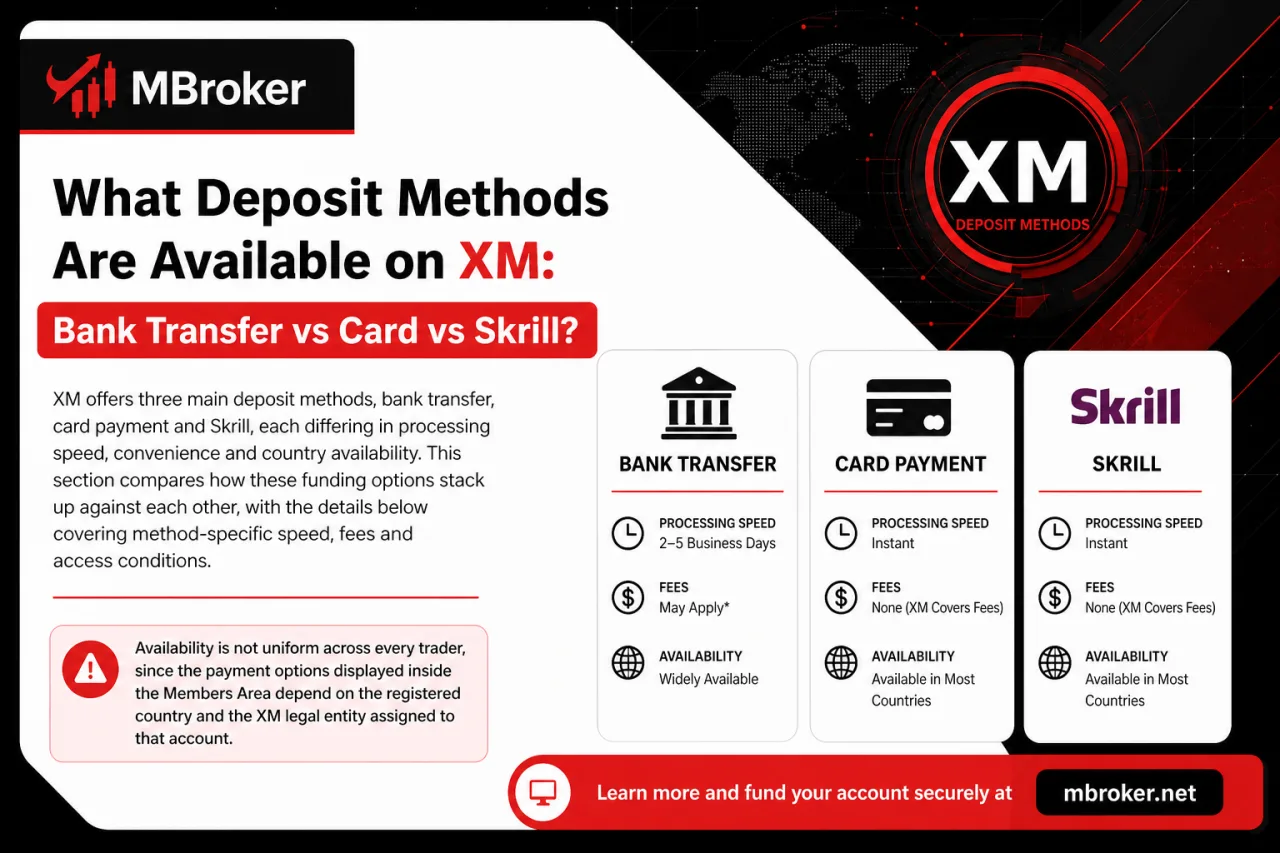
XM offers three main deposit methods, bank transfer, card payment and Skrill, each differing in processing speed, convenience and country availability. This section compares how these funding options stack up against each other, with the details below covering method-specific speed, fees and access conditions.
Availability is not uniform across every trader, since the payment options displayed inside the Members Area depend on the registered country and the XM legal entity assigned to that account. A trader registered under one XM entity may see Skrill listed as an option, while another entity’s clients see only bank transfer and card as active choices. The sections that follow break down bank transfer, card deposits and Skrill individually, covering how each method compares on speed, minimums and regional access.
How Does Bank Transfer Compare to Card and Skrill for Depositing on XM?
Bank transfer wins on transaction size and reliability, card payment wins on convenience for smaller amounts, and Skrill wins on speed and simplicity for e-wallet users, based on how XM structures each method. This comparison sets up the individual breakdowns of bank transfer, card and Skrill that follow.
Each method serves a different priority rather than one option outperforming the others across every category:
- Bank transfer suits larger deposit amounts and traders who already hold an active bank account matching the name on their XM profile
- Card payment suits traders prioritizing quick setup, since most card issuers are widely supported across multiple XM entities
- Skrill suits traders who prefer keeping funds in an e-wallet before moving them between multiple platforms or accounts
Currency handling also differs by method. Bank transfers typically settle in the currency sent unless the receiving bank applies conversion, while card and Skrill transactions usually convert automatically to the trading account’s base currency. None of these methods carries a fixed fee from XM directly, though card-issuing banks or e-wallet providers may apply their own charges depending on the trader’s country. The sections below detail speed, minimums and regional access for each method individually.
Which XM Deposit Methods Are Available in Your Country?
Supported deposit methods split into two main regional groups: XM Global entities typically list bank transfer, card and Skrill, while XM UK/EU entities offer a narrower set shaped by local payment regulations. This grouping explains why two traders can log into the same broker and see different funding screens.
Regional restrictions stem from licensing rather than technical limitations:
- Registration country determines which XM legal entity handles the account
- Legal entity dictates which payment providers XM is permitted to integrate under local financial regulations
- Currency support tied to that entity affects which methods appear as active choices
- Some e-wallet or transfer options available under one entity remain absent under another
Because these rules shift by jurisdiction, the safest way to confirm active options stays inside the account itself. Traders check the Deposit section within the Members Area after logging in, since XM displays only the methods actually approved for that trader’s registered country and entity, rather than the full global list.
How Long Does an XM Deposit Take and What Fees Apply?
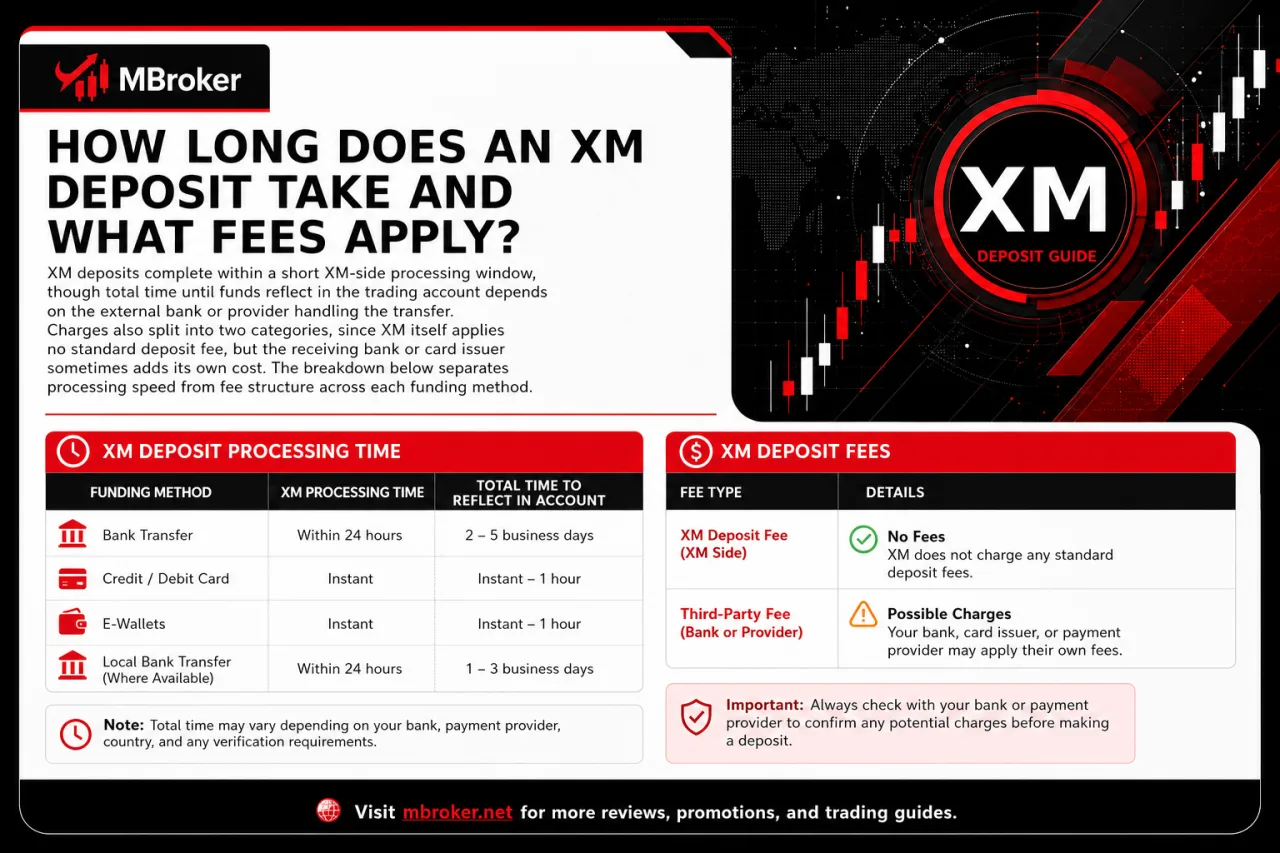
XM deposits complete within a short XM-side processing window, though total time until funds reflect in the trading account depends on the external bank or provider handling the transfer.
Charges split into two categories. XM itself applies no standard deposit fee, but the receiving bank or card issuer sometimes adds its own cost. The breakdown below separates processing speed from fee structure across each funding method.
What Is the Official XM Processing Time for Each Deposit Method?
Bank transfer, card and Skrill each carry different officially stated processing windows on XM’s side, though final crediting time still depends on the receiving bank or provider. This comparison lays out what XM states for each method before noting where external delays can still occur.
- Bank transfer processes on XM’s side within the timeframe stated in the Deposit section, though funds typically post once the receiving bank confirms the transfer. According to XM’s official Help Center, bank wire transfers can take longer to reflect compared to card or e-wallet methods, since intermediary banks add their own handling time.
- Card deposits reflect faster on XM’s side, often within the same session, though the card issuer’s authorization step can still add delay depending on the issuing bank.
- Skrill deposits process quickly on XM’s side as well, since e-wallet transfers skip the intermediary bank step that slows down wire transfers.
Across all three methods, XM’s internal processing represents only one part of the total timeline. The card network, receiving bank or e-wallet provider handling the trader’s specific transaction determines the remaining portion, meaning identical XM-side handling still produces different real-world arrival times for different traders.
Does XM Charge Fees on Deposits?
No, XM does not charge a fee on deposits itself, though intermediary banks, card issuers or e-wallet providers sometimes apply their own separate charges outside XM’s control. This section clarifies where deposit costs actually originate, since the fee-free policy applies only to XM’s side of the transaction.
Three points explain why a deposit can still carry a cost despite XM’s no-fee policy:
- Bank transfer deposits sometimes involve an intermediary bank that deducts a handling charge before the funds reach XM.
- Card deposits sometimes involve the issuing bank applying a foreign transaction or currency conversion fee, depending on the card’s country of issue.
- E-wallet deposits, including Skrill, sometimes involve the provider’s own internal transfer charge, separate from anything XM applies.
Because these third-party charges vary by bank, card network and country, traders confirm the exact cost of a specific deposit by checking with their own bank or payment provider directly, rather than assuming XM’s fee-free policy covers the entire transaction chain.
What Are the Rules and Restrictions for Depositing Funds on XM?
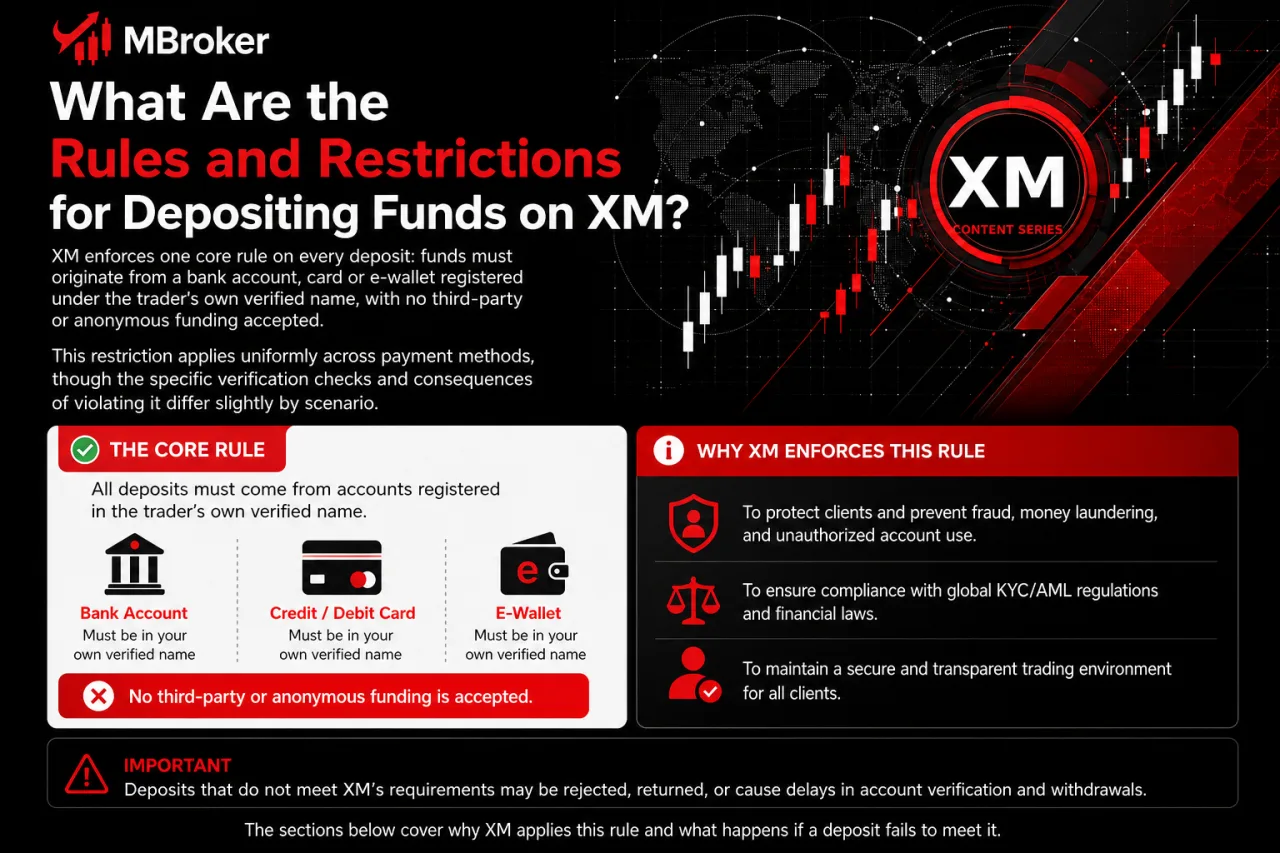
XM enforces one core rule on every deposit: funds must originate from a bank account, card or e-wallet registered under the trader’s own verified name, with no third-party or anonymous funding accepted. This restriction applies uniformly across payment methods, though the specific verification checks and consequences of violating it differ slightly by scenario. The sections below cover why XM applies this rule and what happens if a deposit fails to meet it.
Can You Deposit Funds Into Someone Else’s XM Account?
No, XM does not permit depositing funds into someone else’s account, since every funding source must match the name registered on the trading account. This restriction connects directly to the third-party funding rule outlined above, and the reasoning behind it covers several points.
XM rejects or reverses mismatched-name deposits for a few core reasons:
- Compliance obligations require XM to follow anti-money-laundering regulations that restrict transfers between unrelated parties.
- Fraud prevention relies on tracing every deposit back to a verified account holder rather than an anonymous third party.
- Withdrawal integrity depends on returning funds to the same source they came from, which breaks down if the original depositor differs from the account owner.
- Account ownership disputes become harder to resolve when a deposit originates from a name unrelated to the registered trader.
A deposit submitted from a card, bank account or e-wallet under a different name than the XM account holder typically gets flagged during processing. XM either rejects the transaction outright or reverses it back to the original sender once the mismatch is detected, and traders facing a rejected deposit contact XM support through the Members Area to confirm the reason before attempting another transfer.
What Happens If a Deposit Is Rejected or Delayed?
A rejected or delayed XM deposit typically traces back to three causes: a name mismatch between the payment source and the account, an unverified account status, or incorrect payment details entered during submission. This connects directly to the name-matching rule covered above, and each cause carries its own resolution path.
The three most common triggers behave differently once flagged:
- Name mismatch triggers an automatic rejection or reversal, since XM cannot confirm the sender matches the registered account holder.
- Unverified account status blocks the deposit entirely until identity and address documents receive approval through XM’s KYC process.
- Incorrect payment details, such as a wrong reference number or mistyped account information, cause the transfer to stall with the receiving bank or provider rather than reaching XM at all.
A delay that extends beyond the provider’s stated processing window, rather than an outright rejection, usually points to a bank-side hold instead of an XM-side issue. Traders facing either scenario check the transaction status inside the Members Area deposit history first. If the status shows no update or the deposit remains missing after the expected timeframe, contacting XM support through the official Members Area help section provides the official troubleshooting step, since resubmitting the same transfer repeatedly does not resolve a mismatch or verification block.
What Should You Do If Your XM Deposit Fails or Isn’t Credited?
When an XM deposit fails or funds don’t reflect in the account balance, traders follow a three-step troubleshooting workflow: check the transaction status in the Members Area, gather proof of payment, then escalate to XM support through the official help channel. This workflow goes further than the general rejection causes covered earlier, focusing on exactly what to do once a specific transaction appears stuck or missing. The sections below walk through each of these three steps in order.
What Information Should You Provide When Contacting XM Support About a Missing Deposit?
Contacting XM support about a missing deposit requires four pieces of evidence: the transaction ID or reference number, proof of payment, the exact date and amount sent, and the payment method used. This documentation lets XM’s support team trace the transaction across its own system and the receiving bank or provider.
Each item serves a specific investigative purpose:
- Transaction ID or reference number confirms which specific transfer XM needs to locate in its processing logs.
- Proof of payment, such as a bank receipt or card statement excerpt, verifies that the sender actually completed the transfer.
- Date and amount sent allows support staff to cross-check the claim against incoming records on XM’s side.
- Payment method used, including the bank name or e-wallet provider, narrows down which processing channel to investigate.
Traders submit this evidence through the Members Area help section rather than sharing full card numbers or account passwords, since XM support never requests complete sensitive payment credentials. Providing incomplete details typically extends the investigation, though XM does not publish a guaranteed resolution timeframe for missing-deposit cases.
Conclusion: How Should You Deposit Funds Into an XM Account?
Depositing funds into an XM account is straightforward when the account is verified and the selected payment method belongs to the registered account holder. Traders should log in through the official Members Area, review the available methods, limits, currency and provider-specific conditions, then submit the deposit and retain the transaction confirmation. Bank transfers may suit larger transactions, while cards or Skrill can offer faster funding when available; however, external banks and payment providers may impose separate fees or delays. If a deposit is rejected or not credited, check the transaction history, gather the reference number, payment receipt, date, amount and funding method, then contact XM through an official support channel without sharing passwords or complete card details. Because availability and conditions vary by country and XM legal entity, the Deposit section in the Members Area remains the most reliable source for current account-specific information.

Thoren Vextal is Mbroker’s XM Reviews and How-To Guides Editor, covering broker reviews, regulation, comparisons and practical account guides.Email: [email protected]