
 Tiếng Việt
XM Guide
XM provides step-by-step guides covering account registration, verification, platform installation, deposits, withdrawals and trade execution for both new and existing clients. These instructions follow the official procedures published by XM for its supported trading platforms and account types.
Downloading and installing XM MT4 or MT5 requires selecting the platform version that matches the device operating system, then completing setup with the account login credentials issued after registration. Both platforms remain available as desktop, web and mobile applications.
According to the XM Help Center, opening an account on XM and placing a trade involves completing registration, submitting verification documents, funding the account and executing orders through MT4 or MT5. Each stage follows a fixed sequence set by the broker’s onboarding process.
According to XM’s legal documents page, XM operates under multiple regulated entities—such as XM Global Limited, licensed by Belize’s Financial Services Commission—and offers several account types with differing trading conditions, minimum deposits and eligibility requirements. These structural details affect which features and instructions apply to a given client.
Mbroker compiles these procedures into clear instructional sections, starting with What Step-by-Step Guides Does XM Offer for Traders, followed by account registration and platform installation instructions below.
What Step-by-Step Guides Does XM Offer for Traders?
What Step-by-Step Guides Does XM Offer for Traders
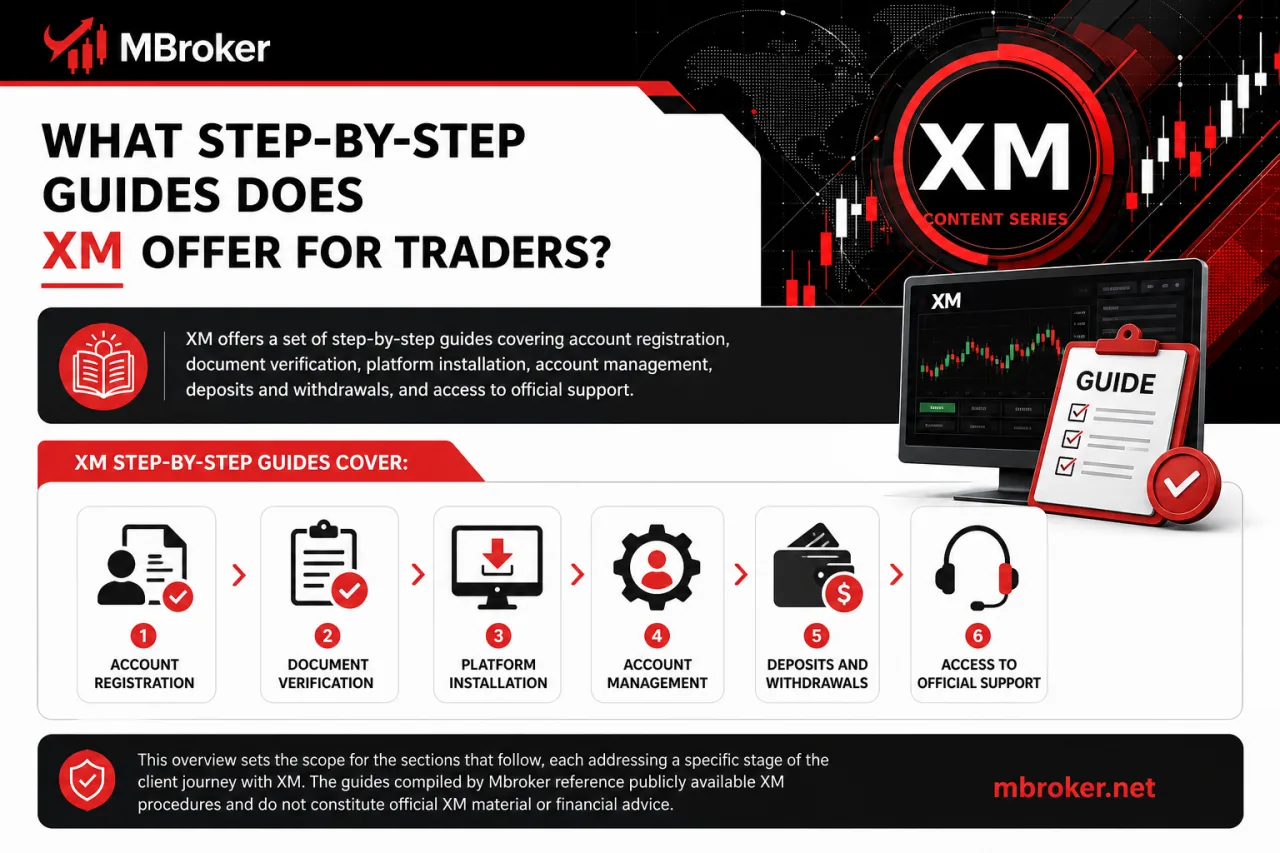
XM offers a set of step-by-step guides covering account registration, document verification, platform installation, account management, deposits and withdrawals, and access to official support. This overview sets the scope for the sections that follow, each addressing a specific stage of the client journey with XM. The guides compiled by Mbroker reference publicly available XM procedures and do not constitute official XM material or financial advice.
How to Register an Account on XM Step by Step?
How to Register an Account on XM Step by Step
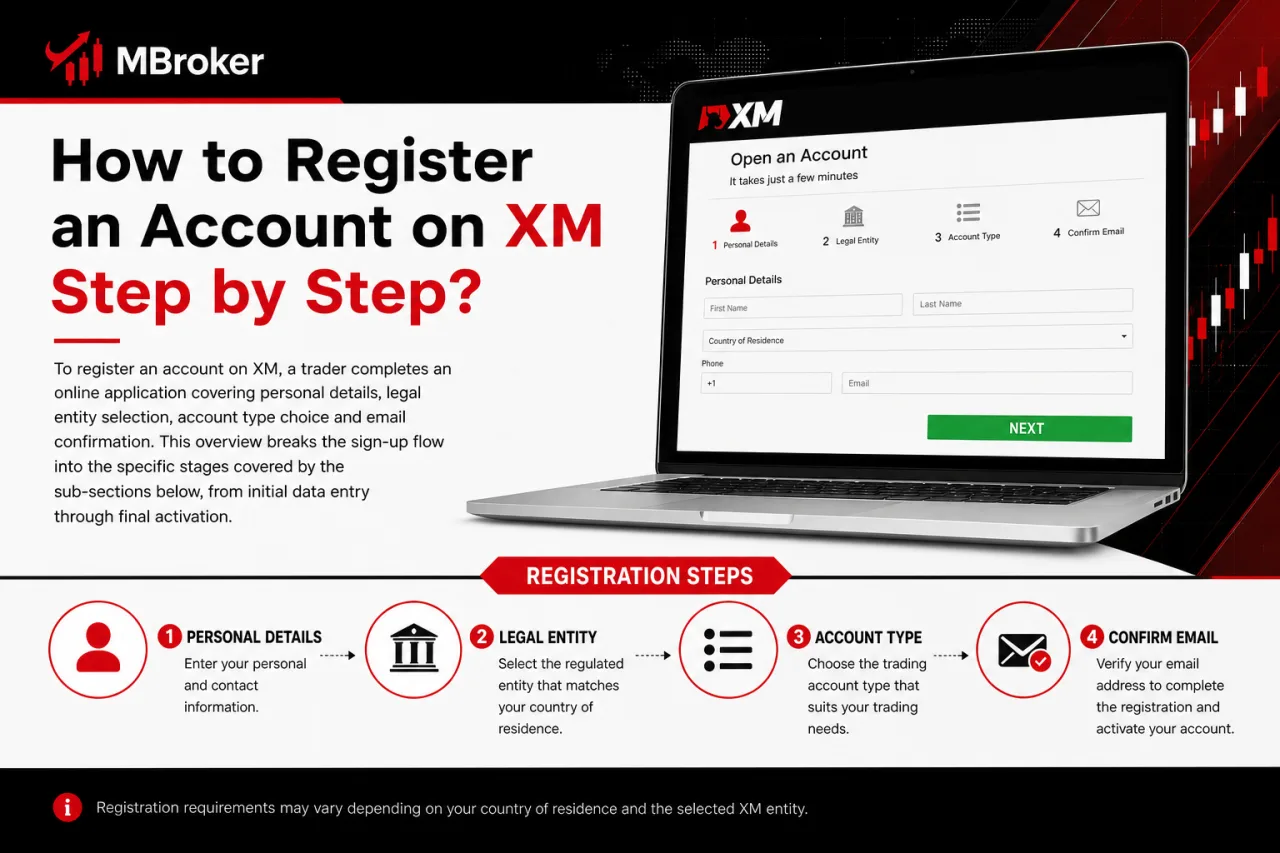
To register an account on XM, a trader completes an online application covering personal details, legal entity selection, account type choice and email confirmation. This overview breaks the sign-up flow into the specific stages covered by the sub-sections below, from initial data entry through final activation.
Registration begins with the applicant’s personal and contact information, followed by selection of the regulated legal entity and trading account type that match the trader’s country of residence. The process closes with an email confirmation step that activates the newly created account.
Sign-up steps may vary slightly depending on the client’s region and the specific regulated entity handling the application, as XM operates under multiple entities—such as XM Global Limited, licensed by Belize’s Financial Services Commission—according to XM’s legal documents page. Details on each stage, including which fields appear and which entities apply, are addressed individually in the sections that follow.
How to Complete the KYC Verification Process on XM?
To complete KYC verification on XM, a trader uploads a valid proof of identity and a proof of address through the secure member area, then waits for document review before full account activation. This process confirms the identity details entered during registration and satisfies the compliance requirements of the regulated entity handling the account.
The verification stage covers two document categories and a review period, following the standard procedure described on the XM Help Center.
- Proof of identity: a government-issued passport, national ID card or driver’s license showing name, photo and date of birth.
- Proof of address: a recent utility bill, bank statement or official government correspondence showing the applicant’s full name and residential address.
- Upload method: submitting scanned or photographed copies directly through the member area document upload tool.
- Review outcome: receiving email confirmation once documents pass verification, unlocking deposits and trading access.
Document review timeframes for KYC verification generally depend on the completeness of submitted documents and whether additional checks are required, which can extend processing beyond the standard timeframe.
Traders submitting unclear scans or mismatched name details commonly experience delays, while those uploading properly formatted, legible files usually reach account activation faster.
How to Log In to Your XM Account and Recover a Forgotten Password?
To log in to an XM account, a trader enters the registered email address and password on the Member Area login page, then accesses trading and account management tools directly. This section covers the standard login steps, the password reset process and basic troubleshooting for common access issues.
Logging into the Member Area follows a short sequence rather than a multi-stage procedure:
- Opening the official XM login page and selecting the Member Area option.
- Entering the registered email address and account password.
- Submitting the credentials to reach the dashboard for deposits, withdrawals and platform downloads.
Recovering a forgotten password involves selecting the “Forgot Password” link on the login page, entering the registered email address and following the reset link sent to that inbox. The new password takes effect immediately once confirmed, allowing the trader to log back into the Member Area.
Common login issues include mismatched email formatting, expired sessions or browser cache conflicts, which are typically resolved by clearing cache, confirming the correct regional XM website, or contacting official XM support if access remains blocked.
How to Download and Install XM MT4 and MT5 Platforms?
How to Download and Install XM MT4 and MT5 Platforms
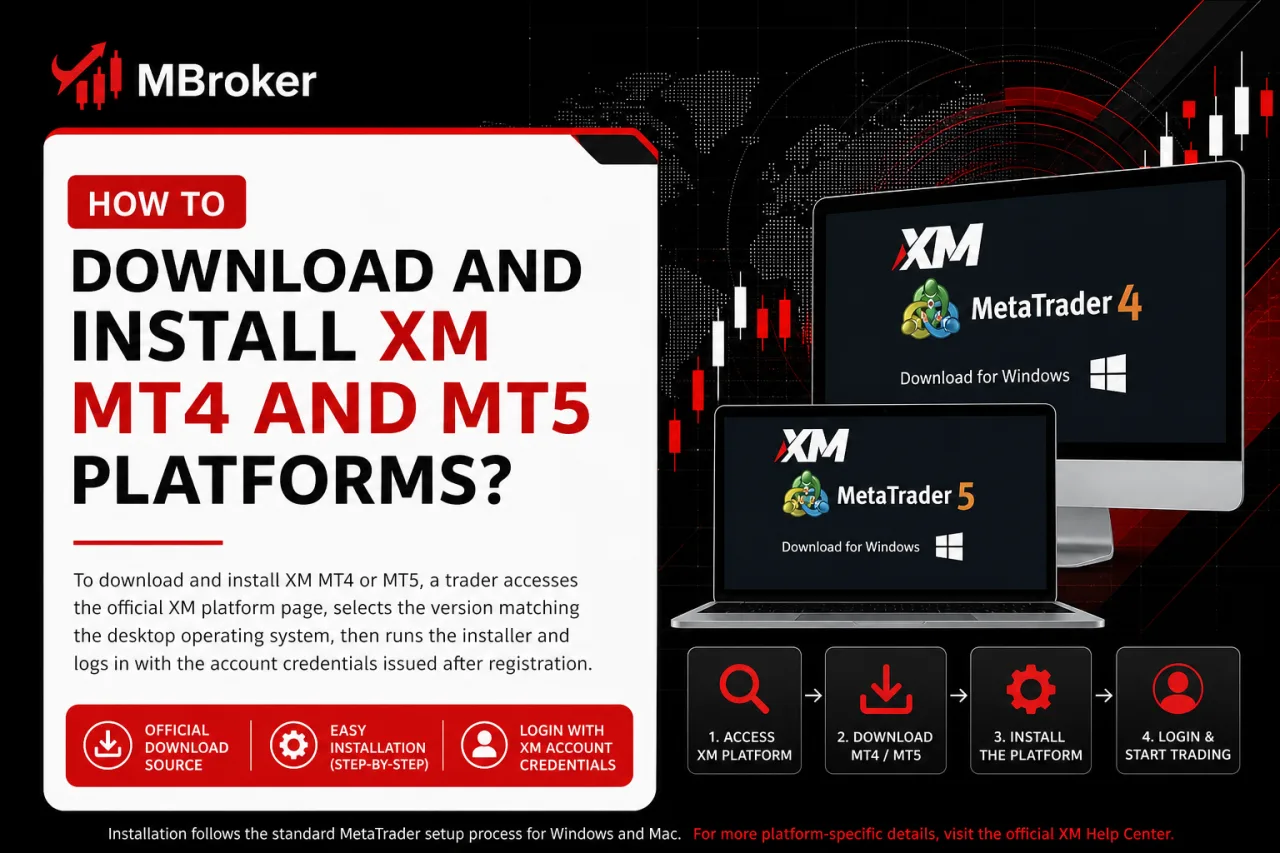
To download and install XM MT4 or MT5, a trader accesses the official XM platform page, selects the version matching the desktop operating system, then runs the installer and logs in with the account credentials issued after registration. This section outlines the download source, the installation steps for Windows and Mac, and where to find further platform-specific setup details.
The installation process follows the standard MetaTrader setup flow rather than a custom XM procedure, covering platform selection, file execution and login.
- Selecting the MT4 or MT5 installer file from the official XM download page based on the operating system in use.
- Running the downloaded executable file (.exe for Windows, .dmg or .pkg for Mac) and following the on-screen setup prompts.
- Confirming the installation directory and completing the setup wizard until the platform launches.
- Entering the trading account number, password and server details to connect the terminal to the XM account.
Mac installation may require additional compatibility steps depending on the operating system version, as detailed in official MetaTrader documentation. Sub-sections below cover device-specific instructions and mobile or web-based access for traders who prefer not to install a desktop application.
How to Set Up MT4/MT5 WebTrader and Mobile Apps?
To set up MT4/MT5 WebTrader, a trader opens the browser-based platform through the XM website and logs in directly with the account number and password, without any installation step. WebTrader runs inside the browser window and connects to the same trading server used by the desktop terminal.
Mobile app setup follows a separate download and login sequence for iOS and Android devices:
- Downloading the MT4 or MT5 app from the Apple App Store or Google Play Store, matching the platform used on the desktop or web version.
- Opening the app and selecting the “Login to an existing account” option instead of creating a demo account.
- Entering the trading account number, password and server name issued after XM registration.
- Confirming the connection to load open positions, account balance and trading tools on the mobile screen.
WebTrader suits traders needing quick access from a shared or unfamiliar computer, while the mobile apps serve clients who monitor positions and place orders away from a desktop setup. Login credentials remain identical across desktop, web and mobile versions, so no separate registration step applies to any platform format.
How to Place a Trade on XM MT4/MT5?
To place a trade on XM MT4/MT5, a trader opens the order window, selects the instrument and volume, sets stop loss and take profit levels, then confirms execution as a market order. This section walks through opening the trade ticket, configuring risk parameters and confirming the order fills correctly on the platform interface.
The sequence follows the standard MetaTrader order panel rather than a custom XM workflow:
- Opening the “New Order” window from the toolbar or by double-clicking the instrument in the Market Watch list.
- Selecting the trading volume in lots and choosing “Market Execution” as the order type.
- Entering stop loss and take profit price levels before submitting the order, or adding them afterward through the open position window.
- Clicking “Buy” or “Sell” to send the order and confirming the trade appears in the “Trade” tab with an open price and ticket number.
Traders using MT5 access additional order types, such as pending orders and pending stop limits, through the same order window that MT4 uses for market execution. Confirming execution means checking that the position shows a filled price matching current market conditions, along with the assigned stop loss and take profit values in the terminal.
How to Make Your First Deposit and Withdrawal on XM?
How to Make Your First Deposit and Withdrawal on XM
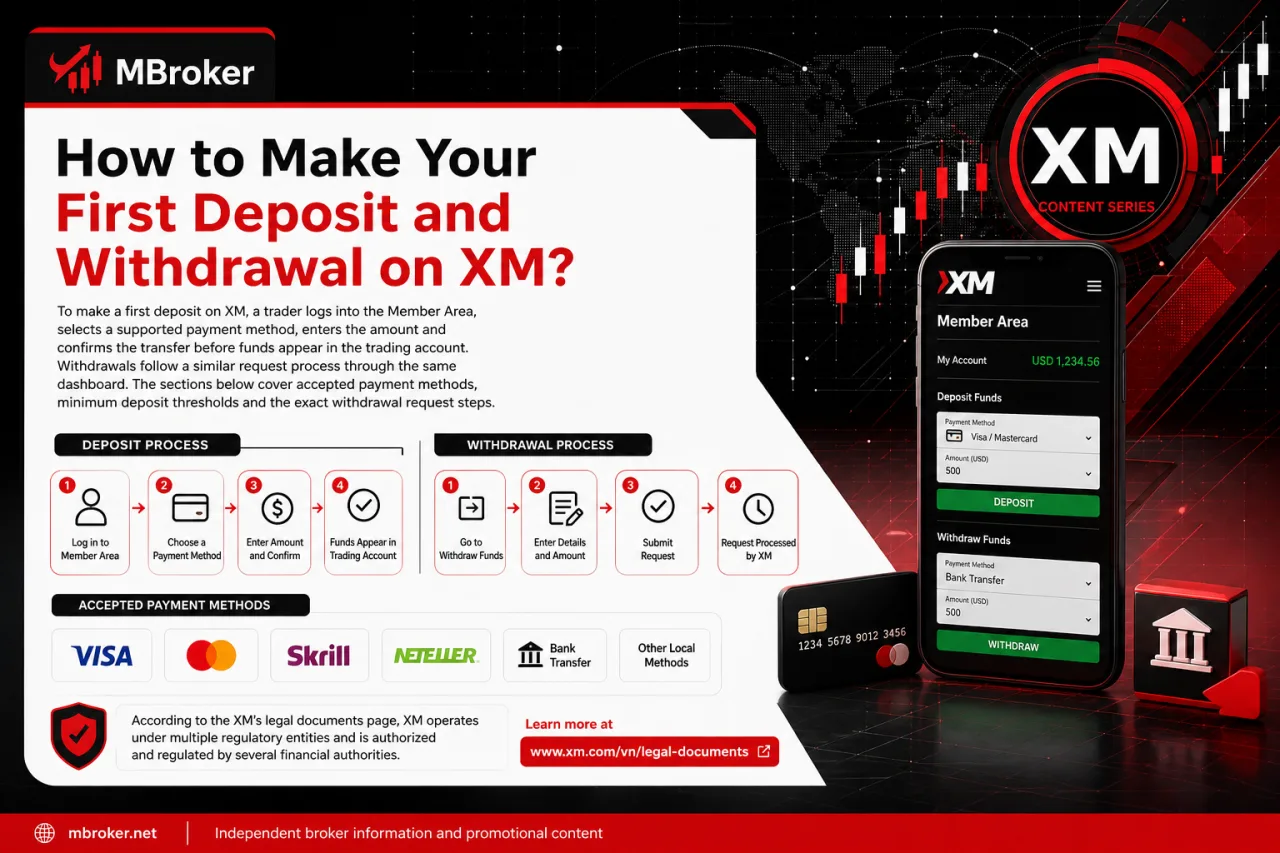
To make a first deposit on XM, a trader logs into the Member Area, selects a supported payment method, enters the amount and confirms the transfer before funds appear in the trading account. Withdrawals follow a similar request process through the same dashboard. The sections below cover accepted payment methods, minimum deposit thresholds and the exact withdrawal request steps.
According to the XM’s legal documents page, XM operates under multiple regulated entities, and funding options such as bank wire transfer, credit or debit card, and various e-wallet services are made available depending on the trader’s country and the specific regulated entity handling the account.
According to XM’s account types page, minimum deposit requirements vary by account type—starting from as low as $5 for some accounts up to $10,000 for others—so the exact figure applying to a given trader depends on which entity processes the registration. Traders confirm the applicable minimum on the account opening page before selecting a funding method.
Requesting a withdrawal follows a fixed sequence inside the Member Area:
- Opening the “Withdraw Funds” section from the Member Area dashboard.
- Selecting the same payment method used for the original deposit, where required.
- Entering the withdrawal amount and confirming the request.
- Waiting for processing confirmation via email before funds reach the receiving account.
Information reviewed as of the current publication date; traders confirm current payment options and processing details directly through the official XM Member Area or Help Center, as figures and available methods change periodically.
What Are the Main XM Account Types and Their Trading Conditions?
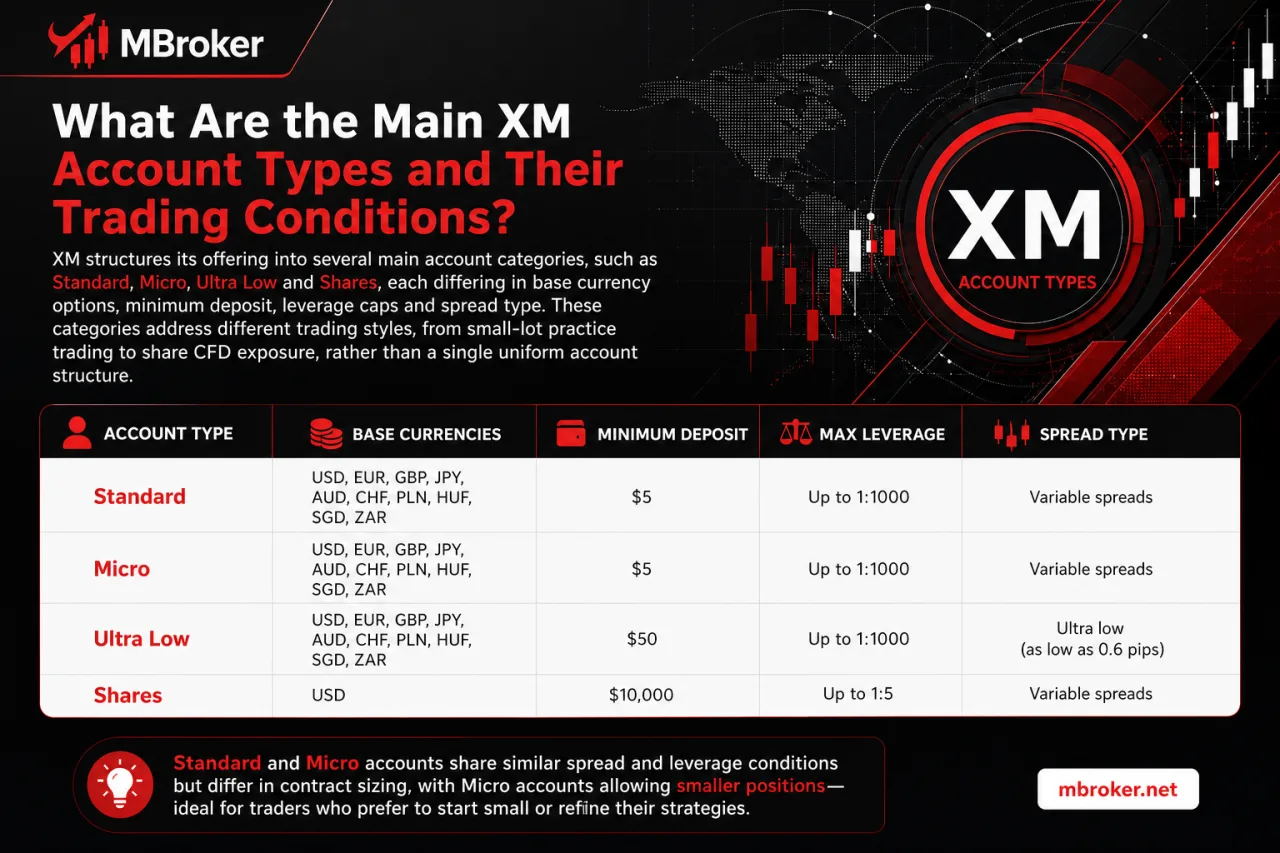
What Are the Main XM Account Types and Their Trading Conditions
XM structures its offering into several main account categories, such as Standard, Micro, Ultra Low and Shares, each differing in base currency options, minimum deposit, leverage caps and spread type. These categories address different trading styles, from small-lot practice trading to share CFD exposure, rather than a single uniform account structure.
Standard and Micro accounts share similar spread and leverage conditions but differ in contract sizing, with Micro accounts allowing smaller position volumes suited to newer traders. Ultra Low accounts prioritise tighter spreads with a fixed commission structure, while Shares accounts focus specifically on equity CFD trading with its own margin requirements.
According to XM’s account types page, exact minimum deposits, leverage limits and available base currencies vary by regulated entity and by client jurisdiction, so the same account name may carry different conditions depending on which XM entity processes the registration. Traders confirm the specific figures applicable to their region directly on the official account types page before opening an account, since these terms change periodically and are not universal across all XM clients.
How to Contact XM Official Support When You Need Help?
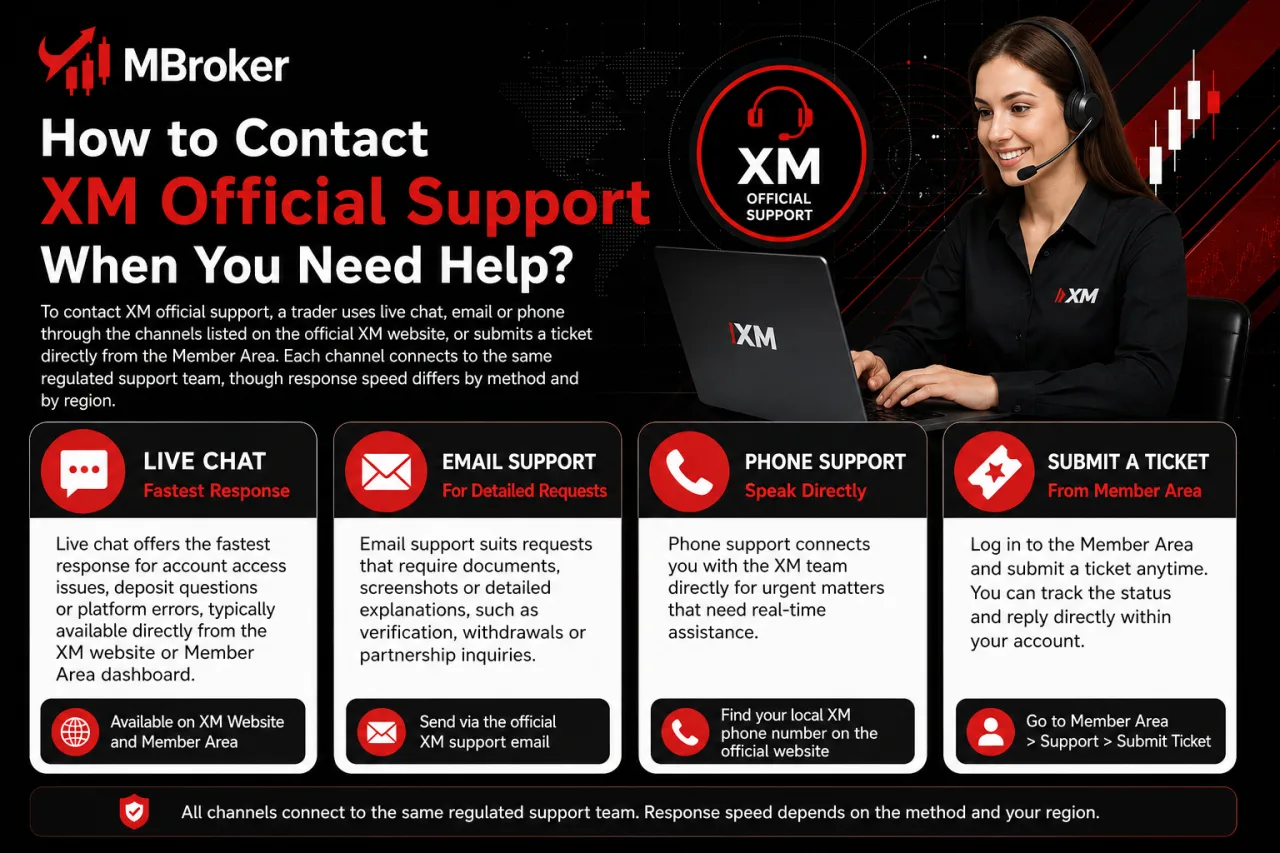
How to Contact XM Official Support When You Need Help
To contact XM official support, a trader uses live chat, email or phone through the channels listed on the official XM website, or submits a ticket directly from the Member Area. Each channel connects to the same regulated support team, though response speed differs by method and by region.
Live chat offers the fastest response for account access issues, deposit questions or platform errors, typically available directly from the XM website or Member Area dashboard. Email support suits requests involving document attachments, such as verification files or transaction records, and follows a queued response process rather than real-time replies. Phone support connects traders to a regional XM contact number listed on the official site, useful for urgent account or trading issues requiring verbal confirmation.
Submitting a support ticket through the Member Area follows a short sequence:
- Logging into the Member Area and locating the support or help section.
- Selecting the relevant category, such as account verification, deposits or platform access.
- Describing the issue and attaching any supporting documents if required.
- Submitting the ticket and awaiting a reply through the registered email address.
Traders confirm contact details exclusively through the official XM Support page, which lists 24/7 phone lines, email and live chat as the verified channels, since unofficial numbers, emails or third-party chat links do not represent verified XM support channels.
What Lesser-Known Account Management Features Can Traders Use on XM?
XM’s Member Area includes several less commonly discussed account management tools, such as internal fund transfers between sub-accounts, negative balance protection settings and loyalty programme enrollment. These features extend beyond the core registration and trading procedures covered above, addressing traders who manage multiple accounts or seek additional account safeguards. The sub-sections below detail each feature individually, as supplementary information beyond the standard step-by-step guides.
How to Transfer Funds Between Multiple XM Trading Accounts?
To transfer funds between multiple XM trading accounts, a trader opens the “Transfer Funds” option inside the Member Area, selects the source and destination sub-accounts, then confirms the amount for an instant internal move. This function applies only to accounts sharing the same trading profile and base currency.
Internal transfers skip external payment processors entirely, so no card, e-wallet or bank details apply during the request. Restrictions typically limit transfers to accounts under the same client profile, and currency mismatches between sub-accounts may block a direct transfer until conversion occurs.
- Opening the “Transfer Funds” section from the Member Area dashboard.
- Selecting the source account holding available balance.
- Choosing the destination sub-account under the same profile.
- Confirming the amount to complete the instant transfer.
Internal transfer limits and currency conversion rules vary by regulated entity and account type.
How to Enable Negative Balance Protection on Your XM Account?
To enable negative balance protection on an XM account, a trader confirms the setting through the regulated entity handling the registration, since some entities apply the safeguard automatically while others require explicit activation. This distinction affects whether the feature appears as a default account condition or as an opt-in step.
Offshore entities such as XM Global Limited generally apply negative balance protection automatically upon account opening, without a separate activation request.
Entities regulated under stricter frameworks may present negative balance protection as a standard term disclosed in the account agreement rather than a toggle inside the Member Area. Traders confirm the exact status through the terms and conditions document issued at registration, since the protection’s automatic or opt-in nature depends entirely on which XM entity processes the account rather than on the trader’s chosen account type.
XM provides a structured process for opening, verifying and managing a trading account, from registration and KYC verification to installing MT4 or MT5, funding the account and placing the first trade. Following each step in order can help traders avoid common setup, login and transaction issues.
However, available account types, minimum deposits, leverage, payment methods and protection measures may vary by country and regulated XM entity. Traders should therefore verify the latest conditions through the official XM Member Area or contact XM support before depositing funds or trading. The guides provided by Mbroker are for informational purposes only and do not constitute financial advice.
XM Withdrawal Guide: Methods, Fees & Steps to Withdraw
Learn how XM withdrawal works: supported methods, fees, minimum limits and step-by-step instructions to get...
How to Register an XM Account: Step-by-Step Guide
Learn how xm register works: official steps to open your XM account, verify identity, and...
How to Enable XM 2FA: Step-by-Step Security Setup Guide
Learn how to enable or disable XM 2FA in your Members Area for stronger account...

XM Login: How to Access Your XM Members Area Account
Struggling with XM login? Get the official Members Area link, step-by-step access instructions, and fixes...
How to Delete Your XM Account: Step-by-Step Closure Guide
Want to delete your XM account for good? Follow our official step-by-step guide covering closure...
XM Verification Guide: How to Verify Your XM Account
Learn how XM Verification works: required documents, submission steps, processing time and how to check...
How to Become an XM Partner: Registration & Login Guide
Want to join the XM Partner Program? See how to register, log in to your...
How to Deposit Funds Into Your XM Account: Full Guide
Want to fund your XM account fast? Discover approved deposit methods, fees, processing times, and...