
 Tiếng Việt
XM Platform
XM offers four main trading platforms: MT4, MT5, WebTrader and the XM App. Each platform connects to the same trading account infrastructure but differs in execution tools, chart features and device design.
MT5 supports more order types, timeframes and asset classes than MT4, while WebTrader and the XM App prioritize accessibility over advanced charting depth. Traders comparing these options typically weigh execution speed, indicator variety and automated-trading support before settling on one platform.
MT4 and MT5 are designed to run on Windows and macOS desktops, while WebTrader works directly through a browser without installation. The XM App extends this access to Android and iOS devices for trading away from a desktop setup.
Evaluating platform reliability involves checking login stability, order execution consistency and how each interface handles account security. Mbroker reviews these functional details to help readers understand what each XM platform actually offers before choosing one to trade on.
The sections below break down what trading platforms XM offers, starting with a direct look at MT4, MT5, WebTrader and the XM App.
What Trading Platforms Does XM Offer?
What Trading Platforms Does XM Offer
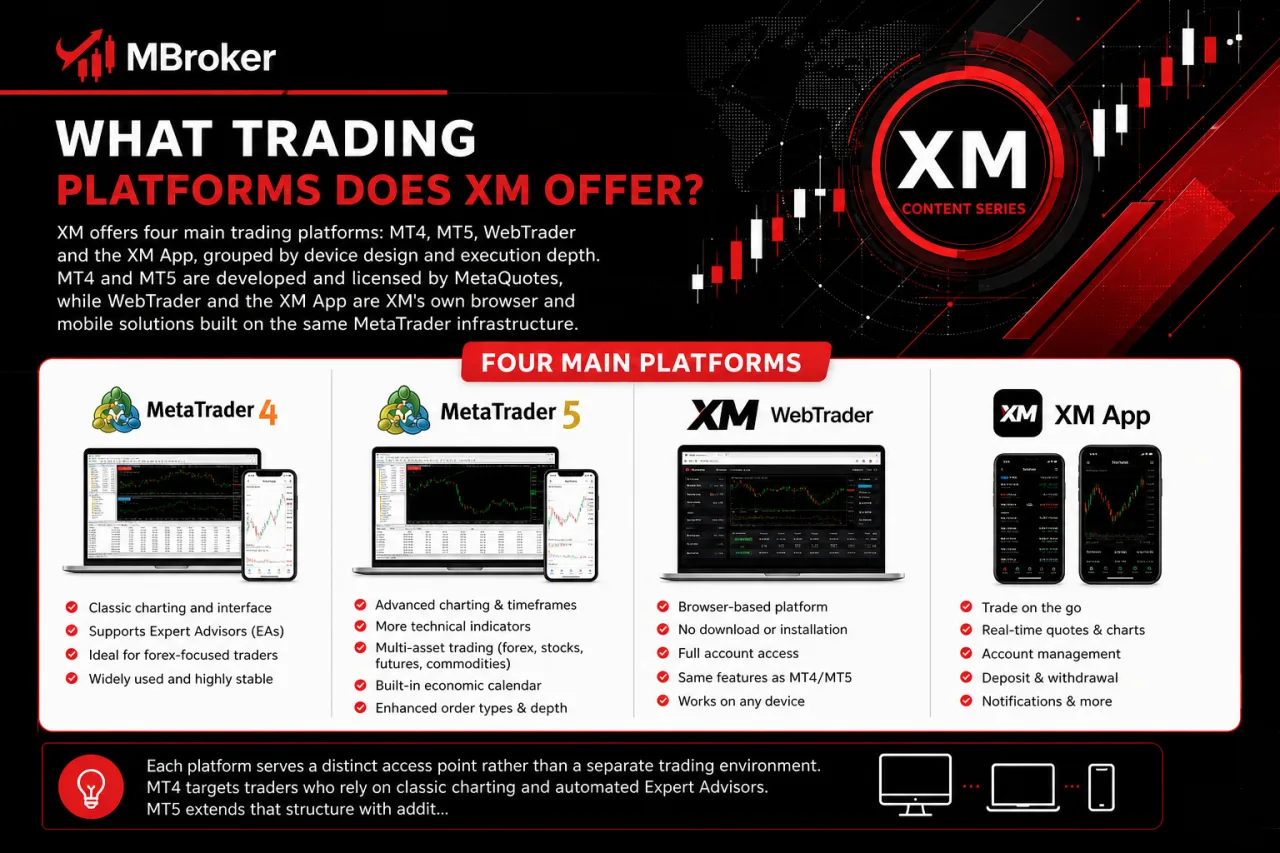
XM offers four main trading platforms: MT4, MT5, WebTrader and the XM App, grouped by device design and execution depth. MT4 and MT5 are developed and licensed by MetaQuotes, while WebTrader and the XM App are XM’s own browser and mobile solutions built on the same MetaTrader infrastructure.
Each platform serves a distinct access point rather than a separate trading environment. MT4 targets traders who rely on classic charting and automated Expert Advisors. MT5 extends that structure with additional order types, timeframes and instrument coverage. WebTrader gives instant browser access without any download, useful for checking positions from a shared or restricted computer. The XM App brings MetaTrader functionality to Android and iOS, letting accounts stay reachable outside a desktop setup.
Platform availability, supported instruments and account compatibility may vary depending on the XM entity a client is registered under and the region they trade from. The next sections look at each platform individually, covering their specific features, compatibility and limitations in detail.
What Is XM MT4?
XM MT4 is the MetaTrader 4 platform licensed from MetaQuotes and offered through XM for manual and automated trading. It runs on the same account infrastructure described earlier, giving traders a chart-based interface built around order execution and Expert Advisor support.
The core purpose of XM MT4 centers on two trading styles working side by side. Manual traders place orders directly from the chart window, using built-in order types and timeframes to plan entries and exits themselves. Automated traders instead load Expert Advisors, which are pre-coded scripts that execute trades based on rules set in advance without requiring constant manual input.
This dual structure makes XM MT4 a common choice for traders who value a lighter, faster interface over MT5’s broader instrument and order-type coverage. General use cases include forex-focused trading, running custom or third-party indicators, and backtesting automated strategies before applying them to a live or demo account. Availability of specific instruments and account types under XM MT4 still depends on the legal entity and region a client is registered with.
What Is XM MT5?
XM MT5 is the MetaTrader 5 platform licensed from MetaQuotes, positioned as the newer successor to MT4 with broader instrument and order-type coverage. It runs on the same account infrastructure covered earlier, pairing a more advanced order system with an expanded set of timeframes for chart analysis.
This wider structure shifts XM MT5’s general use case toward traders who work across multiple asset classes rather than staying focused on forex alone. Where XM MT4 keeps a lighter, chart-first interface, XM MT5 adds a built-in economic calendar, additional pending order types and a depth-of-market view for reading pending buy and sell volume.
Expert Advisors still run on XM MT5, though scripts written for MT4 require conversion before they function on the newer platform. General use cases include multi-asset trading, running more technical indicators per chart window and executing strategies that depend on the extra timeframes MT5 provides. Specific instrument availability and account compatibility under XM MT5 still depend on the legal entity and region a client is registered with.
What Is XM WebTrader?
XM WebTrader is XM’s browser-based access point to the MT4 and MT5 trading environment, requiring no download or installation. It connects to the same account infrastructure as the desktop platforms, opening charts and order windows directly inside a browser tab.
This design shifts the general purpose of WebTrader toward convenience over depth. Traders log in from any computer with internet access, useful when working from a shared, restricted or unfamiliar machine where installing MT4 or MT5 is not practical.
WebTrader carries over core order execution and basic charting functions from MT4 and MT5, though it runs a lighter interface than either desktop platform. Expert Advisor support and advanced indicator loading remain tied to the desktop versions rather than the browser environment. Platform access and account compatibility under XM WebTrader still depend on the legal entity and region a client is registered with.
What Is the XM App?
The XM App is XM’s mobile trading application, built on the MT4 and MT5 infrastructure and designed for Android and iOS devices. It mirrors the account setup used across the other platforms, keeping charts, orders and account balances synced with desktop and browser sessions.
This mobile-first design shifts the general purpose of the XM App toward monitoring and quick execution rather than deep chart analysis. Traders open positions, check balances or close trades directly from a phone or tablet, without needing a desktop or laptop nearby.
Core order execution and basic charting tools carry over from MT4 and MT5, though screen size limits the number of indicators and timeframes viewed at once compared to a desktop window. Expert Advisor automation does not run on the XM App itself, since automated scripts require the desktop MT4 or MT5 environment to execute. Platform features, supported instruments and account compatibility under the XM App still depend on the legal entity and region a client is registered with.
How Do XM MT4, MT5, WebTrader and XM App Compare?
How Do XM MT4, MT5, WebTrader and XM App Compare
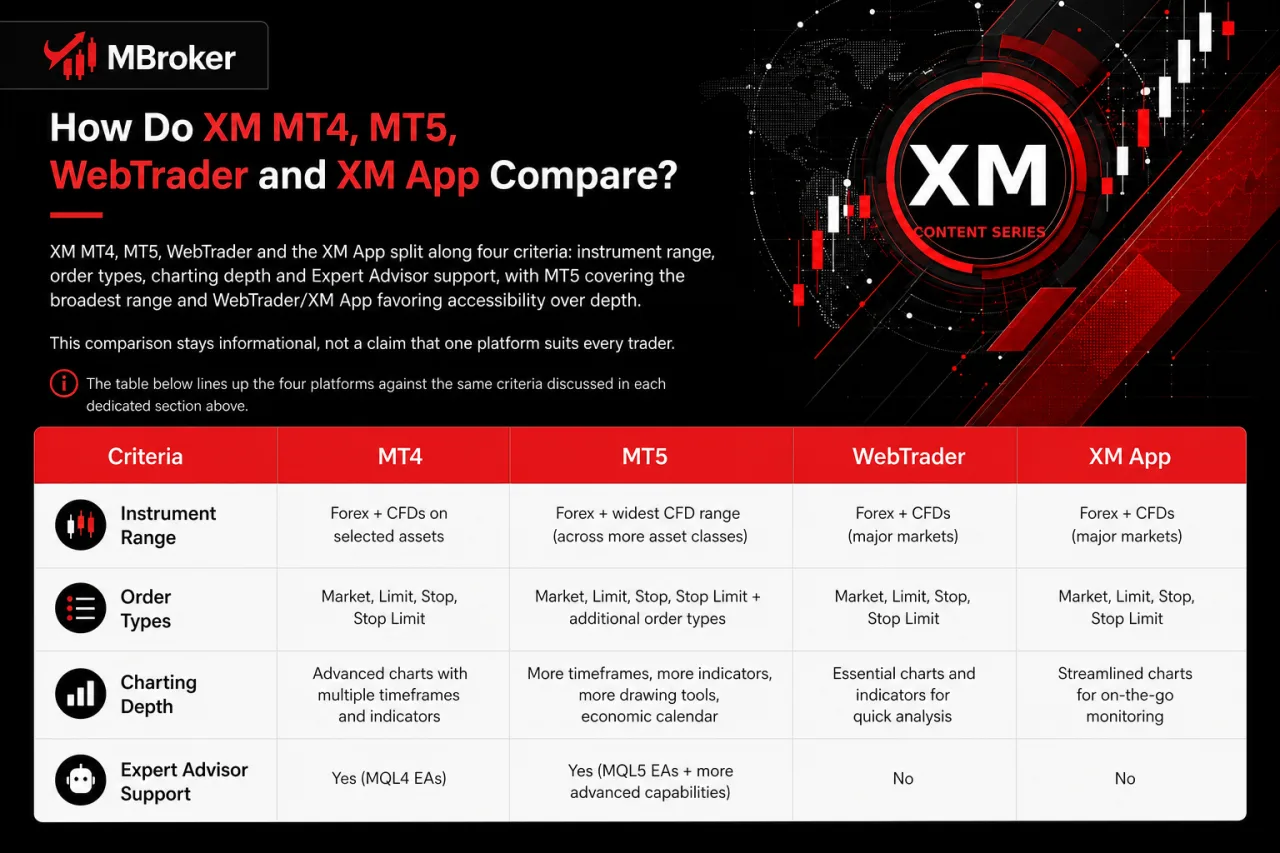
XM MT4, MT5, WebTrader and the XM App split along four criteria: instrument range, order types, charting depth and Expert Advisor support, with MT5 covering the broadest range and WebTrader/XM App favoring accessibility over depth. This comparison stays informational, not a claim that one platform suits every trader.
The table below lines up the four platforms against the same criteria discussed in each dedicated section above.
| Criteria | MT4 | MT5 | WebTrader | XM App |
|---|---|---|---|---|
| Instrument coverage | Forex-focused | Broader multi-asset | Same as linked MT4/MT5 account | Same as linked MT4/MT5 account |
| Order types | Standard set | Extended, including additional pending orders | Core execution only | Core execution only |
| Charting/indicators | Full desktop charting | Full charting plus depth-of-market | Lighter, browser-based charting | Limited by screen size |
| Timeframes | Standard range | Expanded range | Basic set | Basic set |
| Expert Advisor support | Yes, native | Yes, requires MT4-to-MT5 conversion | No | No |
| Execution style | Manual and automated | Manual and automated | Manual only | Manual only |
| Demo/live compatibility | Both | Both | Both | Both |
Instrument and order-type availability under each platform still depends on the XM legal entity and region a client is registered with.
XM MT4 vs XM MT5: What Are the Key Differences?
XM MT4 and XM MT5 differ mainly in order types, timeframes, depth of market, programming language and asset coverage, with MT5 extending every one of these areas beyond what MT4 offers. The sections above already outlined each platform separately, so this comparison lines up the same criteria side by side.
Order types mark the first difference. MT4 runs a standard set of pending and market orders, while MT5 adds extra pending order variants for finer trade planning.
Timeframes follow a similar gap. MT4 covers a standard range of chart intervals, whereas MT5 expands that range, giving traders more granular views on the same instrument.
Depth of market appears only on MT5. This feature displays pending buy and sell volume at different price levels, a view MT4’s interface does not include.
Programming language separates the two platforms at a technical level. MT4 runs on MQL4, while MT5 uses MQL5, which is why Expert Advisors built for MT4 require conversion before running on MT5, as already noted earlier in this article.
Asset coverage rounds out the comparison. MT4 stays forex-focused, while MT5 supports a broader multi-asset range, consistent with the instrument-coverage row in the earlier comparison table. Actual asset availability still depends on the XM legal entity and region a client is registered with.
XM WebTrader vs XM App: Which Access Method Fits Different Situations?
XM WebTrader fits situations needing quick browser access without installation, while the XM App fits situations needing on-the-go monitoring from a phone or tablet. This split already appeared in the comparison table above, so the focus here narrows to which situations favor one access method over the other.
Installation requirement marks the clearest divider between the two. WebTrader opens directly through a browser tab, useful when working from a shared, public or restricted computer where installing software is not an option. The XM App requires downloading and installing the application from Android or iOS app stores before logging in, similar to any other mobile app.
Feature parity stays close between the two, since both carry over core order execution and basic charting from MT4 and MT5 without Expert Advisor support. Neither platform runs automated trading scripts, which remain tied to the desktop MT4 or MT5 environment covered earlier in this article.
The practical difference sits in experience style. WebTrader suits a desktop-like session through a browser window, useful for reviewing charts on a larger screen. The XM App suits situations away from a desk, letting a trader check balances or close a position directly from a mobile device. Actual feature availability under either access method still depends on the XM legal entity and region a client is registered with.
Which Devices and Operating Systems Support XM Platforms?
Which Devices and Operating Systems Support XM Platforms
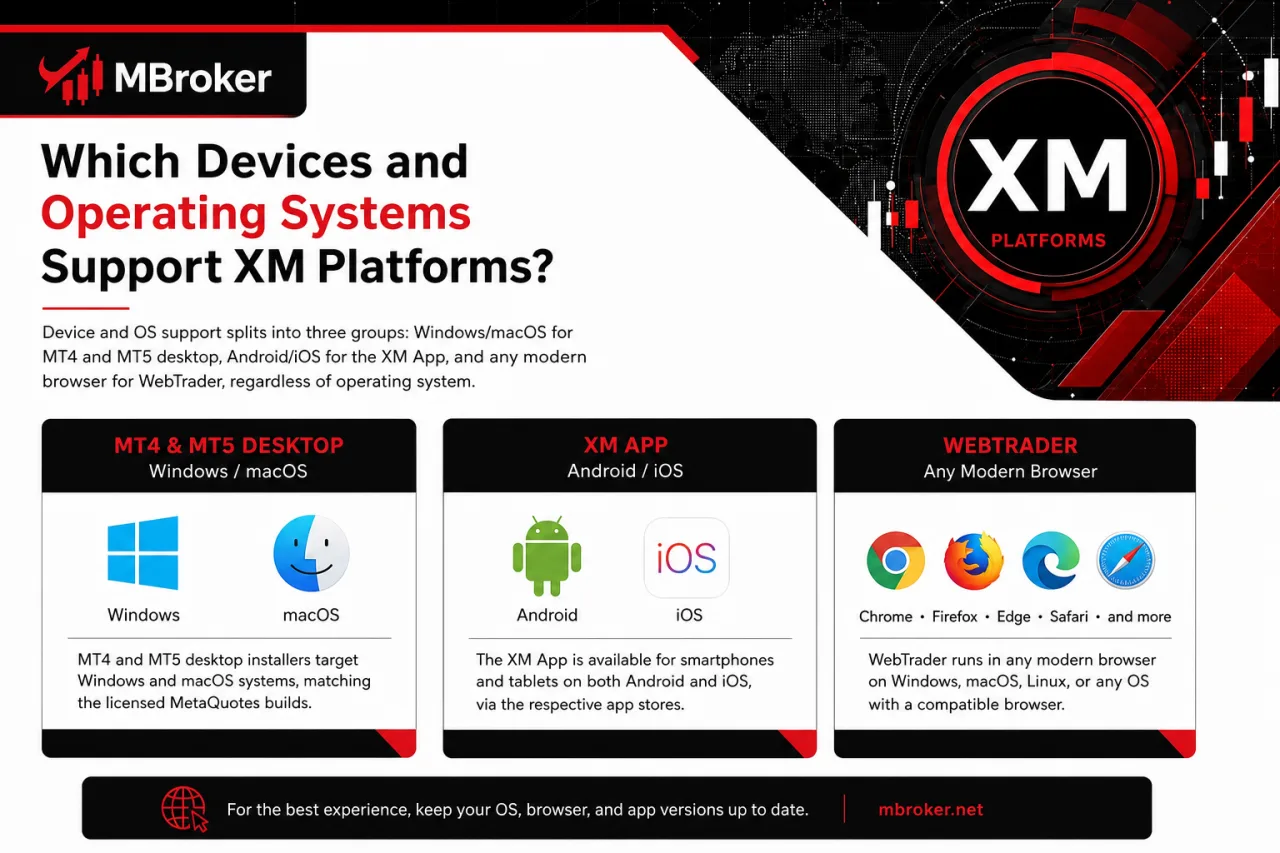
Device and OS support splits into three groups: Windows/macOS for MT4 and MT5 desktop, Android/iOS for the XM App, and any modern browser for WebTrader, regardless of operating system. Each group ties back to the platform structure covered earlier, so the breakdown below stays limited to compatibility rather than repeating feature details already explained per platform.
MT4 and MT5 desktop installers target Windows and macOS systems, matching the licensed MetaQuotes builds discussed in their dedicated sections above. The XM App follows mobile app-store distribution, installing on Android and iOS devices without a desktop dependency. WebTrader skips device-specific installation entirely, opening through any current browser regardless of the underlying operating system.
Exact system requirements, minimum OS versions and supported browser types still depend on the official MetaTrader, XM or app-store pages current at the time of download, since these specifications change with software updates. The following sections look at desktop and mobile compatibility separately, starting with Windows and macOS support for MT4 and MT5.
Is XM MT4/MT5 Compatible With Windows and macOS?
Yes, XM MT4 and MT5 run natively on Windows and macOS, with each operating system receiving its own dedicated installer from MetaQuotes rather than a single shared build. This confirms the desktop availability already noted earlier in this article, though the two systems handle installation differently underneath.
Windows gets the original native application, built directly around the classic MT4/MT5 executable that MetaQuotes designed the platform around first. macOS support runs through a separate installer that MetaQuotes packages specifically for Apple systems, rather than a straight port of the Windows executable. Some macOS setups still rely on Windows-emulation layers to access certain legacy tools or plugins built only for the Windows build, since not every third-party add-on ships a native Mac version.
Core functions stay consistent across both systems, including chart windows, order execution and Expert Advisor support covered in the platform sections above. Exact installer versions, minimum OS requirements and any emulation steps needed still depend on the current MetaTrader and XM download pages at the time of installation.
Is the XM App Available on Android and iOS?
Yes, the XM App is available on both Google Play for Android and the Apple App Store for iOS, matching the mobile access already described earlier in this article. This confirms the same Android and iOS distribution noted in the device-and-OS breakdown above, though each store handles the listing and update process separately.
Google Play hosts the Android build, installing directly on compatible devices without requiring a sideloaded file. The Apple App Store carries the iOS build, following the same review and update process Apple applies to any other listed application.
Minimum supported OS versions for both stores get published on the official app-store listing pages and update over time as MetaQuotes and XM revise the application, so traders should check the current listing before installing or updating the app.
Login credentials and account setup stay identical to the desktop and browser platforms covered earlier, since the XM App draws on the same MT4/MT5 account infrastructure. Checking the current listing on Google Play or the Apple App Store confirms the exact OS version a specific device needs before installing.
How Do You Access and Log In to XM Platforms?
How Do You Access and Log In to XM Platforms
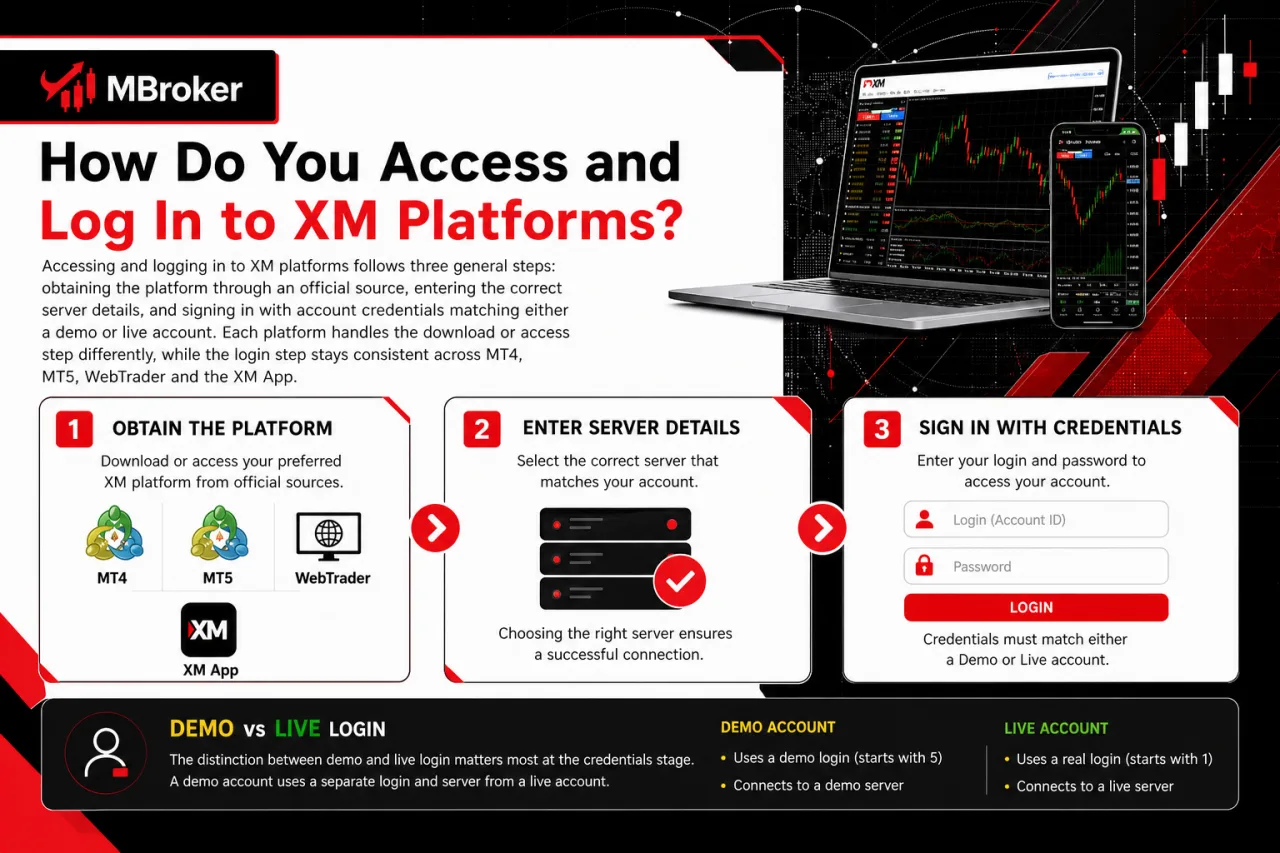
Accessing and logging in to XM platforms follows three general steps: obtaining the platform through an official source, entering the correct server details, and signing in with account credentials matching either a demo or live account. Each platform handles the download or access step differently, while the login step stays consistent across MT4, MT5, WebTrader and the XM App.
The distinction between demo and live login matters most at the credentials stage. A demo account uses a separate login number and server tied to virtual funds, while a live account connects to real trading funds under the same platform interface. Entering the wrong server for either type prevents the platform from connecting, even with correct login credentials.
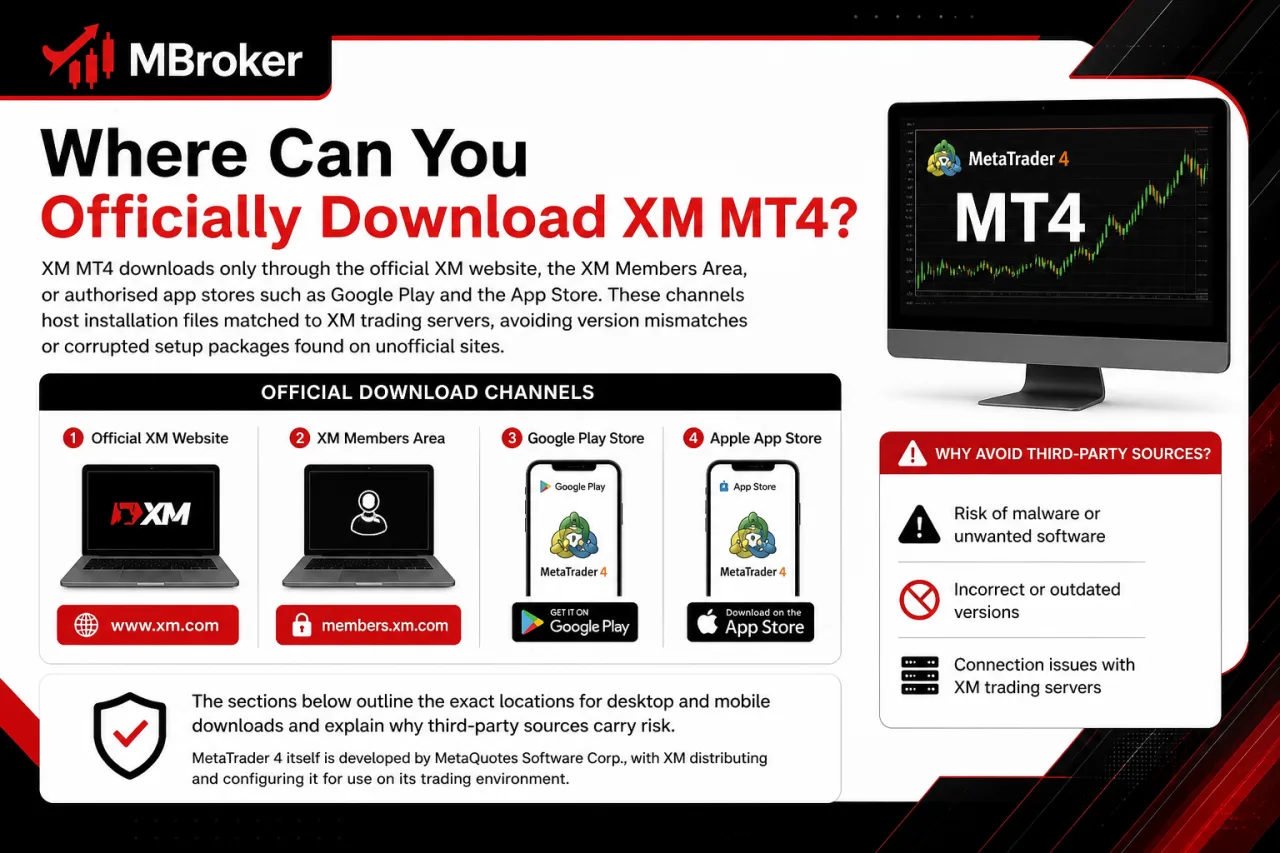
Only official sources apply when obtaining any XM platform. Desktop MT4 and MT5 installers come from the MetaTrader or XM website, the XM App comes only from Google Play or the Apple App Store, and WebTrader opens directly through the official XM site without any download. No platform login step requires sharing a password, verification code or other sensitive account detail with anyone outside the official login screen itself.
The sections below walk through the download and login steps for each platform separately, starting with desktop installation for MT4 and MT5.
How Do You Download and Install XM MT4 or MT5?
Downloading and installing XM MT4 or MT5 involves three general steps: getting the installer from the official MetaTrader or XM website, running the setup file on Windows or macOS, and logging in with account credentials once installation finishes. This expands on the desktop compatibility already noted earlier in this article.
The installer file itself stays platform-specific, matching the Windows and macOS builds discussed in the compatibility section above. Windows users download the standalone executable and run it directly, while macOS users use the dedicated Mac installer package rather than the Windows file. Once installed, opening the platform for the first time prompts a login screen where server details and account credentials get entered, tying the fresh installation into the same account infrastructure covered earlier in this article.
Exact download links, file names and step-by-step setup screens change as MetaQuotes and XM update their installers, so referencing the current official MetaTrader or XM download page confirms the precise installation steps for the version available at the time of download.
How Do You Log In to XM WebTrader or the XM App?
Logging in to XM WebTrader or the XM App involves entering the account number, password and server assigned at account opening, matching the general login pattern already covered for MT4 and MT5. Each platform handles the entry point differently, though the credential step itself stays the same across every XM platform.
WebTrader opens directly through the official XM website, where a login form appears without any download step. Entering the account number, password and server directly on that page connects the browser session to the same account infrastructure used by MT4 and MT5.
The XM App requires installing the application from Google Play or the Apple App Store first, as outlined in the earlier compatibility section. Opening the app afterward presents a similar login screen, asking for the same account number, password and server before syncing balances and open positions with any other active session.
Selecting the correct server matters on both platforms, since a mismatch between a demo and live server prevents the login from completing even with correct credentials. Neither login screen requires sharing a password or verification code with anyone outside the official platform itself.
Are XM Trading Platforms Secure and Reliable to Use?
Are XM Trading Platforms Secure and Reliable to Use
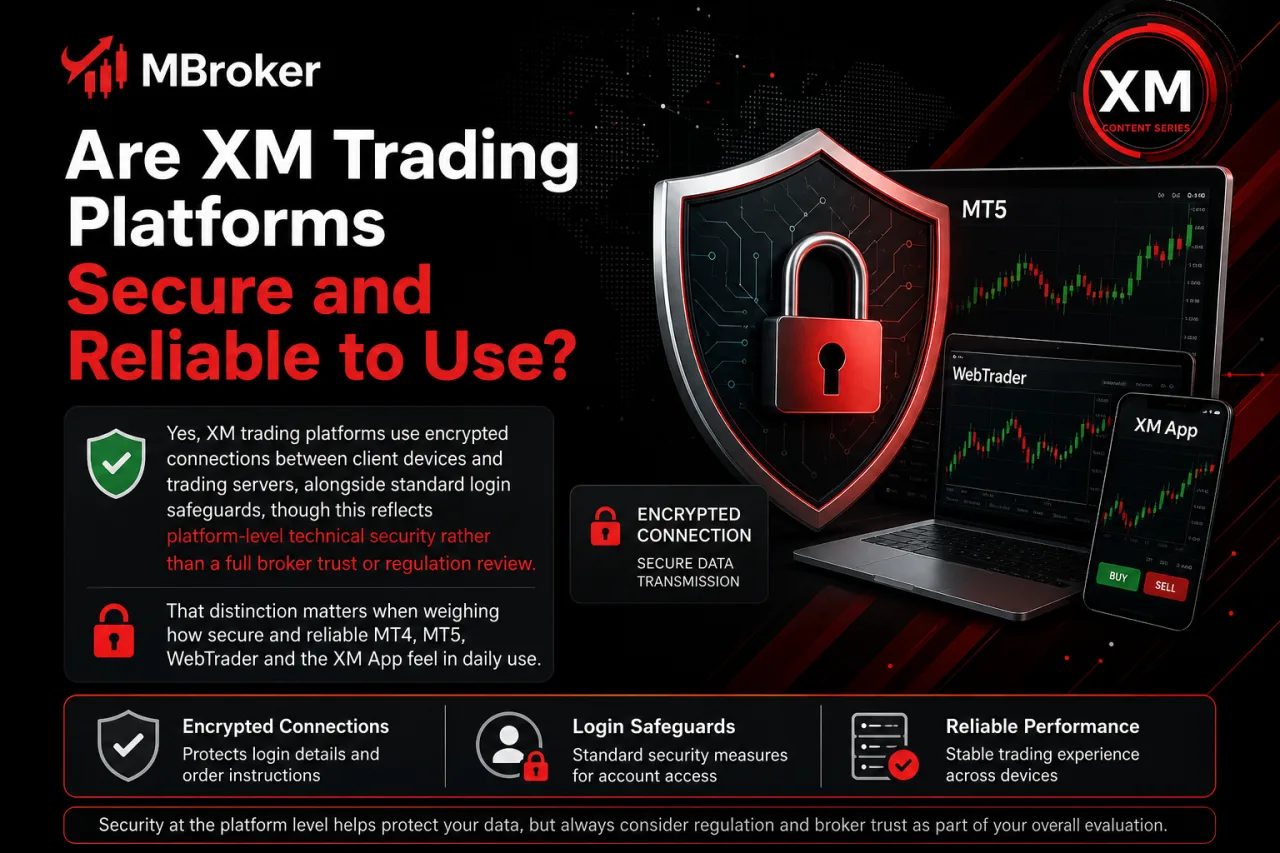
Yes, XM trading platforms use encrypted connections between client devices and trading servers, alongside standard login safeguards, though this reflects platform-level technical security rather than a full broker trust or regulation review. That distinction matters when weighing how secure and reliable MT4, MT5, WebTrader and the XM App feel in daily use.
Encryption covers the data channel linking a device to the trading server, protecting login credentials and order instructions as they travel between the platform and account infrastructure described earlier in this article. Server stability affects reliability directly, since consistent uptime keeps charts, order execution and account balances synced across MT4, MT5, WebTrader and the XM App without interruption.
Two-factor authentication and similar login safeguards depend on what MetaQuotes and XM document officially for each platform version, so confirming current security features through official MetaTrader or XM resources gives the most accurate picture before relying on any specific safeguard.
This platform-level view stays separate from broader questions about XM’s regulatory standing, fund protection or overall trustworthiness as a broker, which fall under a dedicated broker review rather than platform technical security.
What Advanced or Less Common Features Do XM Platforms Offer?
XM platforms group additional features into four areas: one-click trading, price alerts, multiple chart types and platform-specific add-ons, each covered separately below. These sit outside the core order-execution and charting functions already detailed for MT4, MT5, WebTrader and the XM App, adding convenience-focused tools rather than new asset coverage. The sections that follow break down each feature on its own, starting with one-click trading.
What Is One-Click Trading on XM Platforms?
One-click trading on XM platforms lets a trader open a market order directly from the chart window with a single click, skipping the standard order-ticket confirmation step. This function sits inside the advanced-feature group noted above, so the breakdown below stays limited to how it operates technically.
MetaQuotes builds this function into MT4 and MT5, displaying buy and sell buttons with the current bid and ask price on an overlay panel at the top of the chart. Clicking either button sends the order at the displayed price and default lot size set in the platform settings, bypassing the usual order window. Traders enable or disable this panel per chart, and MT4/MT5 typically show a confirmation prompt the first time it activates as a safeguard. Availability of this panel on WebTrader and the XM App still depends on the platform version and account a client is registered under.
How Do Price Alerts and Notifications Work on XM Platforms?
Price alerts on XM platforms work through a built-in alert function that triggers a pop-up, sound or push notification once a set price level gets reached. This sits within the same advanced-feature group covering one-click trading above, so the breakdown below stays limited to how alerts get configured on each platform.
MT4 and MT5 set alerts through the terminal’s Alerts tab, where a trader picks the instrument, condition (such as bid or ask reaching a chosen level) and the action to trigger, typically a sound, pop-up message or email. The XM App handles this differently, sending push notifications directly to the mobile device once the configured condition matches current market price. WebTrader’s alert options stay tied to whatever the browser session supports at the time, which depends on the platform version linked to the account.
Delivery method varies by platform rather than by account type, since MT4 and MT5 rely on desktop-based prompts while the XM App uses native mobile push notifications. Confirming exact alert steps and notification options through official MetaTrader or XM documentation gives the most accurate picture before setting one up.
Which XM Trading Platform Should You Choose?
XM provides several ways to access the same trading account, but the right platform depends on how and where you trade. MT4 suits users who prefer a familiar forex-focused desktop environment and Expert Advisor support, while MT5 offers broader market access and more advanced trading tools. WebTrader is convenient for browser-based access without installation, whereas the XM App is designed for monitoring accounts and placing trades from mobile devices.
Before choosing a platform, confirm its features, supported instruments and account compatibility with the XM legal entity serving your region. Using a demo account can also help you evaluate the interface and functions before trading with real funds.
XM MT4: Official Download, Setup & Trading Features Guide
Discover how to download, install and use XM MT4 safely—charts, indicators, EAs and setup steps...

XM App: Official Download Guide for Android, iOS & Desktop
Looking to download the XM App? See official sources for Android, iOS, Mac and Windows,...
XM MT5: Download, Login & Server Setup Guide for Traders
Learn how to download XM MT5, log in with your account, pick the right server...
XM WebTrader: How to Login and Trade Online (MT4/MT5)
Discover how XM WebTrader lets you access MT4/MT5 markets instantly in your browser—no download. See...
XM Copy Trading Explained: How It Works for Traders
Curious how XM Copy Trading works? See how following or becoming a Strategy Manager functions...
XM VPS Explained: How It Works for XM MT4/MT5 Traders
Curious about XM VPS? Learn what it is, how it supports MT4/MT5 trading, and how...