
 Tiếng Việt
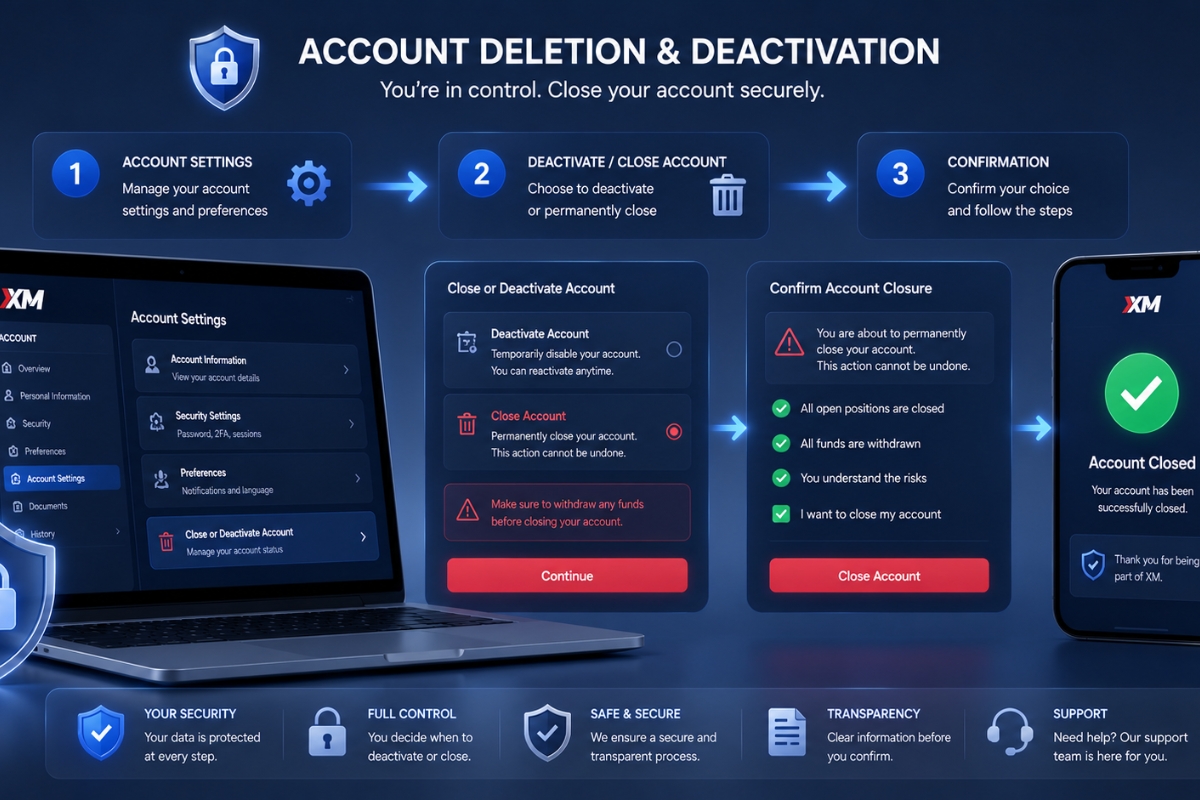
How to delete XM account? XM account deletion requires completing identity verification, withdrawing the remaining balance, and contacting XM customer support to request permanent account removal.
How to close XM trading account step by step can be done by logging into your XM member area, closing all trades, withdrawing funds, confirming the request, and waiting for XM to deactivate the account within several business days.
How to deactivate an XM account instead of deleting allows traders to temporarily stop using the account without permanently erasing account history, making it suitable for inactive users who may return later.
Important things to know before delete XM account include withdrawing all money, ensuring no active positions remain, and understanding that permanent deletion may prevent recovery of trading data and account access later.
Through MBroker, traders can get faster guidance for XM account management, from account closure support to reopening or switching account types when needed.
How to delete an XM account?
Deleting an XM account means permanently closing your trading profile and removing access to the platform. Once the account deletion is completed, you can no longer log in, trade, or recover account data associated with that profile.

Unlike some brokers that allow instant self-service deletion, XM usually requires traders to contact customer support directly to verify ownership and confirm the closure request. In most cases, the process takes between 24 and 72 hours depending on verification status and whether there are remaining funds or active trades.
Before proceeding, traders should ensure:
- All open trades are closed
- All funds are withdrawn
- No pending bonuses or disputes remain
- Account verification is completed
Understanding these requirements makes the deletion process smoother. Next, let’s look at the exact steps to close an XM trading account properly.
How to close XM trading account step by step?
Closing an XM account requires several verification steps to ensure account security and financial compliance. Following the correct order helps prevent delays or rejection of your request.

Step 1: Log in to your XM account
First, access your XM member area using your registered email address and password. Make sure you use the correct account credentials linked to the trading account you want to close.
After logging in:
- Review your account balance
- Check open and pending trades
- Verify withdrawal methods
- Save important trading history if needed
This step is important because XM may restrict access once the account is deleted. Therefore, downloading statements or transaction history beforehand is highly recommended.
Once your account information is verified, the next step is to withdraw all remaining funds.
Step 2: Withdraw all remaining funds
XM generally does not process account deletion requests if there is still money inside the trading account. You must withdraw the entire available balance before requesting closure.
To withdraw funds:
- Go to the Withdrawal section
- Select your preferred payment method
- Enter the withdrawal amount
- Confirm the request
Most withdrawal requests are processed within 24 hours, although bank transfer times may vary depending on your country and payment provider.
Traders should also ensure:
- No bonus credit remains
- No pending withdrawal requests exist
- Account equity is zero
After all balances are cleared, you can move on to contacting XM support.
Step 3: Contact XM support to request account deletion
XM requires users to submit a direct request for account deletion through customer support channels. This is done to verify account ownership and prevent unauthorized closures.
You can contact XM through:
- Live chat
- Email support
- Client portal ticket system
A simple request usually includes:
- Full registered name
- Trading account number
- Registered email address
- Request to permanently delete the account
According to guidance commonly shared by MBroker, traders should use the same verified email linked to the XM account to speed up identity verification.
After sending the request, XM support may ask for additional confirmation documents before processing the closure.
Step 4: Confirm account closure request
For security reasons, XM may require explicit confirmation before permanently deleting your account. This prevents accidental account termination and protects user funds.
You may receive:
- A confirmation email
- Identity verification request
- Security questions from support staff
Responding quickly helps reduce processing delays. In some situations, XM may recommend account deactivation instead of permanent deletion, especially if the account has been inactive for a long period.
Once the request is confirmed, the account enters the final review stage.
Step 5: Wait for account deactivation or deletion
After all requirements are completed, XM will process your request. The review period usually takes 1–3 business days depending on account status and verification complexity.
When the process is finished:
- Trading access is removed
- Login credentials become inactive
- Account services are terminated
However, XM may still retain certain records for regulatory compliance, anti-money laundering rules, or financial auditing purposes. If you are unsure whether permanent deletion is necessary, account deactivation may be a better alternative. The next section explains how it works.
How to Delete XM account instead of deleting?
Deactivating an XM account temporarily disables trading activity without permanently removing account data. This option is useful for traders who may want to return to the platform later.

Compared to permanent deletion, deactivation is generally faster and easier because account records remain stored within the system.
Before choosing this option, traders should understand when deactivation makes more sense than deletion.
When should you deactivate your XM account?
Account deactivation may be a better choice in several situations:
- Taking a temporary break from trading
- Avoiding inactivity fees
- Switching trading strategies
- Waiting for market conditions to improve
- Planning to return later
Many traders deactivate accounts instead of deleting them because reopening a new verified trading account may require repeating KYC verification procedures.
In addition, some traders prefer preserving account history for tax or financial tracking purposes. If deactivation sounds more suitable, follow the process below.
How to deactivate an XM account
To deactivate your XM account:
- Log in to the XM member area
- Close all open positions
- Withdraw available funds
- Contact customer support
- Request temporary account deactivation
In some cases, inactive accounts are automatically archived by XM after extended inactivity periods. However, manual deactivation ensures your request is officially recorded.
Unlike permanent deletion, deactivated accounts may sometimes be reactivated after contacting support again.
Before making a final decision, there are several important things every trader should know.
Important things to know before Delete XM account
Deleting a trading account is a serious decision because it may permanently affect account access, trading history, and financial records. Traders should carefully review all requirements before submitting a deletion request.

Below are the most important factors to consider.
Withdraw all funds before deletion
XM normally rejects deletion requests if the account still contains available balance or pending transactions.
Before submitting your request:
- Complete all withdrawals
- Check bonus balances
- Verify transaction history
- Ensure account equity is zero
Failing to withdraw funds first can significantly delay the account closure process.
Account deletion is permanent
Permanent deletion means you may lose access to:
- Trading history
- Platform settings
- Account analytics
- Previous transaction records
Although XM may keep certain regulatory data internally, traders generally cannot restore deleted accounts through standard support requests.
Knowing how to delete XM accounts correctly helps traders avoid issues related to withdrawals, open positions, and account verification. For more platform tutorials and trading guides, readers can explore the XM Guides section on MBroker
Ultimately, whether you choose deletion or deactivation depends on your long-term trading plans and account management preferences.

Thoren Vextal is a specialist in XM trading guides, offering practical insights and real-market experience to help traders improve their strategies and trading performance. Email: [email protected]