
 Tiếng Việt
XM MT4 is available for download directly from the official XM website and through authorised MetaTrader and app-store channels only. Traders should avoid third-party download links, since installation files outside these official sources may not match the platform version supported by XM trading servers.
Windows and Mac users install XM MT4 through a downloadable setup file, while Android and iOS users install the MetaTrader 4 app from Google Play or the App Store. Login credentials created through an XM account link the platform to the correct trading server after installation.
XM MT4 and XM MT5 differ mainly in order execution options, timeframes and the range of tradable instruments supported by each platform, with MT5 generally offering a broader set of timeframes and order types than MT4. Choosing between the two depends on which technical functions a trader’s strategy requires.
MT4 supports customizable charts across multiple timeframes, a range of built-in technical indicators and Expert Advisors for automated trading strategies. These tools are developed and maintained by MetaQuotes rather than by XM directly. Mbroker outlines below where to find the official download, how to complete login setup, and how MT4 compares with MT5 in practical trading use.
Where Can You Officially Download XM MT4?
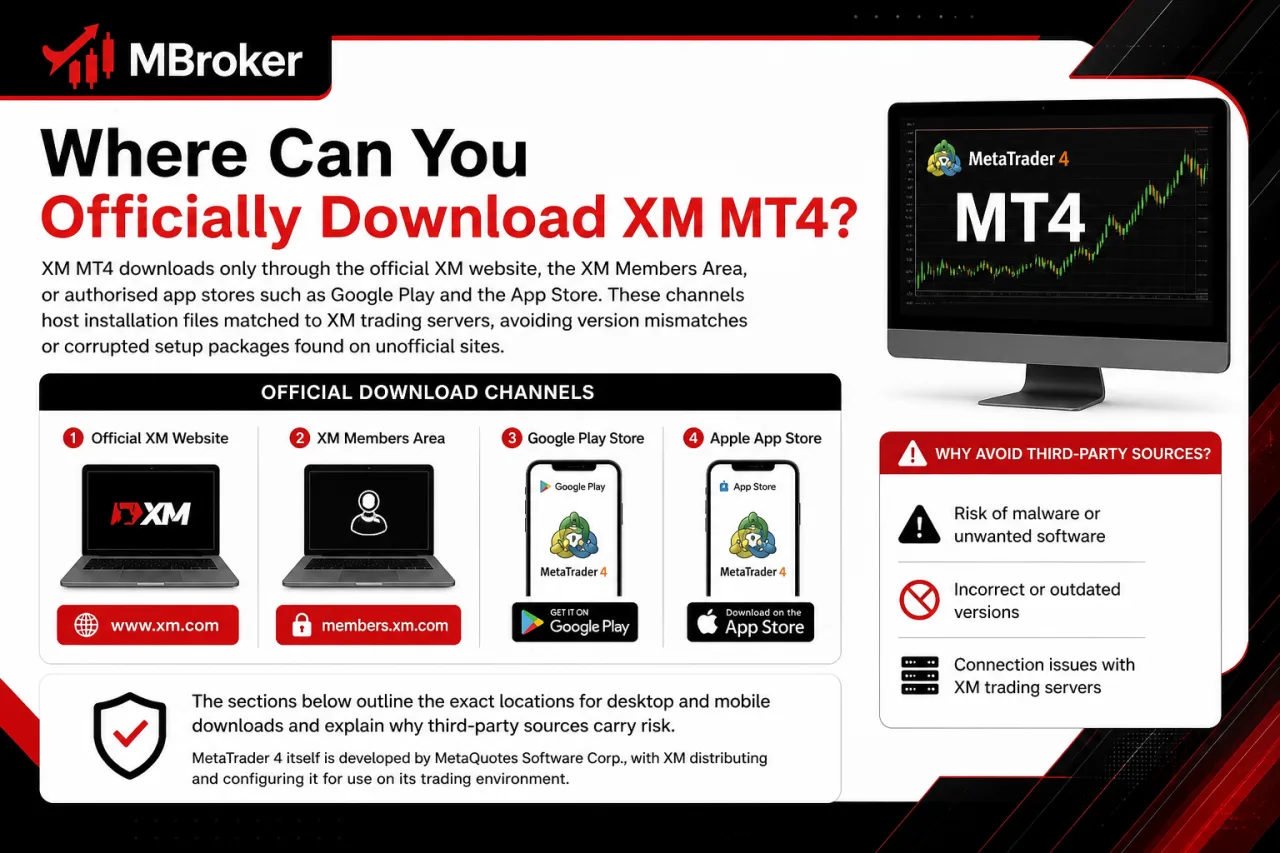
XM MT4 downloads only through the official XM website, the XM Members Area, or authorised app stores such as Google Play and the App Store. These channels host installation files matched to XM trading servers, avoiding version mismatches or corrupted setup packages found on unofficial sites.
The sections below outline the exact locations for desktop and mobile downloads and explain why third-party sources carry risk.
MetaTrader 4 itself is developed by MetaQuotes Software Corp., with XM distributing the platform under license to its clients. This licensing relationship means XM controls account linkage and server access, while the core trading software originates from MetaQuotes.
Downloading from unofficial websites risks installing outdated builds or bundled malware. Files from these sources often fail to connect to XM trading servers altogether.
How to Download and Install XM MT4 on Windows?
Installing XM MT4 on Windows involves four steps: downloading the .exe installer from the official XM website, running the installation wizard, launching the platform, and logging in with XM account credentials and the correct trading server. This process links the desktop terminal directly to XM trading infrastructure once setup completes.
The steps below cover each stage in order.
- Downloading the Windows installer file from the official XM website or the XM Members Area, avoiding third-party mirror sites.
- Running the .exe file and following the installation wizard prompts, selecting a destination folder if prompted.
- Launching MT4 after installation finishes, which opens the platform’s login window automatically.
- Entering the account number, password and server name supplied during XM account registration to connect to the matching trading server.
Traders using a demo account select the corresponding demo server rather than a live server, since entering mismatched credentials prevents the platform from connecting. Checking that the server name matches exactly what XM issued avoids repeated login failures on first launch.
How to Download and Install XM MT4 on macOS?
Installing XM MT4 on macOS involves downloading the native Mac installer package from the official XM website, dragging the application into the Applications folder, launching it, and logging in with XM account credentials and the matching trading server. This sequence connects the Mac terminal to XM trading infrastructure in the same way as the Windows version.
The steps below outline the Mac-specific installation flow and login requirements.
- Downloading the .dmg or .pkg installer file from the official XM website, avoiding third-party mirror sites.
- Opening the downloaded file and dragging the MT4 icon into the Applications folder as prompted.
- Launching MT4 from Applications, which opens the login window automatically on first run.
- Entering the account number, password and server name issued during XM account registration to connect to the correct trading server.
According to MetaTrader 4’s official installation guide, the platform provides a dedicated installer package for macOS, allowing MT4 to be installed directly on Mac systems.
Mac users select a demo server for demo accounts and a live server for live accounts, since mismatched server selection blocks the connection at login. Confirming the operating system meets MetaTrader’s current macOS compatibility requirements before installation avoids setup failures.
How to Download and Install XM MT4 on Android and iOS?
Installing XM MT4 on Android or iOS involves downloading the MetaTrader 4 app from Google Play or the App Store, confirming it is the MetaQuotes-developed app, then logging in with the account number, password and server issued by XM. This mobile setup mirrors the desktop process while adapting the interface for touchscreen navigation.
The steps below outline the mobile installation and login sequence.
- Searching “MetaTrader 4” in Google Play or the App Store rather than searching for “XM” directly, since the app itself is published by MetaQuotes.
- Verifying the developer name shown on the app listing matches MetaQuotes Software Corp. before installing, avoiding lookalike apps from unverified publishers.
- Opening the app after installation, which displays a login screen for existing accounts.
- Entering the account number, password and server name from XM account registration to connect to the correct trading server.
Traders selecting a demo server for demo accounts and a live server for live accounts avoid connection errors at first login, matching the same server-selection logic used on Windows and Mac installations. Checking that the app store listing shows recent updates and an active MetaQuotes developer profile lowers the risk of installing an outdated or unofficial build.
How to Log In to XM MT4 After Installation?
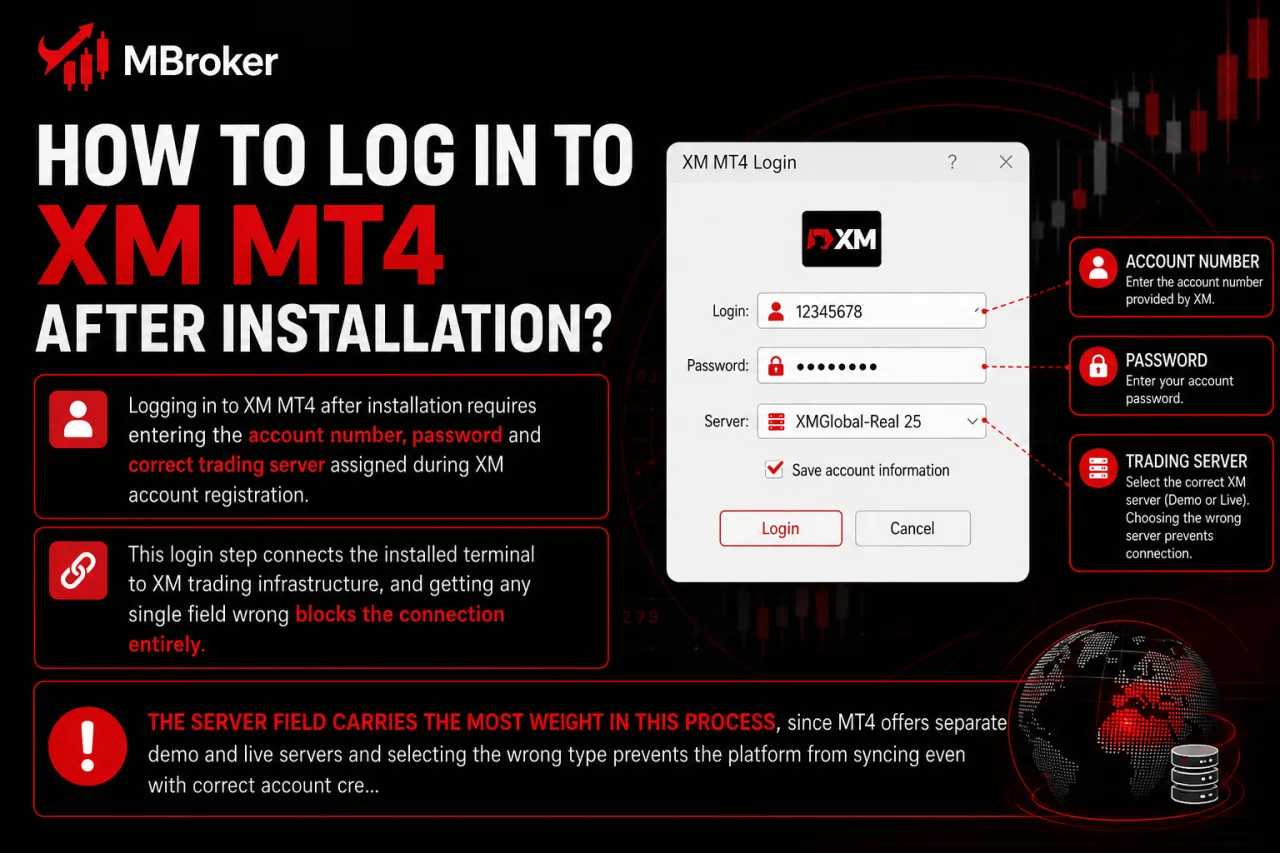
Logging in to XM MT4 after installation requires entering the account number, password and correct trading server assigned during XM account registration. This login step connects the installed terminal to XM trading infrastructure, and getting any single field wrong blocks the connection entirely.
The server field carries the most weight in this process, since MT4 offers separate demo and live servers and selecting the wrong type prevents the platform from syncing even with correct account credentials.
A demo account only connects through its matching demo server, while a live account requires the corresponding live server, mirroring the same server-selection logic covered earlier for Windows, Mac and mobile installations.
Traders locate their exact server name inside the XM Members Area, where account details list the assigned server alongside login credentials. Copying this server name precisely, rather than guessing from memory, avoids repeated failed login attempts.
- Opening the login window on first launch of MT4.
- Entering the account number exactly as issued by XM.
- Typing the account password without altering case sensitivity.
- Selecting the matching server name from the list or entering it manually if not shown by default.
Confirming these four fields match Members Area records resolves most first-time login failures.
How Do XM MT4 and XM MT5 Compare?
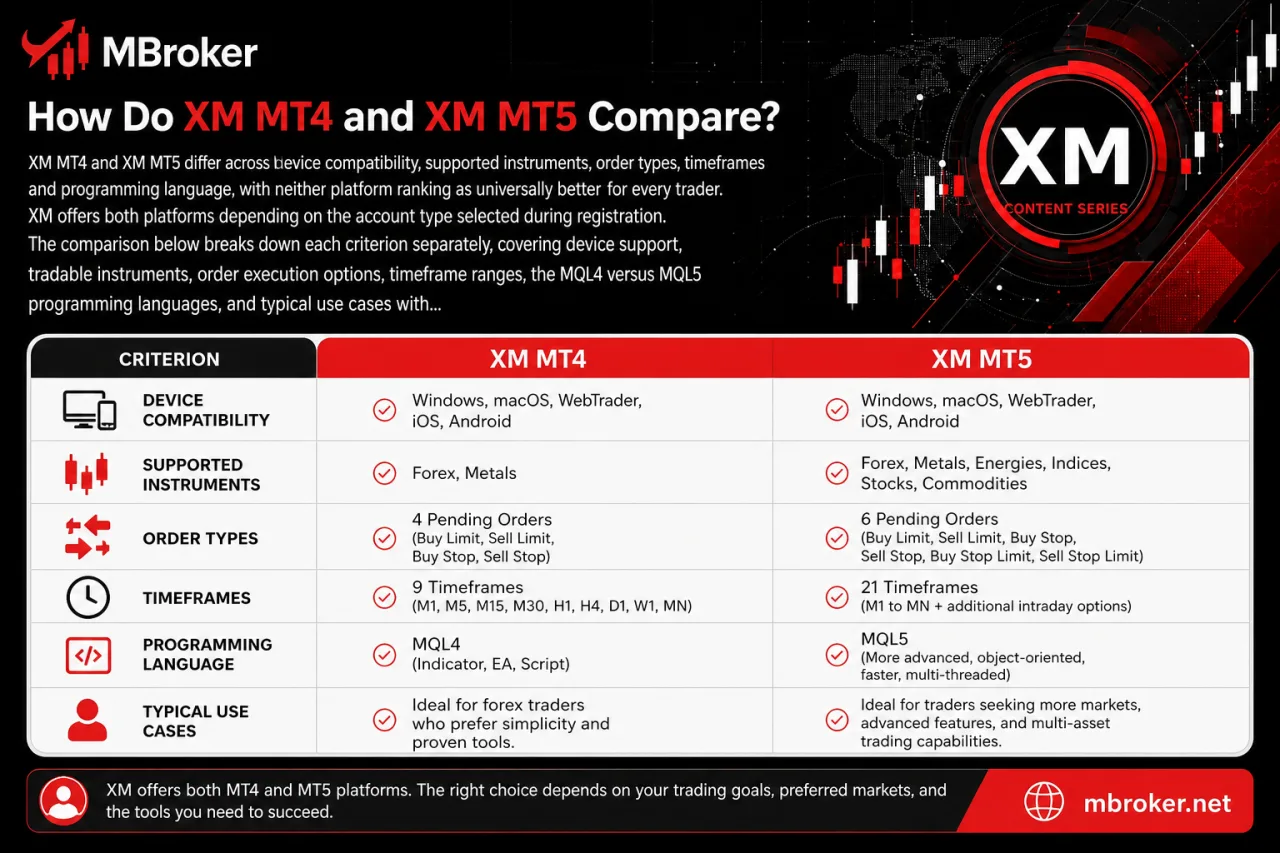
XM MT4 and XM MT5 differ across device compatibility, supported instruments, order types, timeframes and programming language, with neither platform ranking as universally better for every trader. XM offers both platforms depending on the account type selected during registration.
The comparison below breaks down each criterion separately, covering device support, tradable instruments, order execution options, timeframe ranges, the MQL4 versus MQL5 programming languages, and typical use cases where one platform suits a strategy better than the other.
What Are the Main Functional Differences Between MT4 and MT5?
MT5 supports more order types and execution modes than MT4, alongside a native Depth of Market feature that MT4 lacks entirely. This gap in order functions and execution flexibility separates the two platforms most clearly in practical trading use.
MT4 offers four pending order types alongside instant and market execution, covering the basic entry and exit needs of manual and automated strategies. MT5 extends this to six pending order types and adds exchange execution as a distinct mode, giving traders finer control over how orders fill against available liquidity.
Depth of Market marks another structural difference. MT5 displays a live order book showing pending buy and sell volumes at different price levels for supported instruments, while MT4 provides no equivalent built-in view.
- Offering fewer pending order types with instant and market execution only (MT4).
- Offering additional pending order types with instant, market and exchange execution (MT5).
- Lacking a built-in Depth of Market display (MT4).
- Including a native Depth of Market order book for supported instruments (MT5).
Traders relying on order-book visibility or wider execution options typically find MT5 better suited, while those running established MT4-based Expert Advisors often stay on MT4 for compatibility reasons.
Which XM Account Types Support MT4 vs MT5?
MT4 and MT5 availability depends on the account type selected during XM registration, since some account categories link exclusively to one platform’s trading servers. Legal entity also plays a role in this setup, as it is common practice among multi-regional regulated brokers to shape available account types and platform combinations according to the jurisdiction a client falls under.
This account-server relationship connects directly to the login process covered earlier. Matching the correct server name to the correct platform determines whether the connection succeeds.
Rather than assuming both platforms are available under every account type, checking the Members Area confirms which platform-server combination applies to a specific account.
The Members Area lists the assigned trading server alongside account details. This shows whether that account connects through MT4, MT5, or both, depending on what XM has enabled for that entity and account type.
- Selecting an account type during registration that determines platform compatibility.
- Reviewing the Members Area to confirm the exact server assigned to that account.
- Verifying platform-server matching before attempting to log in on either MT4 or MT5.
- Contacting XM support directly when account documentation does not clarify platform availability.
Regional and legal-entity restrictions may also limit certain account types to a single trading platform in specific jurisdictions.
What Trading Tools and Features Does XM MT4 Offer?
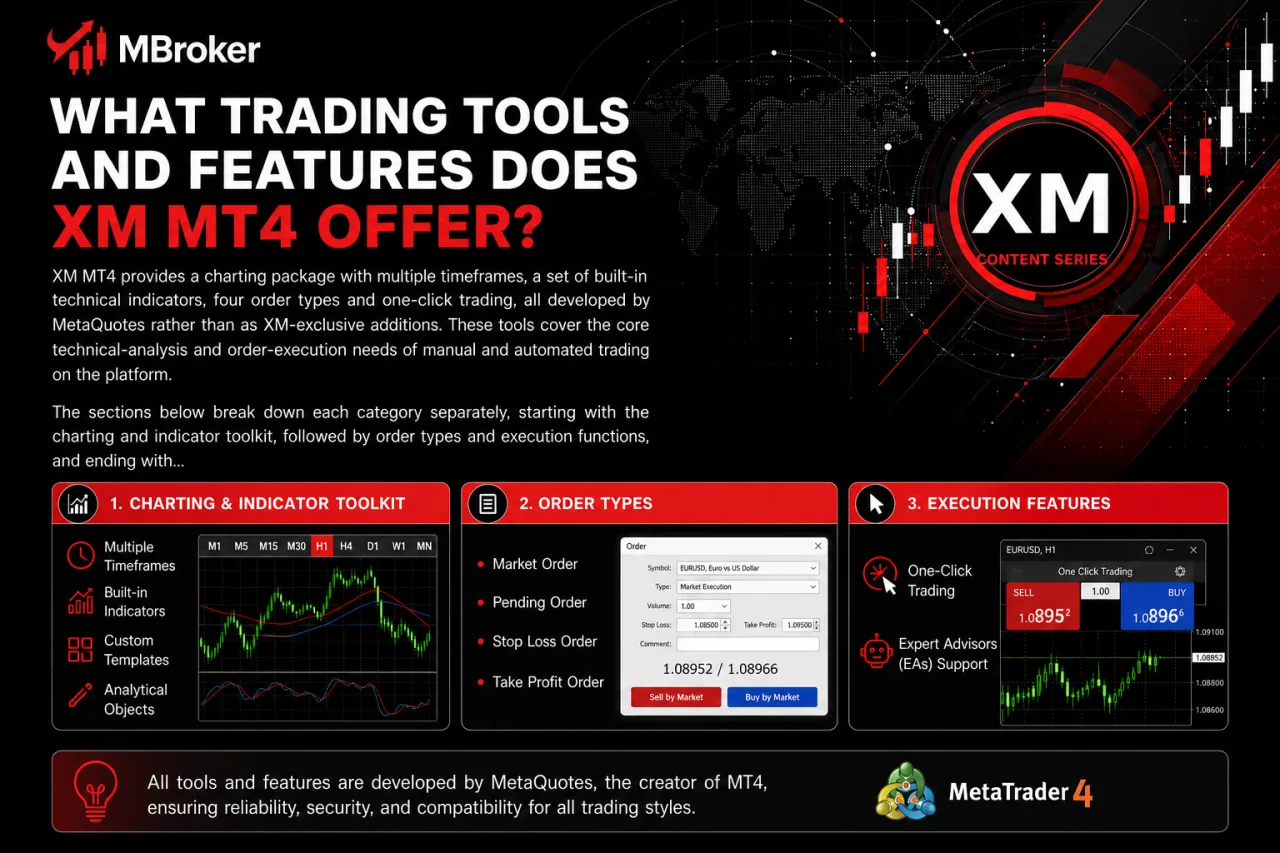
XM MT4 provides a charting package with multiple timeframes, a set of built-in technical indicators, four order types and one-click trading, all developed by MetaQuotes rather than as XM-exclusive additions. These tools cover the core technical-analysis and order-execution needs of manual and automated trading on the platform.
The sections below break down each category separately, starting with the charting and indicator toolkit, followed by order types and execution functions, and ending with one-click trading and Expert Advisor support for automated strategies.
What Chart Types and Technical Indicators Are Available in XM MT4?
XM MT4 offers three chart types (line, bar and candlestick) across multiple timeframes, plus a set of built-in technical indicators and analytical objects for chart analysis. These charting tools originate from MetaQuotes rather than XM-specific development, matching the standard MT4 toolkit found across MetaTrader-licensed brokers.
Line charts plot closing prices for a quick view of overall price direction, while bar and candlestick charts display open, high, low and close values for each period, giving traders more detail on price movement within a session. Timeframes range from one-minute charts up to monthly charts, letting traders switch between short-term and long-term views on the same instrument.
Built-in indicators cover common categories such as trend, oscillator, volume and Bill Williams tools, alongside analytical objects like trendlines, Fibonacci retracements and geometric shapes for marking chart levels manually. Traders combine multiple indicators and objects on a single chart window, though MT4 limits the total indicator count per chart based on platform specifications set by MetaQuotes. According to MetaTrader 4’s official platform documentation, the terminal ships with a fixed library of indicators and objects that cannot be extended beyond custom indicators added through the MQL4 editor.
What Order Types and Execution Functions Does XM MT4 Support?
XM MT4 supports four order types: market orders, pending orders, stop loss and take profit levels, and trailing stops, all executed through the MetaQuotes-built order system rather than any XM-exclusive execution engine. These functions cover both manual entry and automated Expert Advisor trading on the platform.
Market orders fill at the current available price for immediate entry or exit. Pending orders, including buy limit, sell limit, buy stop and sell stop, trigger only once price reaches a level set in advance. Stop loss and take profit attach to any open position or pending order, closing the trade automatically once price reaches the specified level in either direction.
Trailing stop functions adjust the stop loss level as price moves favorably. This adjustment runs on the client side only, meaning it works while the terminal stays connected and the platform remains open. MT4 does not process trailing stops on the server side, so the logic stops the moment the terminal disconnects.
- Market orders execute on the client-side terminal but fill against server-side prices instantly.
- Pending orders sit on the server and trigger automatically once price reaches the preset level.
- Trailing stops run entirely on the client side and pause the moment the terminal disconnects.
Traders relying on trailing stops for unattended strategies typically pair this function with an Expert Advisor to maintain the adjustment logic when the terminal risks disconnecting.
- Filling market orders at the current available price.
- Triggering pending orders once price reaches a preset level.
- Closing positions automatically through stop loss and take profit levels.
- Adjusting trailing stops as price moves in a favorable direction.
Does XM MT4 Support Expert Advisors and Automated Trading?
XM MT4 supports Expert Advisors through the MQL4 programming language, allowing automated strategies to open, manage and close trades without manual intervention. This automated-trading function runs alongside the order types and one-click execution already covered for the platform.
Expert Advisors attach to a chart and execute rules written in MQL4, covering entry conditions, exit conditions and risk parameters set by the trader or developer. The function itself only carries out programmed instructions and does not guarantee any trading outcome, since results depend entirely on the logic coded into each EA and prevailing market conditions.
Running an EA continuously typically requires the terminal to stay connected, since MT4 does not process automated logic on the server side once the platform closes. Traders addressing this limitation often use a VPS (Virtual Private Server) to keep MT4 running uninterrupted, though VPS availability and eligibility depend on conditions XM sets separately from the platform itself.
- Writing or importing Expert Advisor code through the MQL4 editor built into MT4.
- Attaching an EA to a chart to automate entry, exit and risk-management rules.
- Keeping the terminal connected for continuous EA operation, or using a VPS for uninterrupted uptime.
What Common Technical Issues Can Occur When Using XM MT4 and How Are They Resolved?
XM MT4 users typically encounter connection errors, invalid account or server messages, and update-related issues, each resolved through official XM or MetaTrader troubleshooting steps rather than third-party fixes. These problems sit apart from the download and setup topics covered earlier, moving into support scenarios that arise after the platform is already running. The sections below address each issue category separately, covering causes and resolution steps for connection failures, login errors and update prompts.
How to Fix Login or Connection Errors in XM MT4?
Fixing login or connection errors in XM MT4 starts with verifying the server name, since a mismatched server blocks the connection even when the account number and password are correct. This issue builds directly on the login sequence covered earlier, where server selection carries the most weight among the four required fields.
Beyond server selection, three other checks resolve most remaining cases:
- Confirming the internet connection stays active and stable, since intermittent drops interrupt the handshake between the terminal and XM trading servers.
- Reviewing firewall or antivirus settings to ensure MT4 is not blocked from outbound connections, since some security software restricts unfamiliar applications by default.
- Verifying the account number, password and server name against records in the XM Members Area, since manually typed credentials often contain small errors that block login.
- Restarting the terminal after adjusting any setting, since MT4 sometimes requires a fresh connection attempt to apply changes.
Traders unable to resolve the error after these checks contact XM support directly, since some connection issues stem from server-side maintenance or account-specific restrictions rather than local settings.
What Security Measures Should Users Follow When Using XM MT4?
XM MT4 security follows four practices: enabling two-factor authentication where XM offers it, avoiding third-party plugins, downloading only from official sources, and safeguarding login credentials. These measures sit outside MT4’s core trading functions but directly affect account safety once the platform connects to XM trading servers.
Two-factor authentication adds a verification step beyond the account password, reducing the risk of unauthorized access if login details leak. Third-party plugins and custom indicators sourced outside the MQL4 editor’s verified libraries introduce code that XM and MetaQuotes cannot audit, so avoiding unverified add-ons limits exposure to malicious scripts.
Downloading MT4 exclusively from the official XM website or authorised app stores prevents installation of tampered files, consistent with the download guidance covered earlier. Storing account numbers, passwords and server names privately, and never sharing them through email or messaging apps, closes the most common entry point for unauthorized account access.
- Enabling two-factor authentication where XM makes it available for account access.
- Avoiding third-party plugins or indicators from unverified sources.
- Downloading MT4 installers only from official XM or app-store channels.
- Safeguarding login credentials by keeping them private at all times.
Conclusion: Is XM MT4 the Right Platform for You?
XM MT4 remains a practical option for traders who value a familiar interface, MQL4-based Expert Advisors, core charting tools and straightforward order management across desktop and mobile devices. Its suitability ultimately depends on the strategy: traders who rely on established MT4 indicators or EAs may prefer its mature ecosystem, while those who need additional timeframes, order types or a wider range of supported instruments may find XM MT5 more appropriate. To use the platform safely and reliably, download it only from XM, MetaQuotes or an authorised app store, then log in with the exact account number, password and server assigned in the XM Members Area. Traders running EAs or client-side trailing stops should also keep the terminal connected or use a suitable VPS, protect their credentials and confirm current platform availability for their XM account and legal entity.

Sylas Trenven is a forex strategist who helps traders master risk and timing. His work focuses on behavior-driven market entries and portfolio optimization for XM users looking to trade with precision and discipline. Email: [email protected]