
 Tiếng Việt
Withdrawing funds from XM requires submitting a request through the Members Area using the same method or account used for depositing. Traders select their preferred payment channel, enter the withdrawal amount, and confirm the request before XM processes it according to its internal verification procedures.
According to XM’s official help center, the minimum deposit or withdrawal amount is $5 for any account type, though this minimum can vary depending on the specific payment method used, and XM does not charge withdrawal fees on most channels. These thresholds directly affect how much traders can withdraw per transaction and how quickly funds become accessible.
Bank transfer, credit/debit cards, and e-wallets are the primary withdrawal methods XM supports, and according to XM’s official help center, funds are received instantly or on the same day the request is processed, though bank transfer, credit card, or debit card withdrawals may take longer to reflect depending on the third-party provider involved. Comparing these options helps traders choose the fastest and most convenient route for their funds.
XM operates under licenses from multiple financial regulators across its different entities, which supports its reliability for processing client withdrawals. Mbroker, as an independent XM information resource, compiles this guide to help traders verify the withdrawal process before initiating a request.
The full withdrawal procedure, including step-by-step instructions, fee breakdowns, and limit comparisons, begins below with how to submit a withdrawal request from your XM account.
How to Withdraw Funds from Your XM Account?
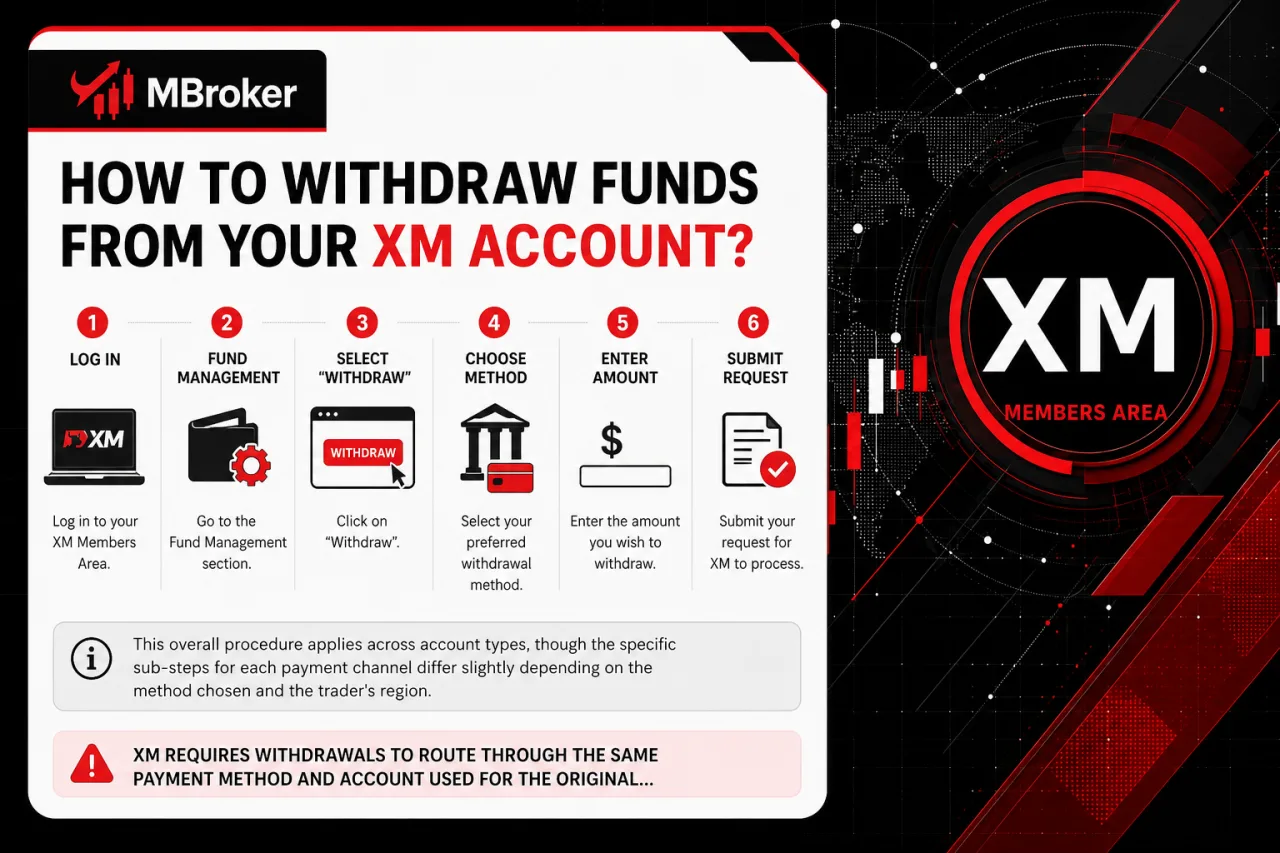
To withdraw funds from an XM account, traders log into the Members Area, navigate to the Fund Management section, select “Withdraw,” choose a withdrawal method, enter the amount, and submit the request for XM to process. This overall procedure applies across account types, though the specific sub-steps for each payment channel differ slightly depending on the method chosen and the trader’s region.
XM requires withdrawals to route through the same payment method and account used for the original deposit, and the name on the receiving account must match the name registered on the XM trading account. This matching rule applies to bank accounts, cards, and e-wallets alike, and mismatched names typically trigger delays or rejection.
The sections below break down the exact steps for the Members Area login and navigation, the method selection process, and the confirmation stage in detail. Traders operating under different XM legal entities may notice minor variations in available options or verification prompts, so confirming the current interface through the official XM website remains the reliable approach before submitting a request.
What Do You Need to Prepare Before Requesting a Withdrawal?
Before requesting a withdrawal from XM, traders confirm four prerequisites: a verified account, sufficient balance, no margin-affecting open positions, and matching payment details. Meeting these conditions before submitting a request avoids delays or rejection at the processing stage.
- Verified account: identity and address verification must be completed and approved in the Members Area, since XM cannot process withdrawals for accounts still pending document review.
- Sufficient account balance: the free margin available must cover the requested withdrawal amount, separate from equity tied up in active trades.
- No open positions affecting margin: traders check that withdrawing funds does not drop equity below the required margin level, which could trigger a margin call or forced position closure.
- Matching payment details: the receiving bank account, card, or e-wallet must be registered under the same name as the XM trading account, as this rule was already noted in the general withdrawal procedure above.
Traders operating under different XM legal entities confirm these requirements through their regional Members Area, since verification prompts and document formats vary slightly by country.
What Are the Step-by-Step Instructions to Submit a Withdrawal Request?
To submit a withdrawal request, traders complete six steps in the Members Area, from logging in to receiving a processing confirmation email. This sequence follows on directly from the prerequisites covered above, walking through the exact actions required once an account is verified and ready.
- Log in to the Members Area using the registered XM account credentials.
- Navigate to the Fund Management section and select “Withdraw Funds.”
- Choose the payment method matching the original deposit channel.
- Enter the withdrawal amount, keeping it within the account’s available free margin.
- Confirm and submit the request for XM to begin processing.
- Wait for a processing confirmation email, which XM sends once the request enters the queue.
If any step fails, such as the withdraw option appearing greyed out or the request bouncing back, traders check their verification status first, since pending documents block processing before it starts. Persistent errors during method selection or submission warrant contacting XM support directly through the Members Area’s official support channel rather than retrying repeatedly. Traders under different XM legal entities confirm minor interface differences through their own regional Members Area before submitting.
What Happens After You Submit a Withdrawal Request?
After submitting a withdrawal request, XM moves the request into an internal review queue, sends a confirmation notification, and updates the status visible in the Members Area. This post-submission phase determines how long funds take to leave XM’s system and reach the trader’s account.
The internal review checks the request against the account’s verification status, matching payment details, and available free margin before approval. Once approved, XM sends a confirmation email marking the request as processed on XM’s side, though this notification does not confirm the funds have arrived, since bank transfers, cards, or e-wallets may still require additional time from the third-party provider.
Traders track the request’s progress directly in the Members Area under the Fund Management or transaction history section, where the status typically shows stages such as pending, approved, or completed. If a request remains in pending status beyond the expected timeframe, checking for outstanding verification requirements or contacting XM support through the official Members Area channel clarifies the cause before assuming an error occurred.
What Are the XM Withdrawal Fees, Minimum and Maximum Limits?
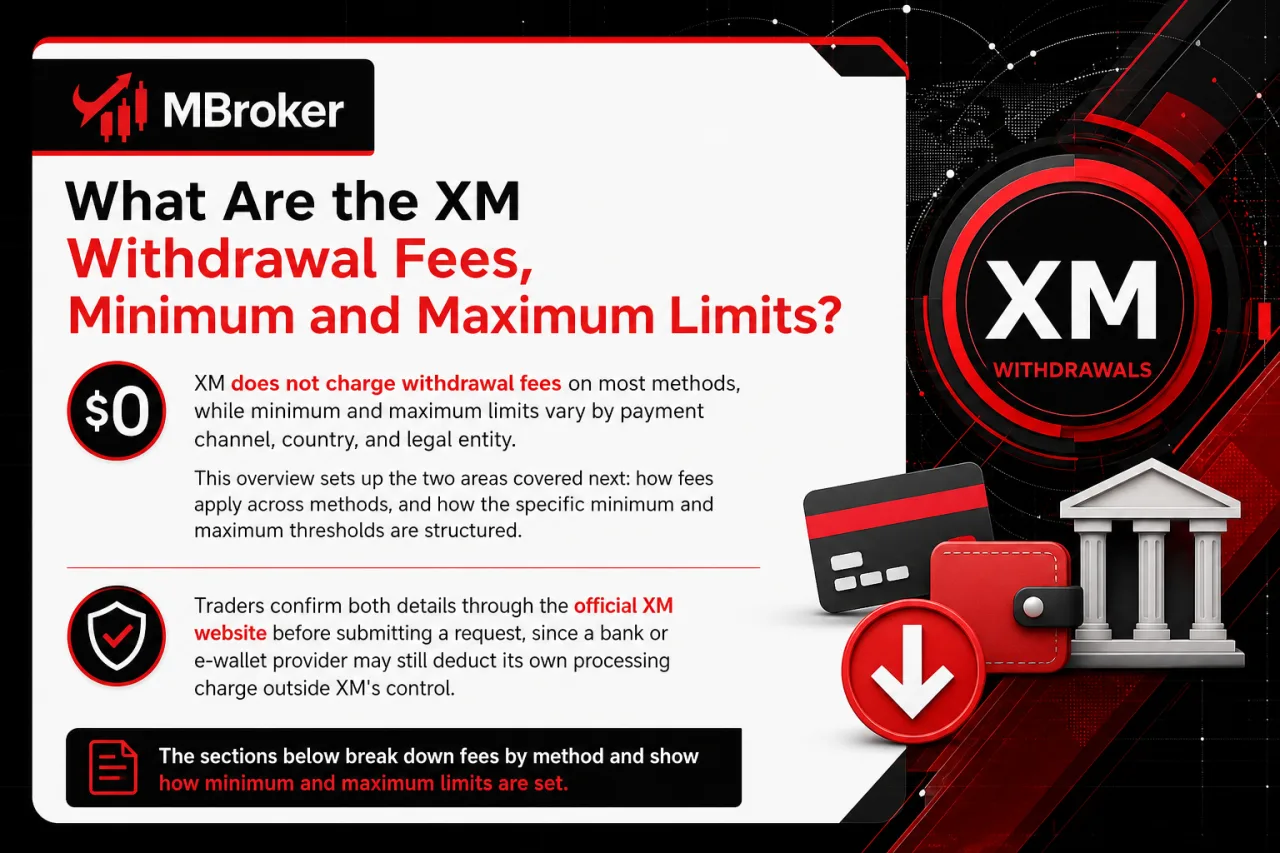
XM does not charge withdrawal fees on most methods, while minimum and maximum limits vary by payment channel, country, and legal entity. This overview sets up the two areas covered next: how fees apply across methods, and how the specific minimum and maximum thresholds are structured.
Traders confirm both details through the official XM website before submitting a request, since a bank or e-wallet provider may still deduct its own processing charge outside XM’s control. The sections below break these points down separately for clarity.
Is There a Minimum or Maximum Withdrawal Amount on XM?
Yes, XM applies both a minimum and a maximum withdrawal amount, with the exact thresholds depending on the payment method, country, and legal entity. This confirms the transaction limits mentioned earlier in the fee overview, so the details below break down how these thresholds work in practice.
The minimum withdrawal amount across most methods sits at $5, matching the deposit minimum already referenced from XM’s official help center. Maximum withdrawal limits are not fixed uniformly; instead, they follow the ceiling set by each payment provider, meaning a card or e-wallet channel may cap a single transaction lower than a bank transfer does.
Regional entity rules also shape these figures, since a trader registered under one XM entity may see different maximum caps than a trader under another entity using the same payment method. Bank transfers typically allow larger withdrawal amounts per request compared to card-based channels, though no single figure applies universally across all countries.
Traders should confirm the exact minimum and maximum for their specific method and region directly through the Members Area or the official XM website before submitting a request, since these limits can change without prior notice.
Does XM Charge Withdrawal Fees?
No, XM does not charge withdrawal fees on standard withdrawal requests, applying this no-fee policy across bank transfer, card, and e-wallet channels. This confirms the fee-free structure already referenced earlier, and the distinction below clarifies where extra charges might still originate outside XM’s control.
XM’s zero-fee policy covers only the charge XM itself applies to a withdrawal request, not any charge imposed by the receiving bank or e-wallet provider. Three points separate these two layers of cost:
- XM-imposed charge: none applied on standard withdrawal transactions across supported methods.
- Bank intermediary fee: some receiving banks deduct a processing charge before crediting the transfer, a cost XM does not control.
- E-wallet provider fee: certain e-wallet services apply their own transaction charge independent of XM’s policy.
Traders reviewing a detailed fee breakdown by payment method confirm current figures through the dedicated XM Fees page rather than assuming uniform pricing across every channel and country.
What Withdrawal Methods Does XM Support and How Do They Compare?
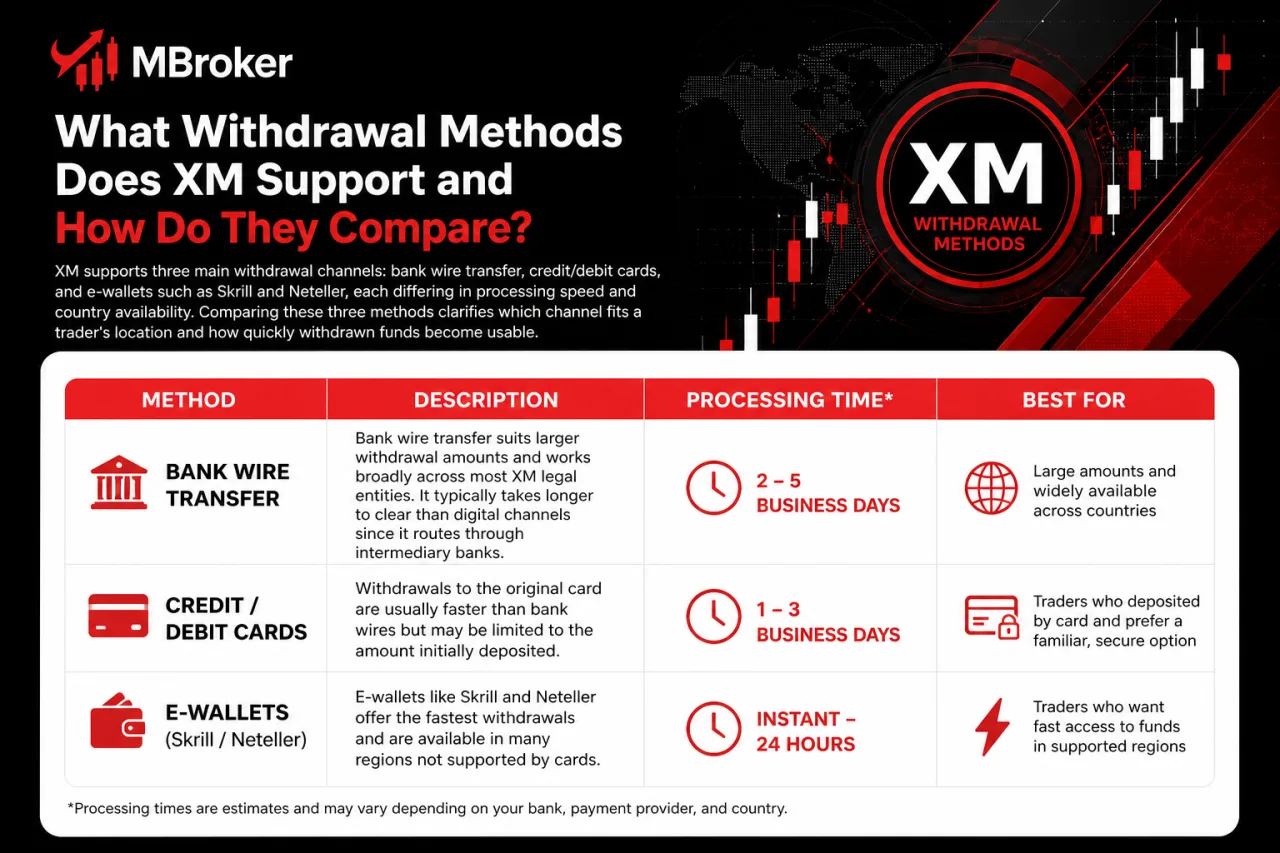
XM supports three main withdrawal channels: bank wire transfer, credit/debit cards, and e-wallets such as Skrill and Neteller, each differing in processing speed and country availability. Comparing these three methods clarifies which channel fits a trader’s location and how quickly withdrawn funds become usable.
Bank wire transfer suits larger withdrawal amounts and works broadly across most XM legal entities, though it typically takes longer to clear than digital channels since it routes through the banking network. Credit and debit card withdrawals return funds to the same card used for depositing, remaining a common choice for traders who prefer avoiding a separate wallet account. E-wallets like Skrill and Neteller process fastest among the three options and suit traders prioritizing quick access, though availability depends on whether the trader’s country and XM entity support that specific provider.
The sections below detail each method’s specific processing time, country restrictions, and typical use case individually.
What Are the Available Withdrawal Methods on XM?
XM groups withdrawal methods into three categories: bank transfer, card withdrawal, and e-wallets, distinguished by processing speed, transfer route, and regional availability. This grouping sets up the direct comparison covered next, looking at how each category performs on speed and where it applies.
Bank transfer routes funds through the banking network directly to a trader’s account, remaining available across most XM legal entities and suiting larger withdrawal amounts. Card withdrawal returns funds to the same credit or debit card originally used for depositing, a common option for traders avoiding a separate wallet setup. E-wallets, such as Skrill and Neteller, process transfers through a linked online wallet account, offering faster access to funds among the three categories.
Availability across all three categories depends on the trader’s country and assigned XM legal entity, since not every method appears as an option in every region. XM also requires the withdrawal method to match the one used for the original deposit, a rule that applies consistently across bank transfer, card withdrawal, and e-wallet channels alike.
How Long Does Each XM Withdrawal Method Take to Process?
Bank wire transfer takes the longest among the three channels, while e-wallets like Skrill and Neteller complete fastest, with card withdrawals falling in between. This comparison splits into two separate timeframes: how long XM’s internal review takes, and how long the external provider needs to finalize the transfer into the trader’s account.
XM’s internal processing covers only the review and approval stage inside the Members Area, ending once XM marks a request as processed. That internal step does not represent the moment funds actually land in a bank account, card, or e-wallet, since the external provider then handles its own completion time separately.
- Bank transfer: clears through the banking network, adding extra time beyond XM’s internal approval before funds reach the account.
- Cards: return funds to the original card, with the issuing bank’s processing cycle determining the final arrival time.
- E-wallets: credit the linked wallet fastest among the three, since providers like Skrill and Neteller typically settle transfers with minimal delay after XM’s approval.
Traders confirming exact timeframes for their specific method and country check the official XM website, since provider-side completion time varies outside XM’s direct control.
Is XM Safe and Reliable for Withdrawing Funds?
Yes, XM operates as a safe and reliable broker for withdrawing funds, supported by regulatory oversight, client fund segregation, and consistent processing procedures across its licensed entities. These three factors together shape how withdrawal requests move through XM’s system, and the sections below cover each one separately, starting with the regulatory framework behind each XM entity.
What Security Measures Does XM Use to Protect Withdrawals?
XM protects withdrawals through three layers: mandatory identity verification, payment-name matching, and internal anti-fraud checks that flag unusual account activity. This set of measures works alongside the verification and matching rules already covered above, adding a dedicated fraud-detection layer to the withdrawal process.
Identity and address verification confirms that only the account owner initiates a withdrawal, blocking requests from unverified profiles before they enter the processing queue. Payment-name matching cross-checks the receiving bank account, card, or e-wallet against the name registered on the trading account, rejecting mismatched details that could indicate an unauthorized attempt. Internal anti-fraud checks review requests for irregular patterns, such as sudden changes in withdrawal behavior or repeated failed attempts, before approval proceeds.
XM never asks traders to share login credentials or one-time passcodes with support staff or third parties, and traders should never disclose these details to anyone claiming to represent XM. Any message requesting such information outside the official Members Area or verified XM support channel signals a phishing attempt rather than a legitimate request.
What Should You Do If Your XM Withdrawal Is Delayed or Rejected?
If an XM withdrawal is delayed or rejected, traders check three common causes first: incomplete verification, a mismatched account name, or a technical processing issue. This troubleshooting sequence follows directly from the review-queue process described above, narrowing down why a request stalls before it reaches the trader’s account.
Incomplete verification blocks a withdrawal at the review stage whenever identity or address documents remain pending approval in the Members Area. A mismatched account name triggers rejection when the receiving bank, card, or e-wallet is not registered under the same name as the XM trading account, repeating the matching rule already covered earlier in this guide. Technical issues, such as a temporary system error or an incorrectly entered payment detail, also stall a request without indicating any fault in the account itself.
- Check the verification status in the Members Area for pending or rejected documents.
- Confirm that the payment method’s registered name matches the trading account name exactly.
- Review the transaction history section for an error message tied to the specific request.
- Contact XM support through the official Members Area channel if the request stays pending beyond the expected timeframe or the cause remains unclear.
Traders under different XM legal entities follow the same troubleshooting order, though document formats and support response channels vary by region.
What Are Some Lesser-Known Factors That Can Affect Your XM Withdrawal?
Some lesser-known factors affecting an XM withdrawal include internal transfers between multiple XM accounts, open bonus credit tied to trading volume, and currency conversion when the payment method’s currency differs from the account’s base currency. These edge-case factors sit outside the standard verification and matching rules already covered, and the sections below explain each one separately.
How Do Internal Transfers Between XM Accounts Affect Withdrawals?
Internal transfers move funds between two XM accounts held under the same client profile, and any balance shifted this way must return to the originating account’s payment method before it qualifies for a standard withdrawal. This restriction ties back to the payment-name matching rule covered earlier, since a withdrawal request cannot bypass that requirement simply by routing funds through a second XM account first.
A trader consolidating funds from a secondary account into a primary one before withdrawing still faces the same verification and matching checks on the primary account. XM’s internal review does not treat a transferred balance differently from funds deposited directly, so the receiving account still needs an approved verification status and a payment method matching the trader’s registered name. Traders managing multiple XM accounts confirm the current internal transfer process through the official Members Area before relying on it as a step toward withdrawal.
Does Withdrawal Currency Conversion Affect the Amount You Receive?
Yes, currency conversion between the account’s base currency and the payment method’s currency affects the final amount received, since a conversion rate applies whenever the two currencies differ. This factor sits alongside the internal transfer issue covered above, and the conversion mechanic works differently from any XM-imposed fee already discussed.
XM processes the withdrawal amount in the account’s base currency, then converts that sum into the currency required by the receiving bank, card, or e-wallet whenever the two do not match. The exchange rate applied at the moment of conversion follows the rate set by XM or the payment provider handling the transfer, and it changes with market conditions.
A trader withdrawing from a USD-denominated account to a bank account held in a different local currency sees the credited amount reflect that day’s conversion rate rather than a fixed figure. Confirming the current base currency of the trading account against the payment method’s currency through the Members Area before submitting a request clarifies whether conversion applies to a specific withdrawal.
Conclusion: How Should You Withdraw Funds from XM Safely?
Withdrawing funds from XM is generally straightforward when the account is verified, sufficient free margin is available and the receiving payment method matches the account holder’s name and original deposit route. Traders should submit requests only through the official Members Area, monitor the transaction status and remember that XM’s processing confirmation does not necessarily mean the funds have reached the bank, card or e-wallet. Although XM generally does not charge fees on standard withdrawals, provider charges and currency conversion may affect the final amount received. If a request is delayed or rejected, check the verification status, payment details, available margin and transaction history before contacting official XM support. Because methods, limits and processing conditions vary by region and legal entity, confirm the current account-specific information before withdrawing.

Thoren Vextal is Mbroker’s XM Reviews and How-To Guides Editor, covering broker reviews, regulation, comparisons and practical account guides.Email: [email protected]