

Lot size on XM refers to the standardized contract size that determines how many units of an underlying asset a trade represents. The minimum tradable volume on most XM instruments is 0.01 lots (a micro lot), with volume increasing in fixed increments up to a specified maximum per order. Traders check the exact minimum volume and increment for their specific instrument and account type directly on the XM platform before placing an order.
Calculating the correct lot size requires three inputs: account balance, risk percentage per trade, and stop-loss distance in pips. Dividing the amount of capital risked by the pip value and stop-loss size gives the position size in lots, a method commonly applied through a position size calculator. This approach follows standard risk management practice used across the forex industry.
Lot size directly determines the margin required to open a trade, since larger contract sizes demand more margin at a given leverage ratio. Higher leverage ratios reduce the margin needed for the same lot size compared to lower leverage settings. The exact leverage cap depends on the account type and the XM entity servicing the account, so traders verify this detail in their account terms.
Minimum and maximum lot size vary across XM instruments and account types, from forex pairs to indices, commodities, and stock CFDs. Contract size, margin requirements, and volume limits differ by asset class and by the XM legal entity servicing the account. Mbroker recommends checking the official contract specifications for each instrument before placing an order.
Understanding these fundamentals starts with a clear definition of what lot size actually means in an XM trading account.
What Is Lot Size in XM Trading?
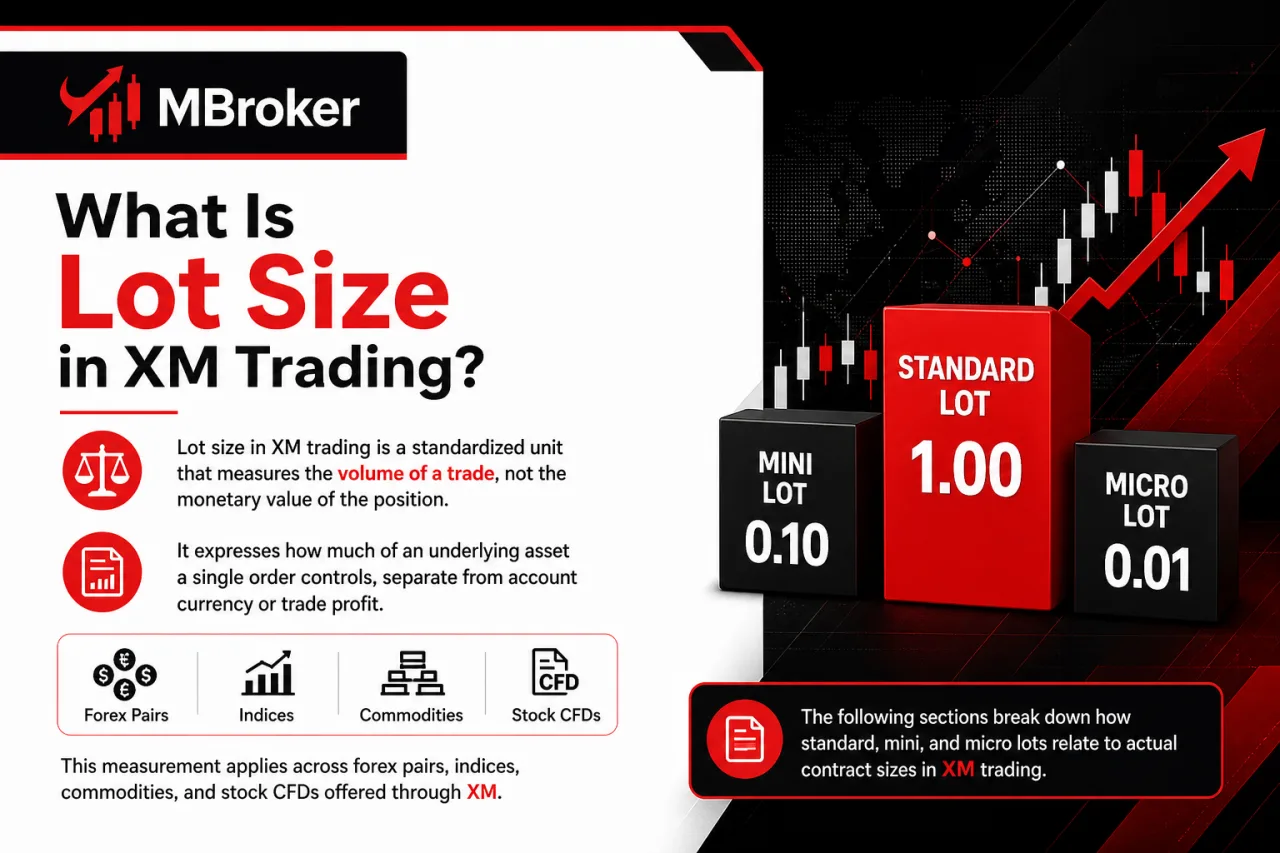
Lot size in XM trading is a standardized unit that measures the volume of a trade, not the monetary value of the position. It expresses how much of an underlying asset a single order controls, separate from account currency or trade profit.
This measurement applies across forex pairs, indices, commodities, and stock CFDs offered through XM, though the underlying contract size behind one lot differs by instrument. The following sections break down how standard, mini, and micro lots relate to actual contract sizes for each asset class.
What Is Contract Size and How Does It Relate to Lot Size?
Contract size is the fixed quantity of the underlying asset that one lot represents on XM, forming the base unit for calculating trade value at any given lot size. This figure stays constant per instrument regardless of leverage or account type, only lot size and price change how much that contract is worth.
Contract size explains why one lot behaves differently across asset classes. According to XM’s Risk Disclosures for Financial Instruments, one Standard Lot has a contract size of 100,000 units, meaning one standard lot on XM typically represents 100,000 units of the base currency.
Gold contracts on XM typically follow an industry-standard lot size, though traders should verify the exact figure in XM’s official contract specifications before sizing a position.
Multiplying contract size by the current market price and by the number of lots traded gives the notional value of a position. This calculation runs independently of the margin required to open the trade, since margin depends on leverage while notional value depends purely on contract size and lot size.
Because contract size differs by instrument, traders check the specification sheet for each symbol before sizing a position. This step avoids the mistake of assuming forex, gold, or index contracts share the same underlying quantity per lot.
What Is the Minimum Lot Size and Volume Increment on XM?
The minimum lot size on most XM instruments is 0.01 lots, known as a micro lot, with volume increasing in steps of 0.01 up to the maximum allowed per order. This applies consistently across standard, micro, and other XM account types offering the same instrument.
This minimum volume and increment structure sets the smallest tradeable unit and the fixed step size a trader adjusts position volume by. According to XM’s Order Execution Policy, the minimum size of an order is 0.01 lots, and this figure, along with maximum volume and increment values, is set per instrument and account type, so forex pairs, indices, commodities, and stock CFDs each carry their own minimum volume, maximum volume, and increment figures.
A trader entering an order below the minimum or outside the defined increment typically has the order rejected by the trading platform, since volume fields only accept multiples of the increment step. Checking the specification sheet of the specific symbol before placing a trade confirms the exact minimum, maximum, and increment applicable, rather than assuming one universal figure across all XM products.
How to Calculate Lot Size on XM?
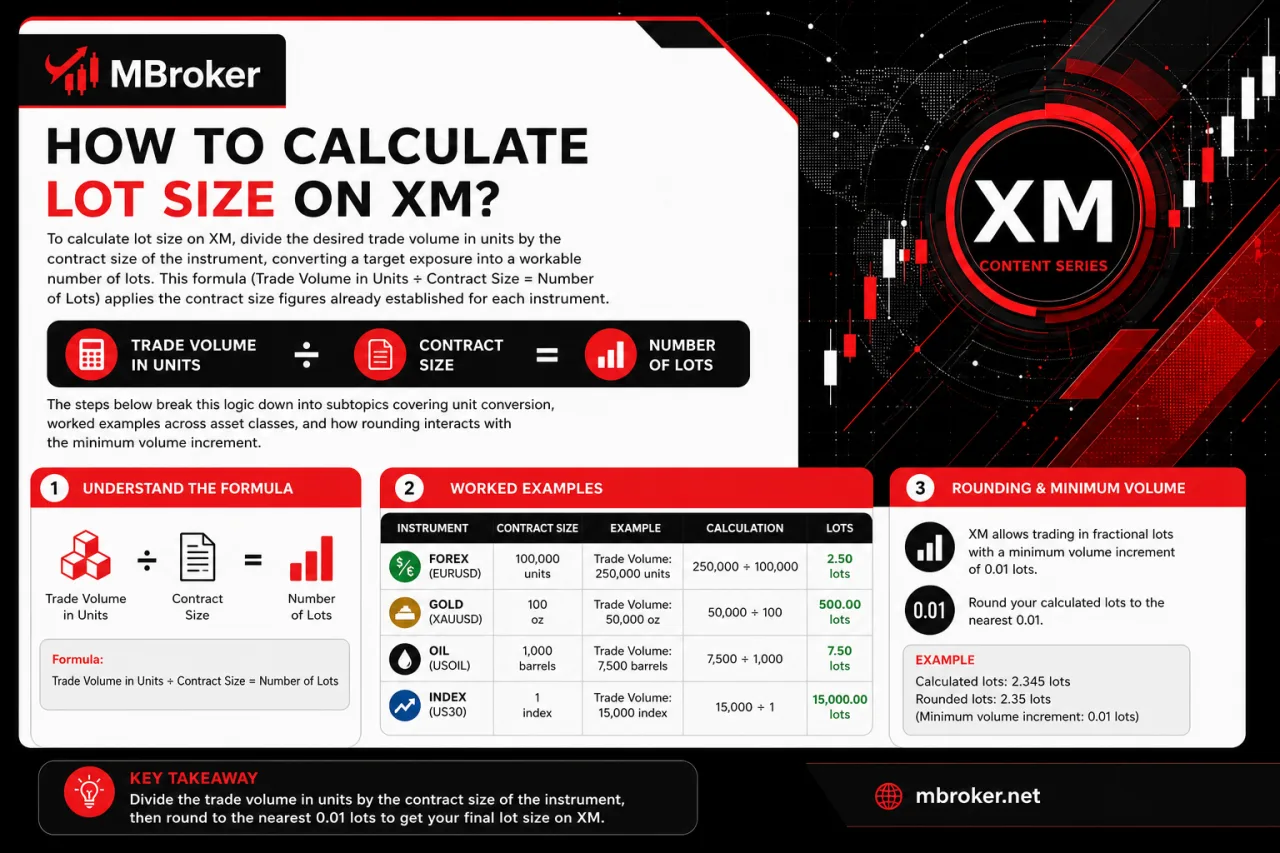
To calculate lot size on XM, divide the desired trade volume in units by the contract size of the instrument, converting a target exposure into a workable number of lots. This formula (Trade Volume in Units ÷ Contract Size = Number of Lots) applies the contract size figures already established for each instrument.
The steps below break this logic down into subtopics covering unit conversion, worked examples across asset classes, and how rounding interacts with the minimum volume increment.
How to Use a Position Size Calculator with Account Balance, Risk, and Stop-Loss?
To use a position size calculator, enter account balance, risk percentage, and stop-loss distance in pips, then apply the formula Lot Size = (Account Balance x Risk %) ÷ (Stop-Loss in Pips x Pip Value). This formula converts three risk inputs into one output figure expressed in lots, matching the calculation method already outlined for determining position size.
A neutral numeric example illustrates the mechanics without implying any guaranteed trading outcome. Consider an account balance of $1,000, a risk of 1% per trade, and a stop-loss of 50 pips: multiplying the balance by the risk percentage produces a risk amount of $10, which is then divided by the stop-loss distance and pip value to reach a lot size.
Pip value itself is not a fixed constant across the calculation. It depends on the specific instrument traded and the quote currency of that pair, since a pip movement on a JPY-quoted pair carries different monetary value than the same pip movement on a USD-quoted pair.
Traders check the pip value of their exact instrument before finalizing the lot size figure from any calculator, since substituting an incorrect pip value shifts the calculated position size away from the intended risk percentage.
How to Convert Pip Value into Lot Size Calculations?
To convert pip value into lot size calculations, multiply the standard pip value of the instrument by the number of lots traded, then substitute that figure into the position size formula. Pip value changes proportionally with lot size, so a calculator producing an inaccurate lot size output usually stems from an outdated or mismatched pip value input rather than an error in the risk percentage or stop-loss figure.
Pip value scales directly with contract size, meaning a standard lot carries a pip value several multiples higher than a micro lot on the same instrument. Instrument type also shifts pip value independently of lot size, since forex, indices, and commodities each carry different contract sizes behind one lot, as outlined earlier in this article.
Quote currency introduces another layer to this conversion. On a JPY-quoted pair, pip value can differ from that of a USD-quoted pair at the same lot size because pip size and currency conversion differ. Our XM Forex Trading guide explains currency-pair specifications, pip values, trading conditions, and the risks of leveraged Forex positions.
When the account currency differs from the quote currency of the traded instrument, the platform applies a conversion rate to translate pip value into the account’s base currency before it factors into the lot size formula. Traders check this converted pip value figure, not the raw pip value quoted in the instrument’s native currency, before finalizing any lot size calculation.
How Does Lot Size Affect Margin and Leverage on XM?
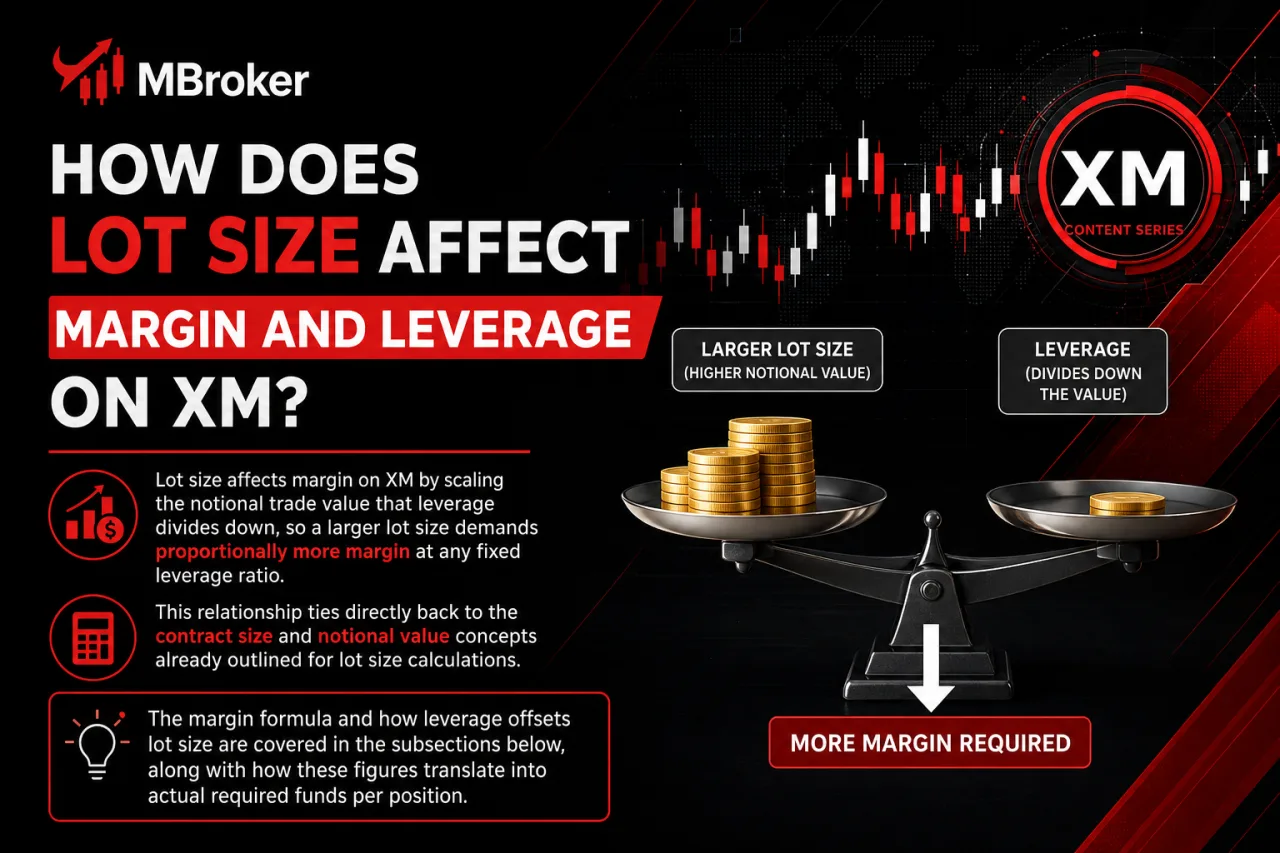
Lot size affects margin on XM by scaling the notional trade value that leverage divides down, so a larger lot size demands proportionally more margin at any fixed leverage ratio. This relationship ties directly back to the contract size and notional value concepts already outlined for lot size calculations.
The margin formula and how leverage offsets lot size are covered in the subsections below, along with how these figures translate into actual required funds per position.
How to Calculate Required Margin for a Given Lot Size?
To calculate required margin for a given lot size, multiply the notional value of the trade by the margin percentage, or equivalently divide notional value by the leverage ratio. Required Margin = (Lot Size x Contract Size x Market Price) ÷ Leverage.
A worked example clarifies this margin calculation formula. Consider 1 standard lot of a forex pair with a contract size of 100,000 units, a market price of 1.10, and leverage of 1:1000: the notional value of 110,000 divides by 1000, producing a required margin of $110, illustrating the general margin formula (notional value divided by leverage) used for forex positions.
Lowering the leverage ratio in this same formula raises the margin figure proportionally, since margin moves inversely to leverage at a fixed lot size.
Leverage tiers at XM are generally structured around account equity, with higher maximum leverage available to accounts holding lower equity and the cap stepping down as equity rises, though the exact thresholds and maximum ratios differ by legal entity, account type, client classification, and traded instrument. Retail clients under certain regulated entities typically face lower maximum leverage than professional clients, and some instruments carry leverage caps distinct from the account-wide setting.
Before applying this margin formula, traders should confirm the leverage tier and contract specifications applicable to their account and instrument. Our XM Margin guide explains required margin, free margin, margin levels, and margin-call risks in greater detail.
Is Leverage the Same for All Lot Sizes and Instruments?
No, leverage is not the same across all lot sizes and instruments on XM, since leverage caps shift by asset class, account equity tier, and legal entity rather than applying as one fixed figure. This variability directly affects the margin calculation outlined for lot size above, because the leverage ratio plugged into that formula changes depending on several factors.
Three factors drive this variability:
- Asset class sets a different leverage ceiling for forex pairs compared to indices or commodity CFDs, since each instrument category carries its own risk profile and margin rules.
- Account balance tiers reduce the maximum leverage available as equity rises, so a smaller account and a larger account on the same instrument face different caps.
- Regulatory entity determines the leverage ceiling permitted for a given jurisdiction, meaning the same instrument carries different maximum leverage depending on which XM entity services the account.
Checking the contract specification of the specific instrument alongside the account’s current leverage setting confirms the actual ratio applied, rather than assuming the highest advertised leverage figure carries over to every lot size and product.
How Does Minimum and Maximum Lot Size Compare Across XM Instruments and Account Types?
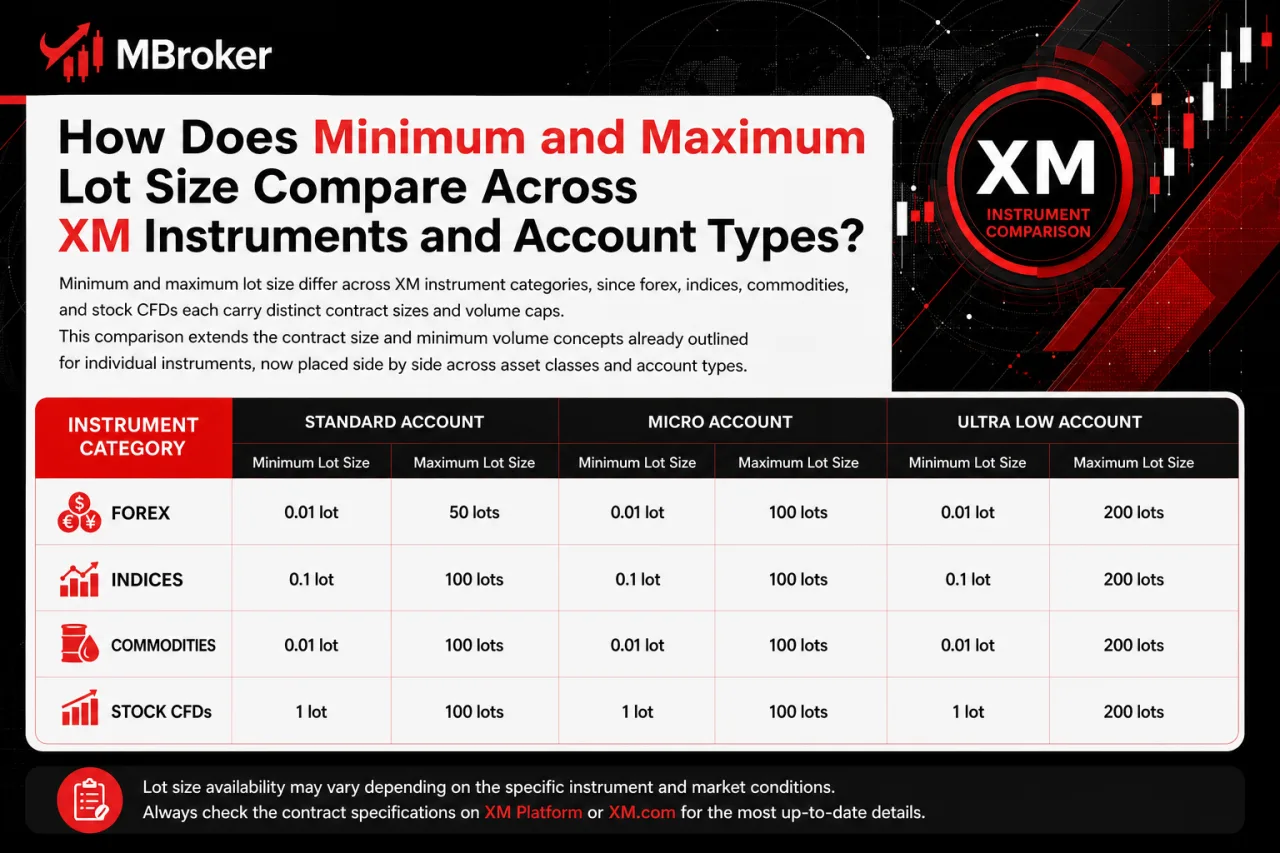
Minimum and maximum lot size differ across XM instrument categories, since forex, indices, commodities, and stock CFDs each carry distinct contract sizes and volume caps. This comparison extends the contract size and minimum volume concepts already outlined for individual instruments, now placed side by side across asset classes and account types.
The subsections below break this comparison down by instrument category and by account type, since Standard, Micro, and Ultra Low accounts sometimes apply different volume figures to the same underlying product. A general comparison table frames these differences before each subsection examines the specific variations in more detail.
| Instrument Category | Typical Minimum Lot | Typical Maximum Lot per Trade | Contract Size |
|---|---|---|---|
| Forex pairs | 0.01 lot | Varies by symbol and account | 100,000 units of base currency |
| Precious metals (Gold) | 0.01 lot | Varies by symbol and account | 100 troy ounces |
| Indices | 0.01 lot | Varies by symbol and account | Varies by index |
| Commodities and energy | 0.01 lot | Varies by symbol and account | Varies by contract |
| Stock CFDs | 0.01 lot | Varies by symbol and account | Varies by share |
The exact maximum lot size per trade and contract size figures for each instrument appear on XM’s official contract specifications page, since these values differ by symbol and update periodically. Traders confirm the precise numbers for their chosen instrument directly on that page rather than relying on a generalized table.
Maximum lot size and specific contract figures also shift by legal entity, as different regional regulatory frameworks impose distinct volume caps on the same instrument, so traders verify these limits with their specific XM entity before trading. Checking the specification sheet under the account’s servicing entity confirms the exact figures applicable before placing an order.
What Is the Contract Size Difference Between Forex, Commodities, and Indices Lots?
The contract size difference between forex, commodities, and indices comes from how each asset class defines one lot: a fixed currency amount for forex, a fixed physical quantity for commodities, and a point multiplier for indices. This distinction extends the contract size comparison table above, isolating just these three asset classes for a direct side-by-side view.
Each category defines its own base unit:
- Forex pairs set one standard lot at 100,000 units of the base currency, as already established earlier in this article.
- Commodities like gold set one lot at a fixed physical quantity, such as 100 troy ounces, also covered previously.
- Indices: The monetary value of one lot depends on the contract specifications, including the index-point value or multiplier defined for each symbol. Our XM Indices guide explains cash and futures index CFDs, contract specifications, and margin requirements.
Because these three structures measure fundamentally different things, currency units, physical ounces, and index points, a single lot never carries the same real-world exposure across asset classes. Traders check the specification sheet of the exact instrument traded before assuming lot size behaves the same way across forex, commodities, and indices.
Does the Micro Account Have a Different Lot Size Structure Than the Standard Account?
Yes, the Micro account structures lot size differently from the Standard account, since a micro lot on this account type denominates a smaller base unit of the underlying asset per lot traded. This structural difference carries over into how minimum trade volume and per-lot monetary value get calculated on each account type.
The distinction affects traders in a few concrete ways:
- Base unit denomination shrinks on Micro accounts, where one lot commonly represents 1,000 units of the base currency rather than the 100,000 units that define one lot on a Standard account, so one lot on a Micro account represents a smaller quantity of the underlying instrument.
- Minimum trade volume shifts accordingly, since the smallest tradeable size on a Micro account corresponds to a smaller real-world exposure than the same numeric lot value on a Standard account, given the difference in base unit denomination between the two account types.
- Per-lot monetary value changes as a direct consequence, meaning pip value and margin per lot differ between the two account types even at an identical lot number entered into the order ticket. The exact figures for this difference vary by instrument and by the servicing XM entity, so no single fixed ratio applies across all cases.
Traders verify these exact figures in the official account specification page for their servicing XM entity before sizing a position, since Micro and Standard account terms are not interchangeable for lot size calculations.
What Are the Volume Restrictions and Rare Edge Cases When Trading Different Lot Sizes on XM?
Volume restrictions on XM cover a few rare but important edge cases beyond the standard minimum, maximum, and increment figures already outlined: aggregate open volume caps per symbol, and reduced volume allowances during high-impact news or low-liquidity periods. These conditions affect how much total exposure an account holds on one instrument at once, separate from the per-order limits already established.
The subsections below break these edge cases down individually, since aggregate volume caps and news-related restrictions operate under different triggers and vary by account or legal entity.
How Does Volume Step Rounding Work When Lot Size Falls Between Increments?
Trading platforms handle volume that falls between increments by rejecting the order outright, since the volume field only accepts multiples of the defined step rather than auto-rounding to the nearest valid figure. This edge case sits apart from the basic increment definition covered earlier, since it addresses what actually happens at the moment an invalid volume gets submitted.
Entering a value like 0.015 lots when the increment step is set at 0.01 typically triggers a rejection message rather than a silent adjustment to 0.01 or 0.02. This behavior reflects a standard validation process where order parameters such as volume are checked against the instrument’s set fields before an order reaches the market, independent of how pricing or execution speed gets handled on the same trade.
Some third-party platforms or automated trading tools round volume inputs before submission, though this behavior depends on the software layer rather than a rule set by XM itself. Traders confirm how their specific platform interface handles a mismatched volume value before relying on any automatic correction, since manual entry remains the more predictable method for staying within the allowed increment step.
What Happens to Lot Size Calculations During Contract Rollover or Expiration?
Yes, contract rollover or expiration changes lot size calculations for futures-based CFD instruments, since a new contract can carry a different contract size, tick value, or price reference than the expiring one. This edge case sits apart from the standard forex, metals, and index lot structures already outlined, since only futures-based CFD products on XM carry a defined expiration date.
The rollover process affects position sizing in a few concrete ways:
- Contract size occasionally shifts between the expiring and the new contract month, changing the notional value calculation for the same lot number.
- Margin requirement adjusts around the rollover date, since brokers sometimes apply different margin rates ahead of expiration to manage risk.
- Open positions in futures-based instruments may roll into the new contract automatically or close out before expiry, depending on the specific instrument and account terms, so traders should verify the exact rollover mechanism for each instrument with their XM account terms before trading.
Traders review the updated contract specification sheet near these dates before assuming a lot size calculated under the old contract still applies unchanged, since this affects position sizing only on futures-based CFD products rather than spot forex or cash indices.
Conclusion
XM lot size determines the volume and market exposure represented by each trade. However, the monetary value of one lot is not identical across all products or account types. Forex pairs, metals, indices, commodities and stock CFDs have different contract sizes, pip or tick values, volume limits and margin requirements. The same numerical lot size may also represent different exposure on XM Standard and Micro accounts.
Before selecting a position size, traders should define their acceptable capital risk, stop-loss distance and the pip or tick value of the chosen instrument. They should then confirm the applicable contract size, minimum and maximum volume, volume step, leverage and currency-conversion rate. Futures-based CFDs may require additional checks around expiration and rollover dates.
Leverage can reduce the margin required to open a position, but it does not reduce the position’s market exposure or potential loss. Using conservative lot sizes, rounding calculated volume to a valid increment and maintaining sufficient free margin are therefore essential. Because specifications vary by instrument, account type, region and XM legal entity, traders should always verify the latest conditions displayed in their XM account before submitting an order. Readers can learn more about our independent editorial approach, research standards, and XM financial market resources on the About Mbroker page.

Sylas Trenven is the XM Trading Platform & Markets Editor at Mbroker, specializing in Forex trading platforms, financial instruments, and market-related research. He focuses on analyzing MetaTrader 4, MetaTrader 5, trading technology, and XM market conditions to provide accurate, practical, and accessible information for Forex and CFD traders.