
 Tiếng Việt

XM Trading Tools include indicators, MT4/MT5 platforms, and trading support features, giving traders a complete ecosystem to analyze markets, execute trades, and manage risk efficiently in real time.
Moreover, indicators on XM such as RSI, MACD, and Moving Averages help traders identify trends, momentum, and entry/exit signals, making technical analysis more structured and data-driven.
In addition, MT4/MT5 platforms on XM provide fast execution, advanced charting, and automated trading (EA), ensuring a professional trading experience for both beginners and advanced users.
Meanwhile, XM trading support tools like economic calendars, market analysis, and signals offer additional insights and decision-making support, helping traders stay aligned with market movements.
Finally, combining XM Trading Tools effectively allows traders to build a complete trading system, integrating indicators, platforms, and support tools to improve accuracy, consistency, and overall trading performance.
XM Trading Tools integrate indicators, MT4/MT5 platforms, and trading support features into one ecosystem, helping traders analyze the market, execute trades, and manage risk more efficiently. Explore more in the XM Guide section at MBroker to learn how to fully leverage these tools and build a more effective trading system.
XM Trading Tools and how traders use them in real trading?
XM Trading Tools are a multi-layered ecosystem of advanced technological plugins, algorithmic calculators, and specialized charting indicators engineered to help retail investors automate market analysis, manage risk exposure, and execute orders with ultra-low latency.

Statistically, utilizing professional trading tools reduces manual mathematical errors by 95% and allows day traders to scan over 50+ financial markets simultaneously for high-probability setups. In real trading scenarios, market participants deploy these tools directly onto their live terminals to track institutional order flow, calculate correct position sizes within seconds, and isolate structural trend reversals across various timeframes.
What are included in XM Trading Tools?
The official suite of XM trading tools consists of an advanced array of proprietary indicators and structural trading support features designed to upgrade your standard charting terminal. This ecosystem includes the proprietary Avramis Despoti technical indicators (such as the Ribbon and River indicators), real-time institutional market sentiment streams, and live economic calendars. Furthermore, it provides automated technical analysis feeds from Trading Central, alongside high-speed Virtual Private Server (VPS) hosting designed to minimize data transmission lag.
While having access to a broad suite of software features is highly beneficial, understanding the underlying tactical motivation for their use is what separates winning accounts from losing ones.
Why do traders need XM trading tools?
Traders aggressively require professional trading tools forex systems because modern financial markets are dominated by high-frequency institutional algorithms that execute orders within microseconds. Relying purely on naked price charts or lagging retail indicators exposes your portfolio to unnecessary slippage, emotional execution delays, and poor risk-to-reward parameters. By leveraging optimized trading tools, you effectively level the playing field, gaining the ability to identify true liquidity pools, filter out erratic market noise, and protect your capital using precise, automated risk-management parameters.
Once you appreciate the foundational necessity of these software assets, you must master the specialized technical overlays that dictate intraday momentum.
Indicators on XM and how to use them effectively?
Indicators on XM are specialized mathematical algorithms—ranging from standard tools like the MACD and Bollinger Bands to proprietary institutional overlays—that translate raw historical price action and tick volume into actionable visual trends.

Statistically, using a verified multi-indicator matrix can elevate strategy execution precision by up to 40% when compared to trading completely blind without visual filters. These programmatic overlays are designed to map out exact price exhaustion thresholds, highlight institutional accumulation blocks, and deliver real-time entry and exit confirmation rules directly inside your live charting window.
What are the most popular indicators on XM?
The platform offers an incredibly diverse selection of technical studies, seamlessly combining classic trend filters with cutting-edge proprietary charting algorithms:
- The Avramis Ribbon Indicator: A high-performance trend-following tool that layers multiple moving averages to visualize trend strength and locate low-risk pullback entries.
- The Avramis River Indicator: An advanced volatility bands indicator designed to identify market consolidation phases and signal explosive breakout opportunities.
- Classic Oscillators: Fully integrated versions of the Relative Strength Index (RSI), Stochastic Oscillator, and MACD used to track momentum velocity.
- The Average True Range (ATR): A critical volatility tracking tool used by professional risk managers to calculate dynamic stop-loss placements based on current market behavior.
To translate these advanced visual overlays into consistent bottom-line profits, you must avoid the classic traps of retail over-analysis.
How to use indicators effectively on XM?
To use indicators effectively on the platform, you must enforce a strict rule-based checklist that prevents “analysis paralysis” caused by overloading your layout:
- Establish a Macro Trend Filter: Use a long-term indicator like the 200-period Simple Moving Average (SMA) on the H4 chart to isolate the dominant institutional market direction.
- Isolate Your Execution Zones: Utilize horizontal support and resistance lines to pinpoint the exact structural price levels where you want to engage the market.
- Deploy Momentum Confirmations: Only trigger a trade entry when your short-term oscillator (like the RSI or Avramis Ribbon) crosses into alignment with your macro trend filter.
- Never Overcrowd Your Chart: Keep your workplace highly optimized by limiting your daily workspace to a maximum of 2 or 3 complementary indicators.
Deploying these visual studies with absolute technical precision requires running them on a robust, institutional-grade execution infrastructure.
Platforms MT4/MT5 on XM and trading experience
The MT4 and MT5 platforms on XM provide the core software architecture and server-side infrastructure required to execute trades with ultra-low latency and absolute pricing transparency.

The platform processes over 99.35% of all orders in under one single second with a strict no-requotes policy, ensuring your trades are filled instantly at the true global interbank rate. This advanced infrastructure delivers a clean, seamless user experience that allows retail investors to run complex automated scripts, conduct deep multi-timeframe chart analysis, and manage multi-asset portfolios from a single unified workspace.
What is the difference between MT4 and MT5 on XM?
While both terminals share a highly familiar visual interface, their underlying programming architecture and functional design are built for entirely different operational tasks:
- MetaTrader 4 (MT4): The undisputed global standard for retail currency day trading, built on a single-thread structure optimized specifically for the forex market and simple MQL4 automated scripts.
- MetaTrader 5 (MT5): A powerful, multi-threaded 64-bit platform designed for multi-asset trading, allowing you to trade forex, equity shares, stock indices, precious metals, and cryptocurrencies from a single account while offering built-in horizontal Volume Profile data and an integrated economic calendar.
Choosing the system that matches your broad portfolio goals is the first step toward establishing a professional operational workflow.
How to use MT4/MT5 effectively on XM?
To extract maximum performance from your MT4 or MT5 terminal, you must properly optimize its internal connection settings and structural shortcuts. First, ensure you clear out your terminal cache and disable unused symbols in your “Market Watch” window to minimize memory consumption and maximize charting data refresh speeds. Second, configure one-click execution parameters to allow instantaneous market entry during high-velocity breakout events. For clients looking to benchmark their platform configurations and access premium download files, visiting the MBroker provides immediate access to fully verified, optimized terminal setups and expert installation walk-throughs.
Beyond the core charting terminal software, maximizing your structural edge requires integrating auxiliary support functions into your routine.
Trading support tools and features on XM
The trading support tools and features on XM are a collection of institutional risk calculators, market sentiment matrices, and automated technical analysis feeds designed to streamline your daily pre-trade research routine.

Statistically, over 70% of retail trading accounts experience preventable losses due to improper risk calculation; integrating automated support tools eliminates this vulnerability entirely by calculating your exact dollar risk per pip before you ever transmit an order. These features act as an auxiliary digital co-pilot, helping you identify upcoming high-impact economic barriers, track institutional volume shifts, and verify structural trade patterns automatically.
What trading support tools does XM offer?
The official platform features several key auxiliary tools designed to automate your manual calculations and technical research:
- The XM All-in-One Calculator: A real-time institutional risk interface that instantly calculates your required margin, pip value, swap fees, and risk-adjusted position sizes across any asset class.
- Trading Central Automated Feeds: An algorithmic pattern-recognition software that automatically scans your charts to identify valid support/resistance levels, chart configurations, and target projections.
- Institutional Sentiment Streams: A data visualizer that maps out the current ratio of long versus short positions held by retail accounts worldwide, serving as an excellent contrarian indicator.
- Premium VPS Hosting: A remote virtual server infrastructure that keeps your automated expert advisors (EAs) connected directly to the broker’s liquidity hub 24/7 with a network speed of under 1 millisecond.
Utilizing these automated features protects your psychological capital by converting stressful manual calculations into clean, rule-based operations.
How to use trading support tools effectively?
To use trading support tools effectively, you must integrate them directly into your fixed pre-trade checklist as a non-negotiable risk-filtering protocol. Before placing a single market execution, run your parameters through the All-in-One Calculator to verify that your position size strictly matches your designated risk profile (e.g., maximum 1% equity risk per trade). Additionally, cross-reference your technical entries with the daily economic calendar to ensure your trade is not exposed to unexpected interest rate or inflation announcements.
Once you have mastered the individual components of this technical ecosystem, the final milestone is combining them into a unified investment system.
How to combine XM trading tools for better performance?
To combine XM trading tools for maximum performance, you must build a unified technical matrix that links your terminal software, advanced indicators, and risk-management calculators into a single, seamless execution pipeline.
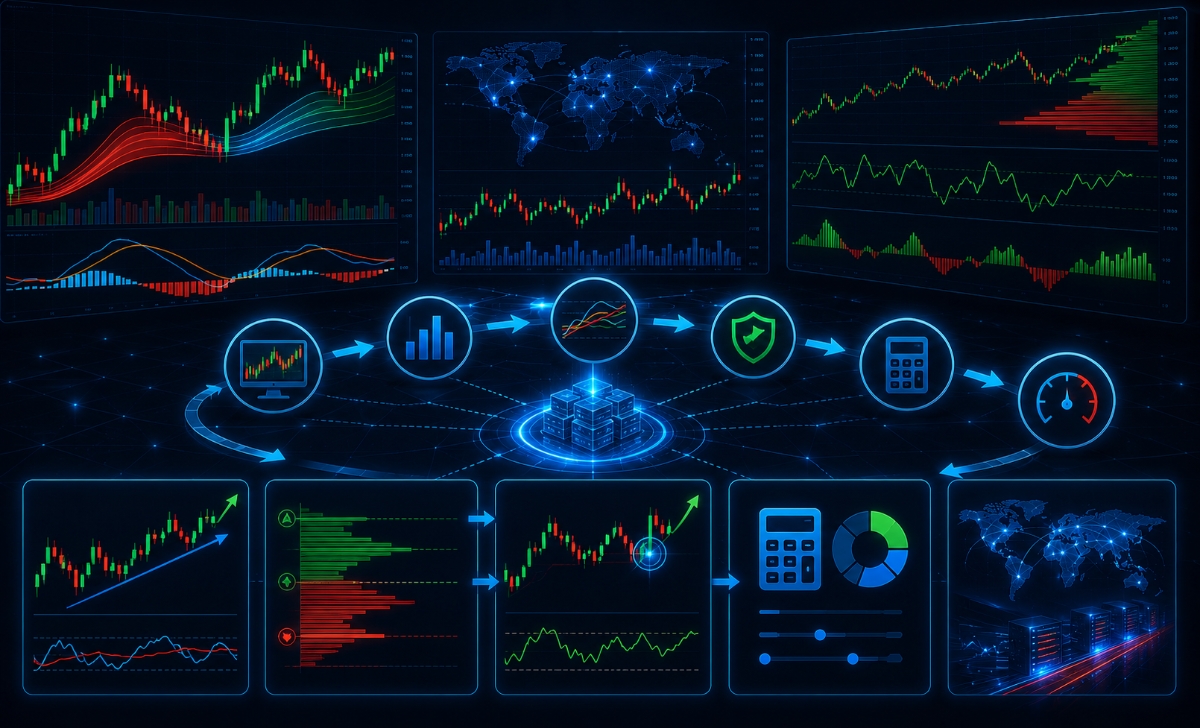
Traders who combine automated structural tools with a verified platform layout experience significantly higher consistency over a 100-trade sample size than those who trade with isolated methods. This systematic approach ensures that every single position deployed by your portfolio is backed by clean statistical data, optimized network execution, and tight risk parameters.
How to combine indicators with MT4/MT5 platforms?
To properly combine your technical indicators with your underlying MT4 or MT5 software architecture, you must construct a standardized execution template. Start by launching your preferred terminal and loading your core trend filters (such as the Avramis Ribbon) alongside a volume indicator to map out institutional order commitment. Once your visual layers are properly calibrated, save the setup as a default workspace profile to ensure your custom settings load automatically across every asset class you scan. This optimization ensures that your indicators operate at peak computing speeds on the 64-bit MT5 infrastructure, giving you an ultra-clean visual workspace free of tracking lag.
With your platform and technical overlays perfectly linked, you can proceed to formalize your daily market operational rules.
How to build an effective trading system using XM tools?
To build a highly effective trading system using the complete suite of available software assets, follow this definitive 5-step structural blueprint:
- Step 1: Establish Your Macro Direction: Open your optimized MT5 platform and consult your long-term trend indicator on the daily chart to determine if your trading bias for the day should be strictly long or strictly short.
- Step 2: Identify Structural Levels via Trading Central: Utilize the automated Trading Central tool stream to map out verified horizontal support and resistance boundaries, identifying exactly where institutional blocks are resting.
- Step 3: Wait for a Technical Indicator Trigger: Monitor your lower timeframes (such as the H1 or M15 charts) for a clean indicator crossover event—such as the Avramis River breakout—manifesting directly at your identified structural level.
- Step 4: Run Your Risk Parameters: Before clicking execution, open the XM All-in-One Calculator to determine the exact position size required to maintain your strict 1% risk ceiling based on your structural stop-loss distance.
- Step 5: Execute with Institutional-Grade Infrastructure: Deploy your order using one-click execution on a platform configuration audited and verified via the MBroker, ensuring your position is routed directly to deep liquidity hubs with minimal slippage and competitive spreads.
In short, mastering the complete ecosystem of XM Trading Tools is an essential requirement for minimizing execution friction, managing equity risk, and competing successfully against institutional algorithms. By running your strategies on optimized MT4/MT5 setups, utilizing proprietary technical indicators, and filtering every trade through real-time risk calculators, you can completely eliminate emotional guesswork from your routine.

Thoren Vextal is a specialist in XM trading guides, offering practical insights and real-market experience to help traders improve their strategies and trading performance. Email: [email protected]