

XM offers leverage up to a maximum ratio of 1:1000. According to XM, leverage of up to 1:1000 is offered on select accounts and instruments, allowing traders to control larger position sizes with a smaller amount of capital. This ratio is not fixed for every trader and depends on factors such as account equity, the applicable XM legal entity and the asset class being traded.
Leverage on an XM account varies according to the client’s equity tier, the regulated entity servicing the account, and the specific instrument category. Leverage tiers at XM can vary depending on the account equity, the entity a trader is registered under, and the asset class being traded, such as forex, indices or precious metals. Higher equity balances typically trigger automatic leverage caps under certain XM entities. The exact equity thresholds for each leverage tier are set out in XM’s official trading conditions page, and traders are advised to check that page directly for the most current figures rather than relying on a fixed number, since these thresholds are subject to change over time.
Traders can adjust their leverage ratio directly through the XM Members Area or trading platform settings. According to XM, traders can adjust their leverage flexibly in just a few clicks from the member area, subject to the limits set by their account’s regulatory entity. Changes may require a request submission and can take effect after a short processing period.
Leverage directly determines the margin required to open and maintain a position, since higher leverage reduces the initial margin needed while increasing exposure to market movements. Required margin is calculated by dividing the position’s notional value by the leverage ratio applied to the account, meaning a higher leverage ratio lowers the amount of capital reserved for that position. Understanding this relationship is essential before calculating position sizes on any XM account.
High leverage options such as 1:1000 or 1:1500 carry substantial risk of amplified losses, though according to XM, the broker applies negative balance protection to prevent client accounts from falling below zero. This safeguard limits losses to the deposited capital under normal market conditions.
Mbroker breaks down these mechanics in detail below, starting with what XM leverage actually means and how the up to 1:1000 ratio functions across different trading scenarios.
What Is XM Leverage and How Does the Up to 1:1000 Ratio Work?

XM leverage is a broker-provided mechanism that lets a trader open a position far larger than the actual deposited capital, with 1:1000 marking the maximum ratio offered on eligible accounts. The ratio format works simply: at 1:1000, every $1 of margin controls up to $1000 of market exposure on the chosen instrument.
This mechanic sits entirely within CFD and margin trading, not direct asset ownership. Opening a leveraged position through XM does not multiply the number of shares, ounces of gold or currency units a client owns; it only changes the margin required to control a given notional value. The underlying instrument remains a contract for difference, and profit or loss is calculated on price movement rather than on transfer of any physical or securitized asset.
It is also worth stating clearly that according to XM, leverage of up to 1:1000 applies to accounts with equity between $5 and $40,000. The ratio steps down as equity rises above that tier, meaning the 1:1000 ceiling reflects specific entity and equity conditions rather than a fixed ratio applied uniformly to every account. Actual leverage assigned depends on the regulatory entity, account equity and instrument class, as outlined earlier in this guide.
Because maximum leverage figures are subject to change by regulators and internal risk policy, readers should verify the current maximum ratio directly on the official XM website or Members Area before opening a position (information reviewed as of the article’s publication date).
How Does XM Leverage Vary by Account Equity, Legal Entity and Asset Class?
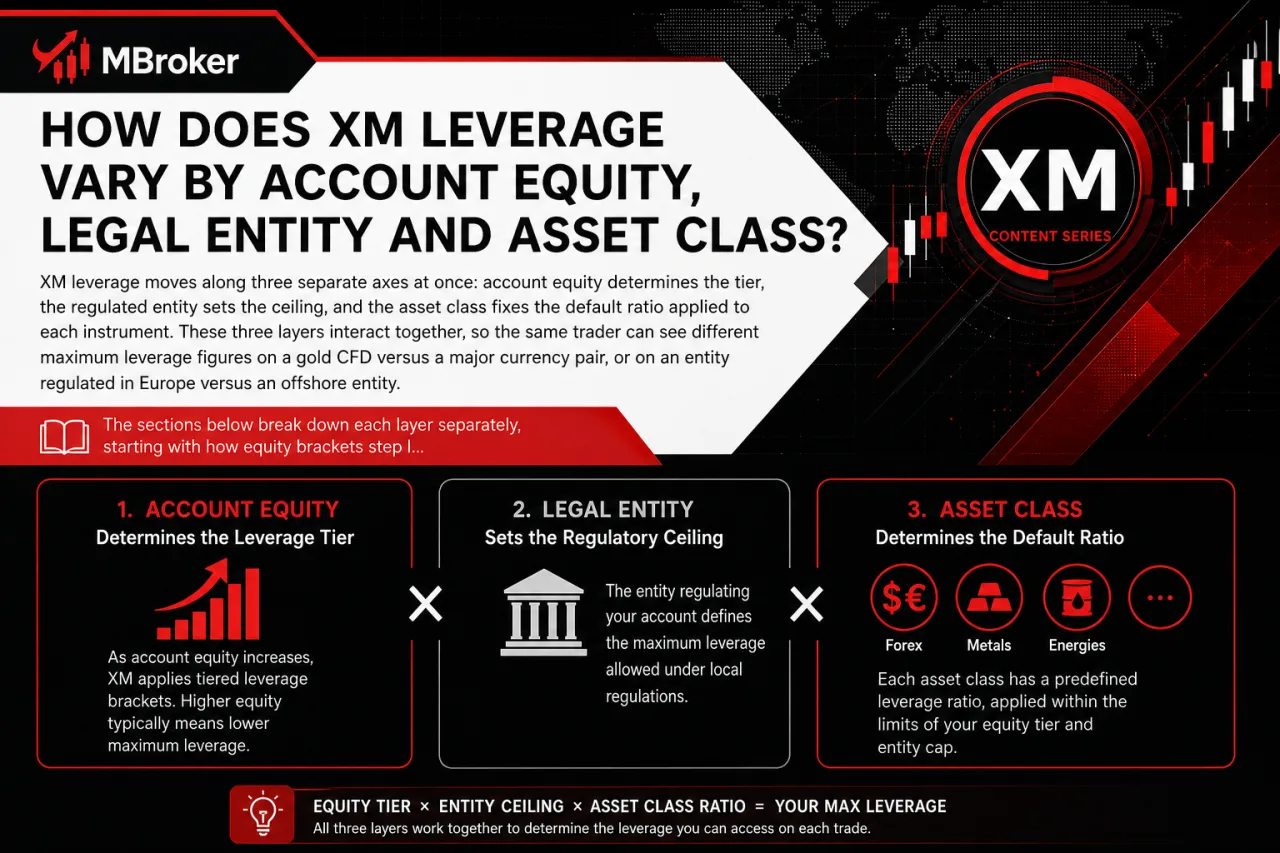
XM leverage moves along three separate axes at once: account equity, regulated entity and asset class. Account equity determines the tier, the regulated entity sets the ceiling, and the asset class fixes the default ratio applied to each instrument. These three layers interact together, so the same trader can see different maximum leverage figures on a gold CFD versus a major currency pair, or on an entity regulated in Europe versus an offshore entity. The sections below break down each layer separately, starting with how equity brackets step leverage down as balance grows, then how legal entity licensing caps the ceiling, and finally how asset class shifts the default ratio even within the same account.
| Variation Factor | General Pattern | Notes |
|---|---|---|
| Account equity | Leverage decreases as equity rises through successive brackets | Exact thresholds vary by entity; check the official XM page for current tiers |
| Legal entity | Offshore/international entities allow higher ceilings; EU-regulated entities apply ESMA-aligned caps for retail clients | Regulatory framework differs by entity, directly limiting available leverage; for instance, under ESMA rules, leverage for retail clients is capped between 30:1 and 2:1 depending on the volatility of the underlying asset, such as 30:1 for major currency pairs. |
| Asset class | Forex typically carries the highest default leverage; indices, commodities, gold and crypto CFDs usually carry lower default ratios | Ratio applies per instrument category, not uniformly across the account |
Readers should confirm exact tier thresholds, entity-specific caps and per-instrument ratios directly on the official XM website or Members Area before trading, since these figures change over time (information reviewed as of the article’s publication date).
Is Maximum Leverage the Same for Retail and Professional Clients?
No, maximum leverage is not identical for retail and professional clients, since regulated entities apply stricter capped ratios to retail accounts while professional or elective clients meeting eligibility criteria access higher ceilings. This distinction directly affects the leverage figures discussed throughout this guide, so understanding client classification clarifies why two traders on the same instrument can see different ratios.
Retail classification exists to protect less experienced traders from excessive exposure, and regulators impose fixed caps regardless of the trader’s own risk appetite. Professional or elective professional status, by contrast, exempts qualifying clients from those retail caps, allowing access to leverage levels far closer to the 1:1000 ceiling available on other XM entities.
Professional or elective professional status typically requires meeting criteria such as trading volume history, portfolio size or industry experience, though exact thresholds differ by regulator and XM legal entity. Clients approved under this status may access leverage closer to, or matching, the 1:1000 ceiling described earlier.
This classification system is not universal across all XM entities or jurisdictions. Readers should confirm their own classification status and applicable leverage ceiling directly through the XM Members Area or official support channels before trading (information reviewed as of the article’s publication date).
Which Asset Classes Typically Allow the Highest Leverage on XM?
XM groups leverage into six broad asset classes, with forex majors and minors typically carrying the highest default ratio and single-stock or crypto CFDs carrying the lowest. This pattern follows the volatility and liquidity profile of each market rather than a single fixed rule applied across the whole account.
Major and minor Forex pairs may qualify for higher leverage ceilings than certain other CFD categories, depending on the trader’s XM entity, account equity, and specific instrument. Our XM Forex Trading guide explains currency-pair trading conditions, leverage-related margin requirements, and the risks of leveraged Forex positions.
Indices and commodities occupy a middle tier, reflecting moderate volatility relative to forex. Gold and other precious metals often receive a lower ratio than forex majors given their own price swing behavior, while stock CFDs and crypto CFDs generally sit at the bottom of the scale due to sharper price movements and, in the case of individual equities, corporate-specific risk.
- Forex majors and minors: generally the highest default leverage tier
- Indices: moderate tier, below forex
- Commodities: moderate tier, varies by underlying market
- Gold and precious metals: reduced tier relative to forex
- Stock CFDs: lower tier, tied to individual equity volatility
- Crypto CFDs: Often subject to stricter, instrument-specific leverage limits. Our XM Crypto Trading guide explains cryptocurrency CFD margin requirements, trading conditions, and regional availability.
Readers should confirm the exact leverage ratio assigned to each symbol in the official XM contract specifications page before trading, since figures differ by instrument and account entity (information reviewed as of the article’s publication date).
How Can Traders Change or Adjust Leverage on Their XM Account?
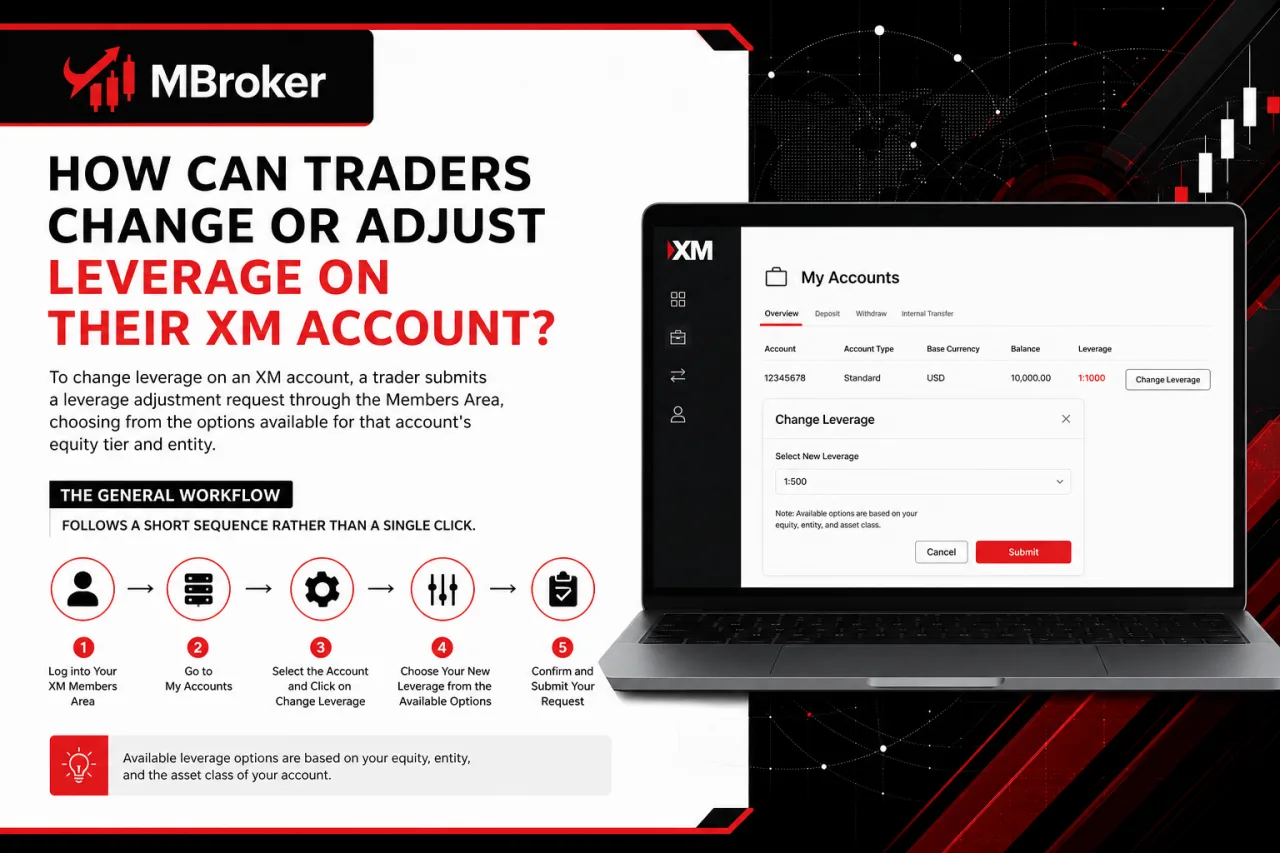
To change leverage on an XM account, a trader submits a leverage adjustment request through the Members Area, choosing from the options available for that account’s equity tier and entity. This process ties directly into the equity, entity and asset class factors described earlier in this guide, since the dropdown options presented differ from one account to another rather than showing a single universal list.
The general workflow follows a short sequence rather than a single click.
- Log into the Members Area or personal area linked to the trading account
- Select the specific trading account requiring a leverage change
- Open the leverage settings or dropdown menu within that account’s profile
- Choose the desired ratio from the options displayed for that equity tier
- Submit the request for processing
A leverage change does not always apply instantly. If an open position no longer meets the margin requirement under the newly selected ratio, the leverage change request may be delayed or rejected until the position is adjusted or closed.
Some entities also limit how often leverage can be changed within a given period. Readers should confirm the current leverage options, waiting periods and change limits applicable to their specific account directly in the XM Members Area before submitting a request (information reviewed as of the article’s publication date).
Are There Restrictions When Reducing or Increasing Leverage with Open Positions?
Yes, restrictions apply when reducing or increasing leverage on an XM account with open positions, since the request may be rejected or delayed if the new ratio pushes the account into a margin call or insufficient margin situation. This condition ties directly back to the margin mechanics described earlier in this guide, where lower leverage raises the margin required to sustain the same open exposure.
Reducing leverage while trades remain open increases the margin locked against those positions immediately upon approval. If free margin at that moment falls short of the new requirement, the platform withholds or rejects the change until the trader closes part of the position, adds funds or waits for market conditions to free up margin.
- Checking free margin before submitting a leverage reduction request
- Reviewing open position size relative to the target leverage ratio
- Closing or partially closing trades if the new ratio would breach margin requirements
- Confirming account equity meets the minimum tier for the desired ratio
Increasing leverage typically faces fewer immediate margin conflicts, though entity-specific limits on request frequency may still apply. Readers should verify current margin rules and leverage change conditions directly through the XM Members Area before submitting a request (information reviewed as of the article’s publication date).
How Does XM Leverage Relate to Margin and Margin Calculation?
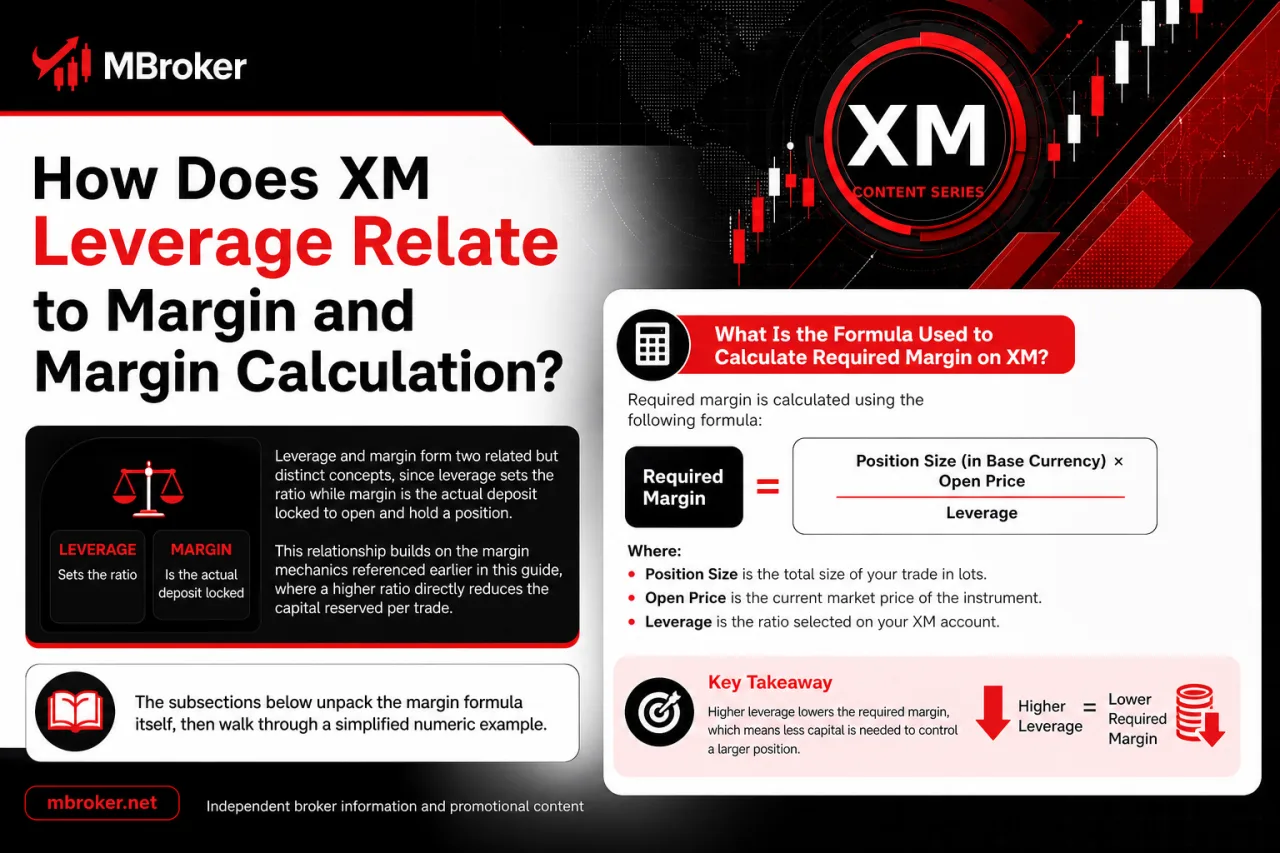
Leverage and margin form two related but distinct concepts, since leverage sets the ratio while margin is the actual deposit locked to open and hold a position. This relationship builds on the margin mechanics referenced earlier in this guide, where a higher ratio directly reduces the capital reserved per trade. The paragraphs below unpack the margin formula itself, then walk through a simplified numeric example.
Required margin is calculated as Volume multiplied by Contract Size multiplied by Price, divided by Leverage. This formula ties the notional value of a trade directly to the leverage ratio applied on the account.
Raising the leverage ratio lowers the required margin for the same position size, since the denominator in the formula increases. Lowering leverage raises the required margin instead, locking more capital against the identical trade. Margin therefore represents the deposit consumed by a position, while leverage represents the multiplier that determines how large that deposit needs to be.
A simplified example shows that required margin decreases for the same trade size as the leverage ratio increases.
- Using the formula above with a fixed volume, contract size and price
- Applying a lower leverage ratio produces a higher required margin figure
- Applying a higher leverage ratio produces a lower required margin figure
- Observing that the notional exposure itself stays unchanged across both cases
This illustration covers margin mechanics only, without projecting any profit or loss outcome. Readers should confirm the exact margin formula and current figures directly through the XM Members Area or official contract specifications before trading (information reviewed as of the article’s publication date).
What Do Margin Level, Margin Call and Stop Out Mean in Relation to Leverage?
Margin level, margin call and stop out form a three-stage risk chain that measures how much of the used margin remains covered by account equity as leverage magnifies price swings. This chain builds directly on the margin formula described earlier in this guide, since the same leveraged position that lowers required margin also narrows the buffer between equity and the thresholds below.
Margin level is generally calculated as Equity divided by Used Margin, multiplied by 100, expressed as a percentage. A margin call is triggered once margin level falls to a specific percentage threshold set by the broker, prompting a warning that additional funds or reduced exposure are required to avoid further action. Stop out follows as the next stage, where the platform automatically closes open positions once margin level drops to an even lower threshold. Stop out level is generally set below the margin call level, so it acts as the final automatic risk-control mechanism rather than a warning stage.
Higher leverage narrows the gap between normal margin level and these thresholds during adverse price moves, since less equity buffer sits behind a larger notional position. Readers should confirm current margin call and stop out percentages directly through the official XM website or Members Area before trading, as these figures vary by account type and legal entity (information reviewed as of the article’s publication date).
What Is XM’s Policy and Risk Profile on High Leverage Such as 1:1000 or 1:1500?

XM applies a defined risk policy on high leverage tiers such as 1:1000 or 1:1500, offering these ratios only to eligible accounts under specific entities while pairing them with negative balance protection. This policy connects directly to the equity, entity and eligibility conditions described earlier in this guide, since the same high ratio does not appear uniformly across every account or region. The section below unpacks negative balance protection and the objective risk implications of trading at such high leverage.
Does Negative Balance Protection Apply to All XM Leverage Levels?
Negative balance protection generally applies across account types under XM entities that offer this safeguard, though exact coverage depends on the specific legal entity’s client agreement. This connects directly to the eligibility and entity-specific conditions described earlier in this guide, since the same protection standard does not always extend identically to every jurisdiction.
Three points clarify how this coverage functions in practice.
- Applying uniformly to retail accounts regardless of the leverage ratio selected, from lower tiers up to the 1:1000 ceiling discussed earlier
- Resetting any negative equity balance to zero under normal market conditions, rather than pursuing the client for the shortfall
- Depending on the regulatory framework of the servicing entity, since coverage terms referenced in one client agreement may differ from another entity’s terms
Regulatory jurisdiction shapes the precise wording and scope of this protection, since some entities state it as a contractual guarantee while others frame it as a discretionary practice.
Readers should confirm the exact negative balance protection terms applicable to their account directly in the client agreement of their specific XM legal entity before trading (information reviewed as of the article’s publication date).
What Lesser-Known Leverage Details Should Advanced Traders Check Before Trading?
Advanced traders check several lesser-known leverage nuances beyond the standard equity tiers already covered, since per-symbol caps and dynamic adjustments can override the account-level default. This layer builds on the equity, entity and asset class factors described earlier in this guide, but it applies at the individual instrument level rather than across the whole account. The subsections below unpack per-symbol maximum leverage caps and dynamic leverage reductions around news events, holidays or weekends.
Can Leverage Differ Between Symbols Within the Same Account?
Yes, leverage can differ between symbols within the same account, since certain instruments carry a fixed maximum leverage cap set at the symbol level that overrides the account’s general setting. This detail connects directly to the per-symbol nuances introduced earlier in this guide, where individual instrument caps sit below the broader equity, entity and asset class layers.
A trader holding an account approved for high leverage may still face lower instrument-specific limits on certain commodities, indices, or stock CFDs. Our XM Stock guide explains leverage and margin requirements for individual equity CFDs, while the account-level ratio should be treated as a ceiling rather than a guarantee for every symbol.
- Displaying a reduced maximum ratio on certain commodity or index symbols regardless of the account’s approved tier
- Applying a lower default cap on individual stock CFDs due to equity-specific volatility
- Overriding the account setting automatically whenever a symbol’s fixed cap sits below it
Readers should confirm the exact per-symbol leverage cap directly in the official XM contract specifications before trading, since these figures vary by instrument and change over time (information reviewed as of the article’s publication date).
Does XM Adjust Leverage Automatically Around High-Impact News or Holidays?
Yes, XM can apply temporary leverage reductions or higher margin requirements around high-impact news releases or low-liquidity holiday periods as a risk-control measure, though this adjustment does not apply as a fixed permanent setting. This dynamic layer sits above the per-symbol caps described earlier in this guide, since it activates only around specific volatility windows rather than staying constant across normal trading conditions.
Brokers commonly widen margin buffers or scale down leverage temporarily during major economic announcements, thin holiday liquidity, or unexpected market gaps, since these periods carry a higher risk of slippage and rapid price swings.
- Reducing maximum leverage temporarily on affected symbols ahead of scheduled high-impact events
- Increasing margin requirements during announced holiday or low-liquidity trading windows
- Restoring standard leverage settings once the volatility window passes
Traders confirm any temporary leverage or margin change directly through official XM announcements, the Members Area, or platform notifications rather than assuming static conditions apply at all times (information reviewed as of the article’s publication date).
Conclusion
XM leverage can reach up to 1:1000 on eligible accounts, but the actual ratio is not the same for every trader. Available leverage depends on account equity, client classification, XM legal entity, asset class and symbol-specific limits. Although higher leverage reduces the margin required to open a position, it does not reduce market exposure and can accelerate losses, margin calls and stop outs when prices move unfavourably.
Before trading, check the latest leverage tier, margin requirements, contract specifications and negative balance protection terms in the XM Members Area. Traders should maintain sufficient free margin, use position sizes appropriate to their risk tolerance and treat maximum leverage as an available limit—not a target that must be used. Readers can learn more about our editorial standards, independent research approach, and XM trading resources on the About Mbroker page.

Sylas Trenven is the XM Trading Platform & Markets Editor at Mbroker, specializing in Forex trading platforms, financial instruments, and market-related research. He focuses on analyzing MetaTrader 4, MetaTrader 5, trading technology, and XM market conditions to provide accurate, practical, and accessible information for Forex and CFD traders.