

XM Copy Trading allows traders to automatically replicate the positions of experienced Strategy Providers directly within their own trading account. This system links a follower’s account to a chosen strategy through XM’s supported copy trading infrastructure, executing trades in real time based on the provider’s activity.
XM Copy Trading works through a connection between a follower account and a Strategy Manager’s account, where trade signals are mirrored proportionally according to the follower’s allocated capital. Execution speed, lot sizing and risk settings depend on the specific copy trading platform and configuration used.
Starting copy trading with XM involves opening a compatible trading account and connecting it to the copy trading platform XM supports. From there, traders select a Strategy Provider, allocate funds and adjust risk parameters before trades are copied automatically.
Whether XM Copy Trading is worth it depends on the historical performance, risk level and consistency of the chosen Strategy Manager, none of which guarantee future profits. Copy trading carries the same market risks as manual trading, including potential capital loss.
Earning profit share as a Strategy Manager on XM requires building a track record that attracts followers, after which a percentage of followers’ profits is paid to the Strategy Manager as performance fees. This structure rewards consistent, transparent trading strategies over short-term gains.
Mbroker breaks down these mechanics in detail, starting with a clear definition of what XM Copy Trading is, how it operates technically, and the exact steps required to begin.
What Is XM Copy Trading?
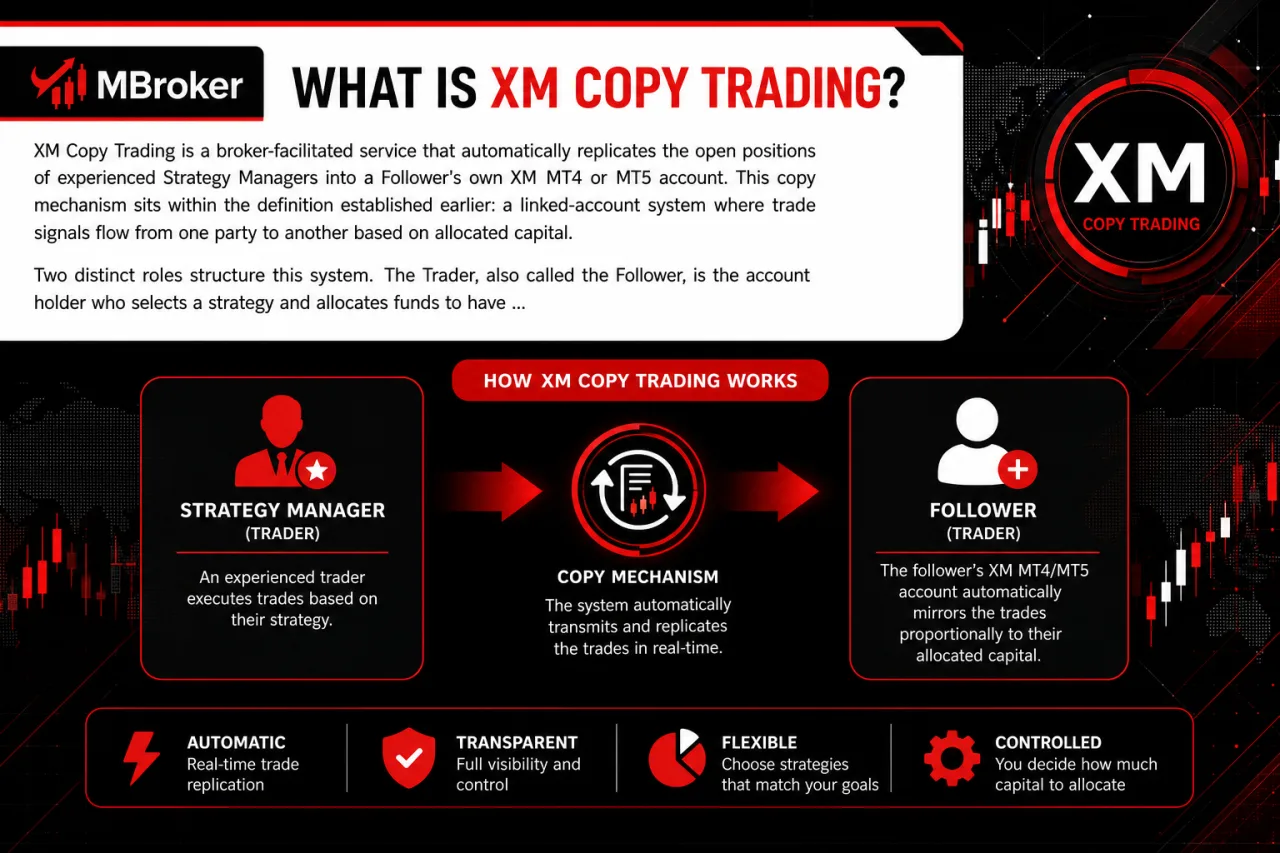
XM Copy Trading is a broker-facilitated service that automatically replicates the open positions of experienced Strategy Managers into a Follower’s own XM MT4 or MT5 account. This copy mechanism sits within the definition established earlier: a linked-account system where trade signals flow from one party to another based on allocated capital.
Two distinct roles structure this system. The Trader, also called the Follower, is the account holder who selects a strategy and allocates funds to have trades mirrored automatically. The Strategy Manager is the participant whose trading activity generates the signals being copied, and whose track record determines follower interest.
This setup differs from independent copy trading apps because XM integrates the connection directly through its supported MT4/MT5 infrastructure rather than a separate third-party platform layer. Execution still depends on account type, server assignment and the copy trading tool used, points explored further in later sections.
This information was reviewed as of 2025. Availability of XM Copy Trading, supported account types and Strategy Manager access can vary by region and legal entity. Readers should confirm current features and eligibility through official XM resources before connecting an account.
How Does XM Copy Trading Work?
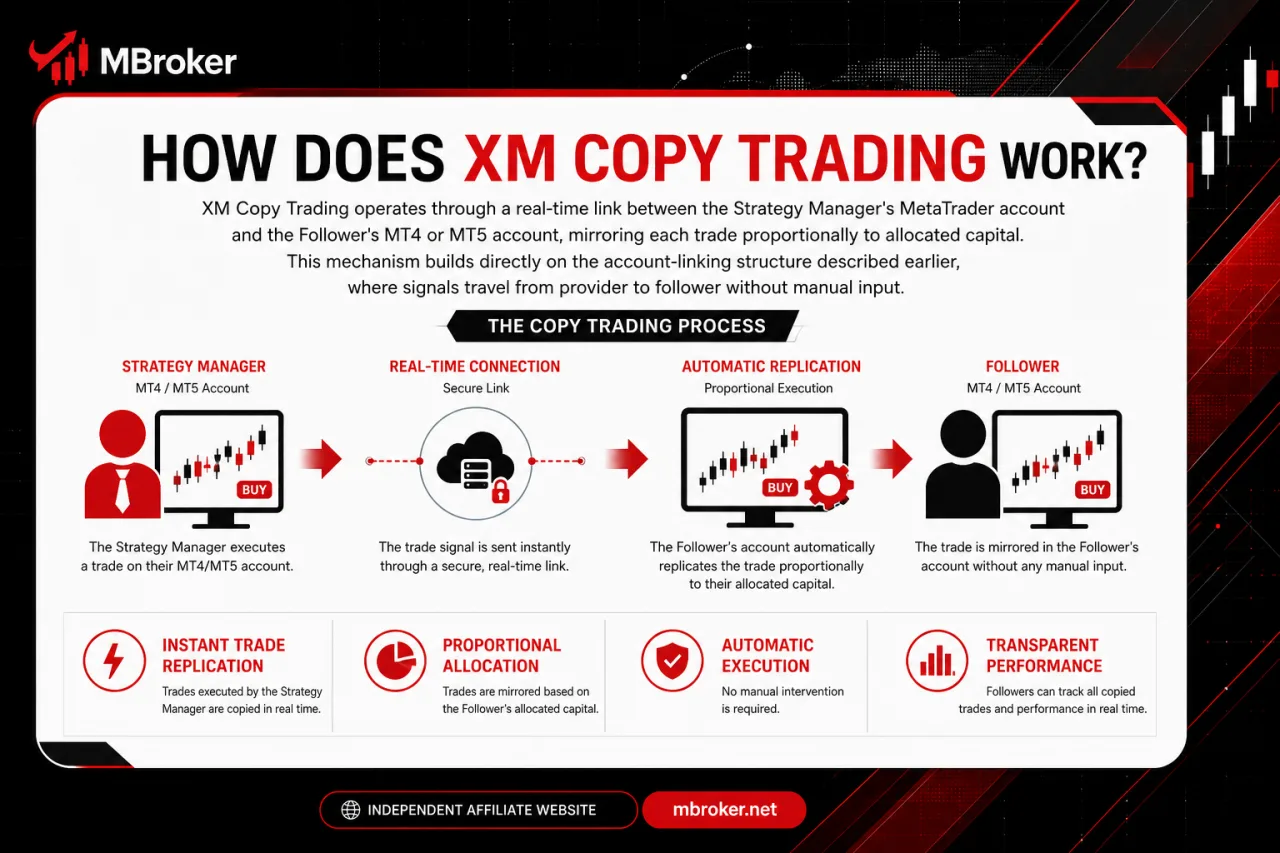
XM Copy Trading operates through a real-time link between the Strategy Manager’s MetaTrader account and the Follower’s MT4 or MT5 account, mirroring each trade proportionally to allocated capital. This mechanism builds directly on the account-linking structure described earlier, where signals travel from the Strategy Manager to the follower without manual input.
The sections below break this operating mechanism into its core components: how trade replication happens instantly, how proportional allocation is calculated, and how profit or loss passes through to the Follower’s balance.
What Are the Main Components of the XM Copy Trading System?
The XM Copy Trading system consists of five core components: Strategy Managers, Followers, the copy trading platform or dashboard, MT4/MT5 trading accounts, and performance statistics used for selection. Each element connects to form the account-linking mechanism described earlier.
Strategy Managers generate the trade signals that get copied, building a track record through open positions on their own MT4 or MT5 account. Followers are the traders who allocate capital toward a chosen strategy, receiving mirrored trades proportional to their invested amount.
The copy trading platform or dashboard acts as the interface connecting both roles, displaying available strategies, allocation settings and connection status. MT4/MT5 trading accounts serve as the technical infrastructure where actual order execution occurs, since XM Copy Trading operates through these MetaTrader-based accounts rather than a standalone application.
Performance statistics complete the structure by giving Followers verifiable data, such as historical returns, drawdown levels and risk scores, to evaluate a Strategy Manager before allocating funds. These metrics do not guarantee future results and should be reviewed alongside official XM disclosures.
Do Followers Need an MT4 or MT5 Account to Use XM Copy Trading?
Followers need a compatible MT4 or XM MT5 account to use XM Copy Trading, subject to the account eligibility and platform requirements established by XM. This requirement connects directly to the platform components described earlier, where MT4/MT5 accounts serve as the technical layer executing every mirrored trade.
Three points clarify this platform compatibility requirement. First, the copy trading connection only functions on account types XM designates as compatible with its copy trading service, meaning not every account category automatically qualifies. Second, the Follower’s chosen account must match the trading server and conditions required by the copy trading platform for signals to transmit correctly. Third, without an active, properly verified MT4 or MT5 account linked to the copy trading dashboard, no trade replication occurs regardless of the Strategy Manager selected.
Account opening, verification steps and specific eligible account types fall outside this scope. Readers should confirm current compatible account types through official XM resources before connecting to copy trading, as details on opening and verifying accounts belong to dedicated XM Guide and XM Account content.
How to Start Copy Trading with XM?
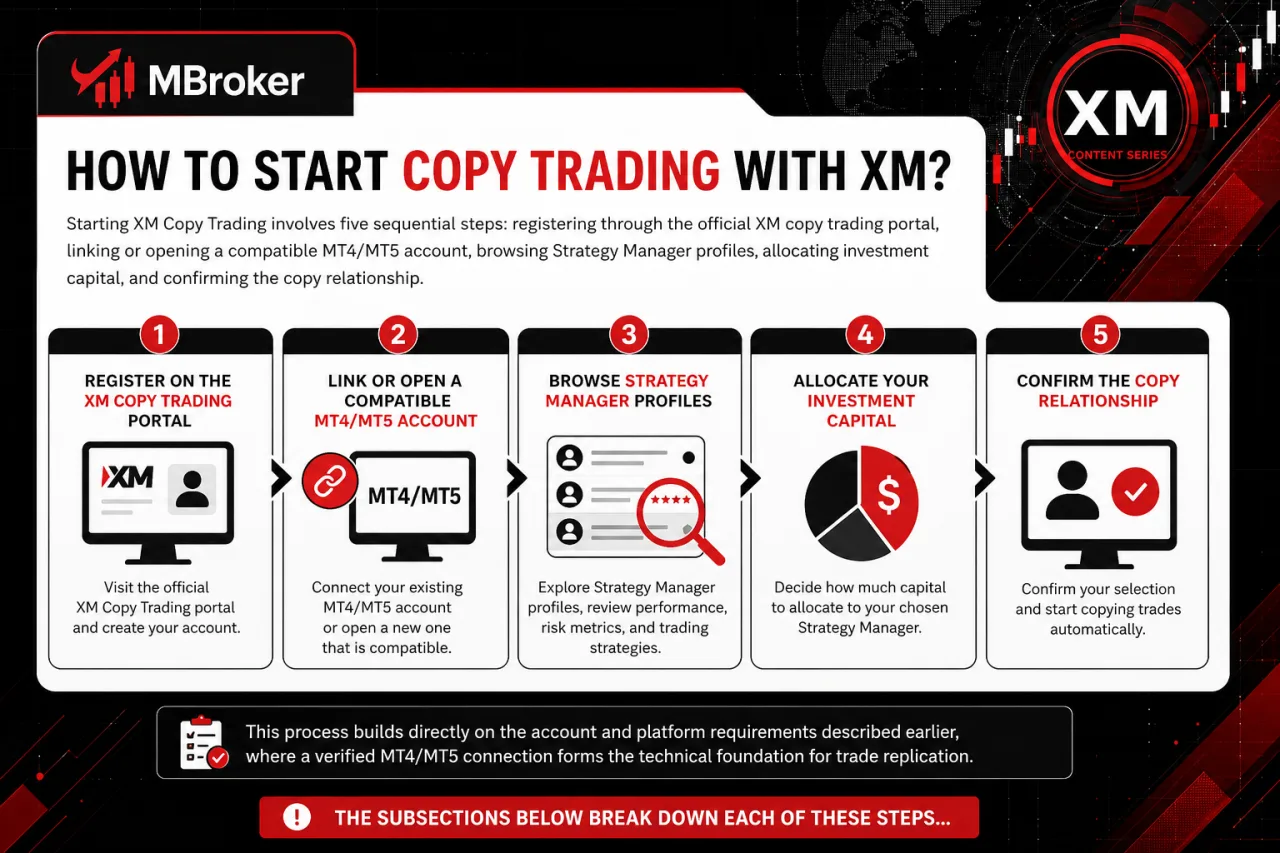
Starting XM Copy Trading involves five sequential steps: registering through the official XM copy trading portal, linking or opening a compatible MT4/MT5 account, browsing Strategy Manager profiles, allocating investment capital, and confirming the copy relationship. This process builds directly on the account and platform requirements described earlier, where a verified MT4/MT5 connection forms the technical foundation for trade replication.
The subsections below break down each of these steps individually, covering registration, account linking, Strategy Manager selection, capital allocation and final confirmation. Readers should follow only official XM channels at every stage, since third-party portals claiming to offer XM copy trading access do not carry the same verification or security standards.
How to Choose a Strategy Manager to Copy?
Choosing a Strategy Manager to copy involves comparing four dashboard metrics: historical performance, risk score, drawdown level, and follower count. This selection stage follows directly from the copy relationship steps outlined earlier, since none of those steps proceed meaningfully without evaluating who is being copied first.
The four metrics that matter are:
- Historical performance: shows past returns generated by the Strategy Manager over a given period, though past results do not indicate future outcomes.
- Risk score: reflects a rating assigned to the trading style, typically based on volatility and position sizing patterns used by that manager.
- Drawdown level: indicates the largest peak-to-trough decline the strategy experienced, offering insight into potential downside exposure during unfavorable market conditions.
- Follower count: shows how many traders currently allocate capital to that manager, which signals relative popularity but not necessarily reliability or safety.
Strong historical performance alone does not confirm that a Strategy Manager suits every Follower’s risk tolerance or trading objective.
Followers cross-reference these four metrics together rather than relying on a single figure, since a high return paired with a high drawdown may signal an aggressive strategy unsuitable for conservative allocations.
How to Stop or Adjust Copy Trading Settings?
To stop or adjust XM Copy Trading settings, Followers access the copy trading dashboard and select the active connection to pause, close, or modify allocated capital directly. This account management action connects to the allocation and confirmation steps outlined earlier in the setup process.
Three actions cover most adjustment needs on the dashboard:
- Pausing a connection temporarily halts new trade replication while keeping existing open positions intact until manually closed.
- Stopping a connection permanently ends the copy relationship with the selected Strategy Manager and prevents further signals from transmitting.
- Adjusting allocated capital changes the proportional exposure applied to future copied trades without affecting the underlying strategy itself.
Followers confirm each change through the same dashboard interface used during initial setup, since settings typically apply only after confirmation rather than instantly on selection. Existing open trades linked to a strategy require separate manual closure in some copy trading tool configurations, a detail that varies by platform version. Readers should verify current dashboard controls and confirmation requirements through official XM resources before adjusting an active connection.
Is XM Copy Trading Worth It? Reviewing Profitability and Risks
Whether XM Copy Trading is worth it depends on balancing access to experienced strategies against the market risks that remain present in every copied trade. This evaluation builds on the selection and setup mechanics covered earlier, weighing what a Follower gains against what stays exposed once capital is allocated. The subsections below separate these benefits from the risks and clarify what verified performance data does and does not indicate.
What Risks Should Followers Be Aware of Before Copy Trading?
Followers face four documented risk types before copy trading: market volatility, Strategy Manager drawdown, execution slippage, and leverage risk. This risk profile connects directly to the profitability discussion above, clarifying what stays exposed even after selecting a strong-performing Strategy Manager.
These categories cover the main sources of exposure disclosed in official risk statements:
- Market volatility moves prices against open positions regardless of the Strategy Manager’s skill or track record.
- Strategy Manager drawdown reduces the Follower’s allocated capital proportionally whenever the copied strategy enters a losing sequence.
- Execution slippage shifts the entry or exit price between signal generation and order fill, altering the actual outcome of a copied trade.
- Leverage risk amplifies both gains and losses on copied positions depending on the leverage ratio applied to the Follower’s account.
None of these risk categories disappear simply because a strategy shows positive historical returns. Readers should review official XM risk disclosures and terms before allocating funds to any Strategy Manager.
How to Earn Profit Share as a Strategy Manager on XM?
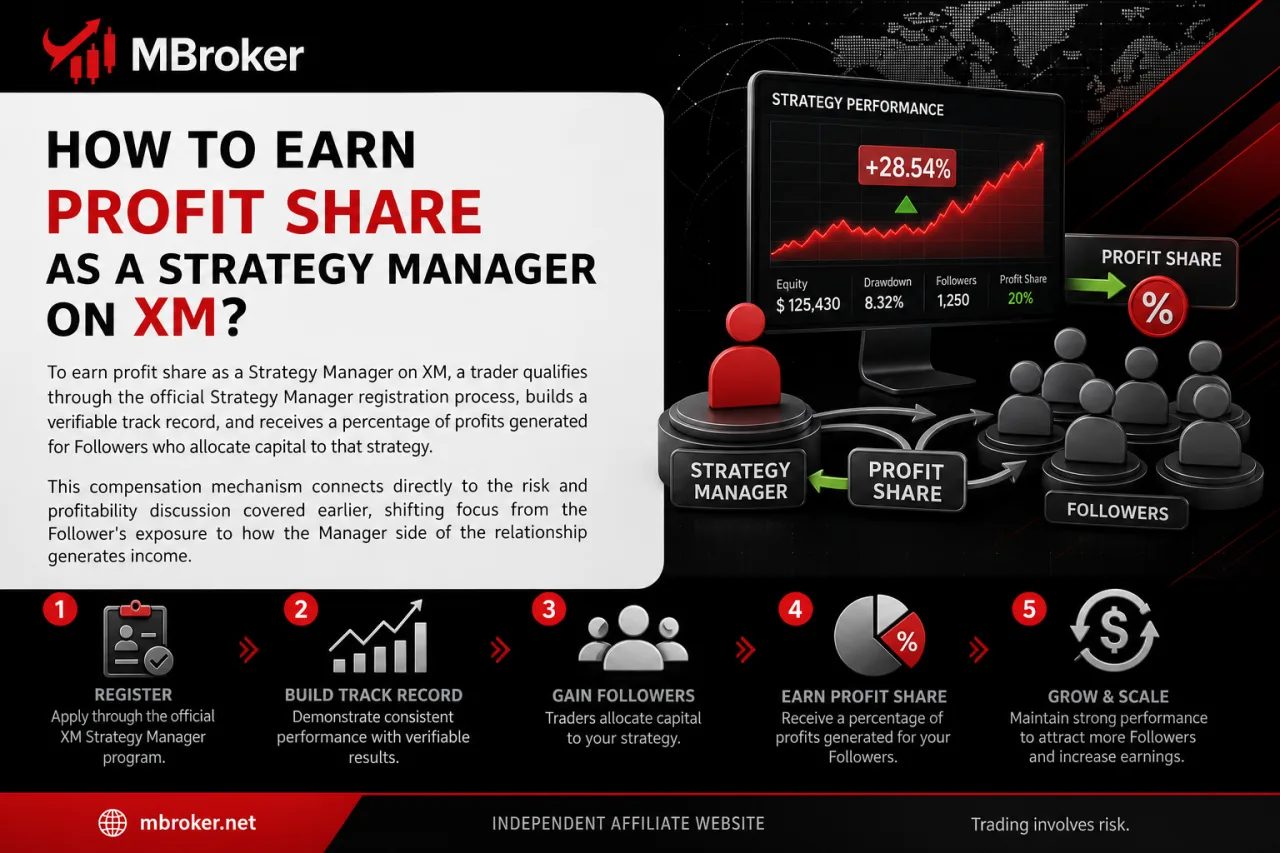
To earn profit share as a Strategy Manager on XM, a trader qualifies through the official Strategy Manager registration process, builds a verifiable track record, and receives a percentage of profits generated for Followers who allocate capital to that strategy. This compensation mechanism connects directly to the risk and profitability discussion covered earlier, shifting focus from the Follower’s exposure to how the Manager side of the relationship generates income.
The subsections below break this earning mechanism into two parts: the qualification and registration requirements a trader completes to become a Strategy Manager, and how the performance-fee structure translates Followers’ allocated capital into compensation.
Exact performance-fee percentages, payout schedules and commission structures fall under XM’s official fee terms rather than this platform-focused explanation. Readers should confirm current profit-sharing rates and payout conditions through official XM Fees resources or XM’s official Strategy Manager documentation before registering, since these figures vary and are not detailed here.
What Requirements Must Traders Meet to Become a Strategy Manager?
Traders qualify as a Strategy Manager on XM by meeting three published criteria: holding an eligible live MT4/MT5 account, completing verification, and maintaining a minimum trading history. This eligibility checklist connects directly to the qualification process introduced earlier, forming the entry gate before any track record starts accumulating followers.
An eligible live account means the trading account type used must fall within categories XM designates as compatible with Strategy Manager registration, since demo accounts and certain account classes do not qualify. Completed verification confirms the trader’s identity and account status meet XM’s standard compliance checks before Strategy Manager status activates. A minimum trading history requirement establishes that the applicant has generated sufficient trade activity on the account to produce meaningful performance statistics for prospective Followers to review.
Exact minimum trading history duration, specific eligible account types, and additional documentation requirements are set by XM and subject to change.
Readers should confirm current qualification criteria through official XM Strategy Manager registration resources before applying.
How Does XM Copy Trading Compare to Manual Trading on MT4/MT5?
XM Copy Trading transfers trade decisions to a selected Strategy Manager, while manual trading on MT4/MT5 keeps full control with the individual trader. This comparison extends the earlier discussion of Follower responsibilities and Strategy Manager mechanics into a broader platform-level contrast. Traders comparing copy trading with running their own Expert Advisors can also explore our XM VPS guide, which explains how remote hosting keeps automated strategies running on MT4 or MT5 without relying on a personal computer.
- Decision control: In manual trading, the individual trader analyzes the market and places every order directly on MT4 or MT5. In XM Copy Trading, the Strategy Manager makes the trade decisions, and these trades are mirrored into the Follower’s account.
- Time commitment: Manual trading demands ongoing attention to charts, news, and open positions throughout the trading session. Copy Trading reduces this daily time demand, since the Follower does not monitor the market to execute each trade.
- Required market knowledge: Manual trading depends on the trader’s own understanding of technical and fundamental analysis to build and manage a strategy. Copy Trading lowers this requirement for the Follower, though a basic understanding of risk and account monitoring remains relevant.
- Reliance on Strategy Manager performance: Manual trading results depend entirely on the individual trader’s own decisions and discipline. Copy Trading results depend on the performance and risk approach of the selected Strategy Manager, making the Follower’s outcome tied to a third party’s trading activity.
Can Followers Combine Manual Trades with Copy Trading on the Same Account?
Official XM documentation does not confirm unrestricted manual trading alongside an active copy trading connection on the same MT4/MT5 account. This account-behavior question extends the earlier discussion of stopping or adjusting copy trading settings, since combining manual orders with mirrored trades touches the same dashboard connection.
Three points frame this edge case. First, manual positions opened on an account actively receiving copied trades risk interfering with margin calculations and lot sizing tied to the Strategy Manager’s signals. Second, closing a copied position manually may conflict with the automated replication logic, creating a mismatch between the Follower’s account and the Strategy Manager’s actual open trades. Third, some copy trading configurations restrict simultaneous manual intervention specifically to preserve accurate performance tracking for both parties.
Readers should confirm current account-behavior rules on combining manual and copied trades through official XM support channels before attempting this on a live account.
What Security Measures Protect Copy Trading Accounts?
Security measures protecting copy trading accounts center on three account-level practices: two-factor authentication, secure login protocols, and strict safeguarding of account credentials. This security layer connects directly to the account-linking mechanism described earlier, since a compromised login exposes both the Follower’s capital and the copied Strategy Manager relationship.
Two-factor authentication adds a verification step beyond the standard password, reducing the risk of unauthorized access to the trading terminal linked to copy trading. For general mobile account access, traders can review our XM App guide to understand official installation channels and account management features. Copy trading controls should be accessed only through XM-approved interfaces, while unsecured networks should be avoided.
Safeguarding credentials means never sharing account passwords, investor passwords, or verification codes with third parties, including anyone claiming to represent a Strategy Manager or support service.
No legitimate XM Copy Trading process requires disclosing a password or verification code to another party. Readers should confirm current security recommendations through official XM support resources before linking an account.
Conclusion: Is XM Copy Trading Worth Using?
XM Copy Trading can be a practical option for traders who want to follow experienced strategies without placing every order manually, but it does not remove trading risk or guarantee profits. Results still depend on the selected Strategy Manager, capital allocation, drawdown, leverage, market volatility and execution conditions such as slippage. Before connecting an account, Followers should compare long-term performance with risk metrics, begin with an affordable allocation and continue monitoring the strategy. They should also use only official XM channels, protect their credentials and confirm current account compatibility, controls, fees and regional availability for their assigned XM legal entity.
Ultimately, XM Copy Trading is most useful when combined with careful manager selection, clear risk limits and ongoing account oversight. Readers can learn more about our independent editorial approach, research standards, and XM trading platform resources on the About Mbroker page.

Sylas Trenven is the XM Trading Platform & Markets Editor at Mbroker, specializing in Forex trading platforms, financial instruments, and market-related research. He focuses on analyzing MetaTrader 4, MetaTrader 5, trading technology, and XM market conditions to provide accurate, practical, and accessible information for Forex and CFD traders.